
Trunecord - Stream to Discord
Stream music from YouTube Music, Spotify, Apple Music, and Amazon Music to Discord
As of June 2026, Trunecord - Stream to Discord has 93 users and a 5.00/5 rating from 1 reviews in the Functionality & UI category.
Usersup 36.8 percent+36.8%
93
93
Ratingno change0%
5.00
1 reviews
Reviewsno change0%
1
Version
1.3.5
Manifest V3
History
7 snapshotsTracking since Apr 1, 2026.
View as table
| Date | Users | Rating | Reviews | Version |
|---|---|---|---|---|
| Apr 1, 2026 | 68 | 5.00 | 1 | 1.3.5 |
| Apr 19, 2026 | 59 | 5.00 | 1 | 1.3.5 |
| Apr 28, 2026 | 68 | 5.00 | 1 | 1.3.5 |
| May 8, 2026 | 69 | 5.00 | 1 | 1.3.5 |
| May 16, 2026 | 57 | 5.00 | 1 | 1.3.5 |
| May 29, 2026 | 60 | 5.00 | 1 | 1.3.5 |
| Jun 9, 2026 | 61 | 5.00 | 1 | 1.3.5 |
| Now | 93 | 5.00 | 1 | 1.3.5 |
Permissions & access
- Permissions
- activeTabtabstabCaptureoffscreenstorage
- Host access
- http://localhost/*, http://127.0.0.1/*, http://[::1]/*, ws://localhost/*, ws://127.0.0.1/*, ws://[::1]/*, https://m0j3mh0nyj.execute-api.ap-northeast-1.amazonaws.com/*, https://music.youtube.com/*, https://open.spotify.com/*, https://music.apple.com/*, https://music.amazon.com/*, https://music.amazon.co.jp/*
Screenshots



About
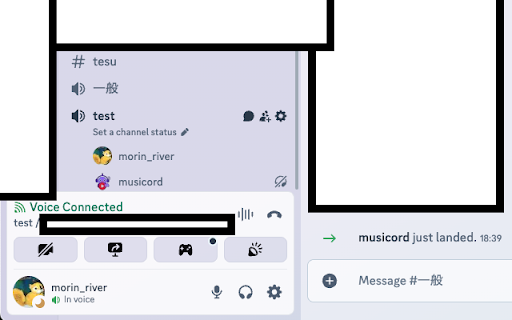
🎵 Stream YouTube Music, Spotify, Apple Music, or Amazon Music directly into Discord voice channels — with high-quality, low-latency audio.

**⚙️ Requires a companion desktop app (Windows / macOS / Linux).**
Trunecord works through a lightweight open-source client running locally on your device.

---

✨ Features
• Direct streaming from major music platforms
• Native Discord streaming button inside each player
• One-click start — no bot commands needed
• Local audio processing for maximum privacy
• Real-time sync, minimal delay
• Works with your existing Discord permissions and setup

---

🚀 How It Works
1. Install the Chrome extension
2. Install the 100% open-source local client
3. Select your Discord server & voice channel
4. Press the Discord button on any supported music player
5. Enjoy high-quality synchronized playback with friends

---

🎯 Perfect For
• Gaming communities
• Study groups and coworking
• Friend groups and long-distance hangouts
• Streamers & VTubers

---

🛡️ Security & Privacy
• All audio is processed locally — nothing is uploaded or stored
• No personal data or listening history collected
• Minimal browser permissions

---

🆘 Troubleshooting
• If the bot doesn’t join, check your Discord permissions
• If there's no sound, restart both the extension and the local client
• Visit our GitHub Issues for support

---

💻 Open Source
The Trunecord local app is fully open-source.
Review or contribute on GitHub.

---

⚖️ Legal Notice
Unauthorized retransmission of copyrighted music may violate platform terms and copyright laws.
Trunecord does not host or distribute any audio; users are responsible for their own content.
Technical
- Version
- 1.3.5
- Manifest
- V3
- Size
- 114KiB
- Min Chrome
- 88
- Languages
- 4
- Featured
- No
Metadata
- ID
- dhmegdkoembgmlhekieedhkilbnjmjee
- Developer ID
- u77e42842edc9c6d6d3bd226dc73819a2
- Developer Email
- [email protected]
- Created
- Jun 30, 2025
- Last Updated (Store)
- Nov 14, 2025
- Last Scraped
- Jun 9, 2026
- Website
- amagal.ch
- Support URL
- —
- Privacy Policy
- https://amagal.ch/privacy-policy-en.html
Similar extensions
Alternatives to Trunecord - Stream to Discord, ranked by description similarity.

Plume - Bandcamp Player Enhancer
Bandcamp extension: volume slider, hotkeys, loop modes, fullscreen mode, playback speed, waveform progress bar & beat visualizer.
—
★ 5.0

Tidal Discord Rich Presence
An application that tracks Tidal Web Player activity and communicates with an external app to update Discord's Rich Presence
146
★ 3.0

YouTube Audio Spatial Splitter
YouTubeの音声を左右に分離し、没入感のある空間オーディオ体験を提供する拡張機能。バイノーラル効果や音声位置の微調整が可能です。
93
★ 5.0

TuneTrackerPRO
A simple extension for TuneTrackerPRO
—

PulseSynth
Audio-reactive ambient glow for your browser
13

RoQoL - Improve your Roblox experience
Multiple changes to the roblox site for a better user experience.
70.0K
★ 3.0
Bandcamp Play
Enhanced playback for Bandcamp: autoplay, speed, pitch, hotkeys, history, batch download, and more.
1.0K
★ 4.8

Better Teams
Better Teams. Improved MS Teams Experience.
968
★ 3.7
Data sourced from the Chrome Web Store · last verified Jun 9, 2026.