
95% Phonics Menu Hider
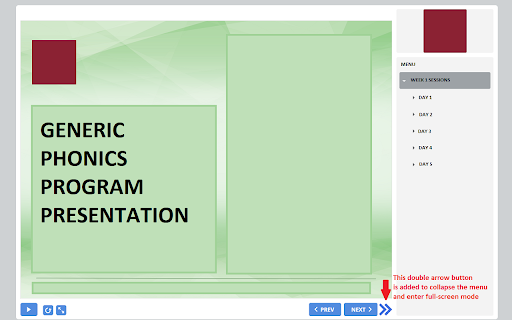
Adds a button to hide the menu and skips the saved slide dialog on 95% phonics.
As of May 2026, 95% Phonics Menu Hider has 5 users in the Workflow & Planning category.
Usersup 25.0 percent+25.0%
5
5
Ratingno change0%
—
— reviews
Reviewsno change0%
—
Version
0.1.0
Manifest V3
History
3 snapshotsTracking since Apr 1, 2026.
View as table
| Date | Users | Rating | Reviews | Version |
|---|---|---|---|---|
| Apr 1, 2026 | 4 | — | — | 0.1.0 |
| May 1, 2026 | 5 | — | — | 0.1.0 |
| May 30, 2026 | 6 | — | — | 0.1.0 |
| Now | 5 | — | — | 0.1.0 |
Permissions & access
- Permissions
- None declared
- Host access
- None declared
Screenshots
About
A low-impact extension that adds an additional button to the 95% Phonics Core program presentation documents that allows the side-menu to be hidden when using the presentation in full-screen mode.

The addon also automatically sets the presentation to open on the last-used page, rather than prompting the user every time. Since the menu is left open until the user selects to hide it, resetting the presentation through the menu instead of the pop-up dialog does not add any additional clicks but does reduce the barrier to starting work in the majority of use cases.
Technical
- Version
- 0.1.0
- Manifest
- V3
- Size
- 14.43KiB
- Min Chrome
- 88
- Languages
- 1
- Featured
- No
Metadata
- ID
- dhmeendooeflmmbbiggijhjkbgbaekek
- Developer ID
- uec5a3aad9b4a9b612c3c7708b06be4e6
- Developer Email
- [email protected]
- Created
- Aug 6, 2023
- Last Updated (Store)
- Aug 6, 2023
- Last Scraped
- May 30, 2026
- Website
- —
- Support URL
- —
- Privacy Policy
- —
Similar extensions
Alternatives to 95% Phonics Menu Hider, ranked by description similarity.

Leetcode Enhancer
A browser extension to improve productivity on Leetcode.
10.0K
★ 3.9

BEST Auto Start Trigger
Hide START button, Click anywhere to trigger it endlessly.
—

Comfort Monitor Live
Enable Planning Center’s ‘Services LIVE.’ to be shown on a comfort monitor with one click (previously Planning Center Live Kiosk)
77

Quality of Life
Just does some cool stuff
89
★ 5.0

NoPopup
Move the popup to the popup source window.
1.0K

Single Window (open links in active window)
Do not allow popup windows. Open all links in the current window
10.0K
★ 3.7

SmartDocs Document Viewer
Optimizes document display and rendering of Documents managed on SmartDocs platform
5

Gentle Alerts
Intercept browser alerts (the interruptive popups) and turn them into gentle modals.
76
★ 5.0
Data sourced from the Chrome Web Store · last verified May 30, 2026.