
AutoFiller by Utilery
Auto-fills form fields from JSON.
As of June 2026, AutoFiller by Utilery has 1 users in the Productivity category.
Usersno change0%
1
1
Ratingno change0%
—
— reviews
Reviewsno change0%
—
Version
1.3.1
Manifest V3
90-day change · In the last 90 days this extension 1 version update.
History
2 snapshotsTracking since Jun 2, 2026.
Not enough history yet for this metric — the chart fills in as we collect more snapshots.
View as table
| Date | Users | Rating | Reviews | Version |
|---|---|---|---|---|
| Jun 2, 2026 | — | — | — | 1.0.0 |
| Jun 8, 2026 | — | — | — | 1.0.0 |
| Now | 1 | — | — | 1.3.1 |
Changelog
- Jun 8, 2026description
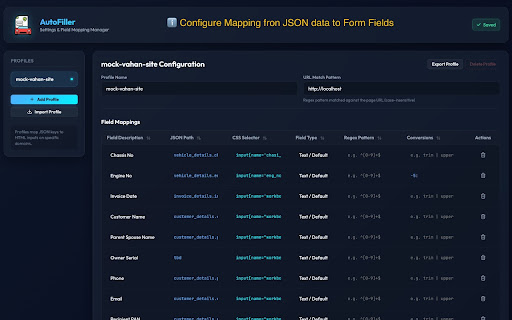
AutoFiller fills webpage forms based on mappings to JSON data.

Step 1: Create mappings of json to form fields. E.g. address.zip -> input[name="zip_field"]
Step 2: Open web page. Paste your JSON in popup. Click "Fill Form"
AutoFiller fills webpage forms based on mappings to JSON data. Step 1: Create mappings of json to form fields. E.g. address.zip -> input[name="zip_field"]. This means, fill the field named zip_field with the value within { address: { zip: 12345}} Step 2: Open web page. Paste your JSON in popup. Click "Fill Form" v1.3.0 * Mostly UI changes in the popup to give main content a little more space. * Showing version number in options page. * Allow filtering of fields in the popup to easily fill in a specific field. * Replace text labels in the popup with icons to make UI more compact and seem less busy. * Autohide messages, again to give more space to main content. * v1.3.1 fixed a security suggestion v1.2.0 * Updated name to "AutoFiller by Utilery" to distinguish it from multiple other extensions with the same name * Added an option for the user to choose a time that the json payload remains in local storage. It can be set to 0 if it should not be saved local storage. * Updated logo * Other improvements in options page - more conversions and checks v1.1.0: • Options Page & Editor Enhancements: Improved the options page with live syntax validation for CSS selectors and mapping fields, a real-time search filter, a Reset button, and UI refinements including replacing the "Add Profile" button with a "New Profile" sidebar link. • Pipeline & Popup Improvements: Added support for a pause(ms) command to handle asynchronous form-filling delays, added a toggle transition for the popup's JSON payload. - Jun 8, 2026name
AutoFiller
AutoFiller by Utilery
Permissions & access
- Permissions
- scriptingactiveTabstorageclipboardRead
- Host access
- None declared
Screenshots


About
AutoFiller fills webpage forms based on mappings to JSON data.

Step 1: Create mappings of json to form fields. E.g. address.zip -> input[name="zip_field"]. This means, fill the field named zip_field with the value within { address: { zip: 12345}}
Step 2: Open web page. Paste your JSON in popup. Click "Fill Form"

v1.3.0
* Mostly UI changes in the popup to give main content a little more space.
* Showing version number in options page.
* Allow filtering of fields in the popup to easily fill in a specific field.
* Replace text labels in the popup with icons to make UI more compact and seem less busy.
* Autohide messages, again to give more space to main content.
* v1.3.1 fixed a security suggestion

v1.2.0
* Updated name to "AutoFiller by Utilery" to distinguish it from multiple other extensions with the same name
* Added an option for the user to choose a time that the json payload remains in local storage. It can be set to 0 if it should not be saved local storage.
* Updated logo
* Other improvements in options page - more conversions and checks

v1.1.0:
• Options Page & Editor Enhancements: Improved the options page with live syntax validation for CSS selectors and mapping fields, a real-time search filter, a Reset button, and UI refinements including replacing the "Add Profile" button with a "New Profile" sidebar link.
• Pipeline & Popup Improvements: Added support for a  pause(ms)  command to handle asynchronous form-filling delays, added a toggle transition for the popup's JSON payload.
Technical
- Version
- 1.3.1
- Manifest
- V3
- Size
- 242KiB
- Min Chrome
- 88
- Languages
- 1
- Featured
- No
Metadata
- ID
- dhjpkeoanomijeigikjooljohgmgbcco
- Developer ID
- ub599207796a7a9494476a2bc43d2b9ce
- Developer Email
- [email protected]
- Created
- Jun 1, 2026
- Last Updated (Store)
- Jun 6, 2026
- Last Scraped
- Jun 8, 2026
- Website
- —
- Support URL
- —
Data sourced from the Chrome Web Store · last verified Jun 8, 2026.