
YouTube Transcript — One-Click Copy
Instantly view and copy the full transcript of any YouTube video, with timestamps and click-to-seek. No account needed.
As of June 2026, YouTube Transcript — One-Click Copy has — users in the Productivity category.
Usersno change0%
—
—
Ratingno change0%
—
— reviews
Reviewsno change0%
—
Version
1.0.1
Manifest V3
History
1 snapshotsTracking since Jun 10, 2026.
Not enough history yet for this metric — the chart fills in as we collect more snapshots.
View as table
| Date | Users | Rating | Reviews | Version |
|---|---|---|---|---|
| Jun 10, 2026 | — | — | — | 1.0.1 |
| Now | — | — | — | 1.0.1 |
Permissions & access
- Permissions
- activeTabscripting
- Host access
- https://www.youtube.com/*
Screenshots


About
Get the full transcript of any YouTube video — instantly.

Click the extension while watching any YouTube video and the complete transcript appears, ready to copy. No accounts, no sign-ups, no setup.

★ ONE-CLICK COPY
Grab the entire transcript with a single click and paste it anywhere — notes, a doc, ChatGPT, an email.

★ TIMESTAMPS & CLICK-TO-SEEK
Toggle timestamps on or off. Click any timestamp to jump the video straight to that moment. Copy the transcript with or without times.

★ NO ACCOUNT NEEDED
Install it and click. No sign-up, no configuration, no extra steps.

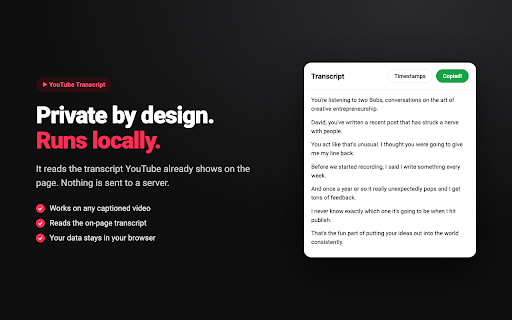
★ PRIVATE BY DESIGN
Everything runs locally in your browser. The extension reads the transcript YouTube already shows — your data is never sent to any server, and we don't collect anything.

★ CLEAN & FAST
A simple, readable panel that does one thing well: get you the words.

HOW IT WORKS
1. Open any YouTube video that has captions.
2. Click the YouTube Transcript icon.
3. Read it, or hit Copy.

Perfect for students, researchers, writers, content creators, and anyone who wants to read, search, summarize, or save what was said in a video.

Note: works on videos that have captions available (manual or auto-generated). Not affiliated with or endorsed by YouTube or Google.
Technical
- Version
- 1.0.1
- Manifest
- V3
- Size
- 13.82KiB
- Min Chrome
- 88
- Languages
- 1
- Featured
- No
Metadata
- ID
- dhjmpnhhamjicafdnolbjblkpnfbmhji
- Developer ID
- u9bb31cc9af15cbcda1b227b138a125cd
- Developer Email
- [email protected]
- Created
- Jun 9, 2026
- Last Updated (Store)
- Jun 9, 2026
- Last Scraped
- Jun 10, 2026
- Website
- —
- Support URL
- —
- Privacy Policy
- —
Data sourced from the Chrome Web Store · last verified Jun 10, 2026.