
PDF Dark Theme
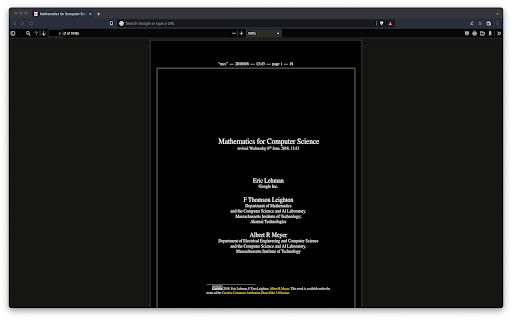
Applies a dark theme to your PDF viewer
As of May 2026, PDF Dark Theme has 9,000 users and a 3.00/5 rating from 30 reviews in the Accessibility category.
Usersup 12.5 percent+12.5%
9.0K
9,000
Ratingup 4.9 percent+4.9%
3.00
30 reviews
Reviewsup 7.1 percent+7.1%
30
Version
1.04
Manifest V3
90-day change · In the last 90 days this extension gained 1.0K users.
History
2 snapshotsTracking since Apr 1, 2026.
View as table
| Date | Users | Rating | Reviews | Version |
|---|---|---|---|---|
| Apr 1, 2026 | 8.0K | 2.86 | 28 | 1.04 |
| May 30, 2026 | 9.0K | 2.93 | 29 | 1.04 |
| Now | 9.0K | 3.00 | 30 | 1.04 |
Permissions & access
- Permissions
- None declared
- Host access
- file://*.pdf
Screenshots

About
⚠️IMPORTANT⚠️: This extension won't work until you give it permission to access file URLs. You can do so by heading to your browser's extension page and enabling file access there.

⚠️IMPORTANT⚠️:  This extension will only work on PDFs that you have installed locally on your computer. If you want it to work on PDFs you find online as well i.e. http://www.africau.edu/images/default/sample.pdf, I recommend you use Arshpreet Buttar's DarkPDF extension instead @ https://chrome.google.com/webstore/detail/darkpdf/cfemcmeknmapecneeeaajnbhhgfgkfhp?hl=en.

⚠️IMPORTANT⚠️: Your PDF viewer should be set to light theme for this extension to work. If you try to open up a light PDF document in a dark PDF viewer, this extension is going to invert the colors for both of them. Leaving you with a dark PDF document and a light PDF viewer. You need to have both of a light PDF document and a light PDF viewer for the desired results.

EDIT: As pointed out in the reviews, you can't change the theme for chrome's default PDF viewer without changing the theme of your browser (as of May 2024 at least). I use the Vimium C PDF Viewer chrome extension instead, which gives me a different PDF viewer that can have a theme independent of the browser. Put chrome in dark theme, put vimium C pdf viewer in light theme, and it should work out. You can find that extension here.

https://chromewebstore.google.com/detail/pdf-viewer-for-vimium-c/nacjakoppgmdcpemlfnfegmlhipddanj

https://chromewebstore.google.com/detail/vimium-c-all-by-keyboard/hfjbmagddngcpeloejdejnfgbamkjaeg

This extension is a fork of Buttar's extension (from above) except it's one file only.

```js
let darkPdfDivStyles = `
  pointer-events: none;
  width: 100vw;
  height: 100vh;
  background-color: #e6e6e6;
  mix-blend-mode: difference;
  z-index: 1;
`;

let darkPdfDiv = document.createElement('div');
darkPdfDiv.setAttribute("style", darkPdfDivStyles);
document.body.appendChild(darkPdfDiv)
```

EDIT: I ended up switching to Buttar's extension myself, but in case people still want this one I'll leave it up. If anyone wants to use my logo, it's public domain no attribution required (no warranty). Code is GPLv3.

https://github.com/chris-straka/pdf-dark-theme
Technical
- Version
- 1.04
- Manifest
- V3
- Size
- 20.15KiB
- Min Chrome
- 88
- Languages
- 1
- Featured
- No
Metadata
- ID
- dhhcfpbikhlkoicblakagcmfpnnkhkpl
- Developer ID
- u10e7893796433bb246c8f8290b7795a7
- Developer Email
- [email protected]
- Created
- Jun 15, 2022
- Last Updated (Store)
- May 10, 2024
- Last Scraped
- May 30, 2026
- Website
- —
- Support URL
- —
- Privacy Policy
- —
Similar extensions
Alternatives to PDF Dark Theme, ranked by description similarity.

Darken - PDF Dark Mode Reader
Applies dark mode and other themes to PDFs.
108
★ 3.3

Simply Dark
A simple dark mode toggle extension
62
★ 5.0

PDF Dark Mode Toggle
Toggle dark mode for PDFs embedded in Chrome.
485
Dark Mode for Chrome
Dark mode for all websites. Use dark theme for night and daily browsing with dark reader. Night shift mode.
60.0K
★ 4.5

Dark Mode
Dark Mode, read at night. Bluelight filter for every website. Relax your eyes at night and day.
20.0K
★ 4.4
ANTDR: ANother Trivial Dark Reader
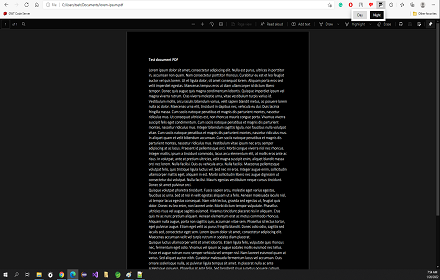
Only two buttons. Simply switch between day and night mode for the active tab. Works for offline PDFs too!
895
★ 5.0

Dark Theme - Dark mode for Chrome
Dark mode switch any websites to dark theme. Take care of your eyes day using a classic dark reader or change screen brightness.
400.0K
★ 4.3
Dark Night Mode
It is a night mode for the entire Internet. It darkens all the websites you visit so that you can browse without straining your eyes
70.0K
★ 4.2
Data sourced from the Chrome Web Store · last verified May 30, 2026.