
Bulk Select
select multiple dropdowns at once
As of May 2026, Bulk Select has 2,000 users and a 4.20/5 rating from 5 reviews in the Workflow & Planning category.
Usersno change0%
2.0K
2,000
Ratingno change0%
4.20
5 reviews
Reviewsno change0%
5
Version
0.5.1
Manifest V3
Permissions & access
- Permissions
- activeTabscripting
- Host access
- None declared
Screenshots
About
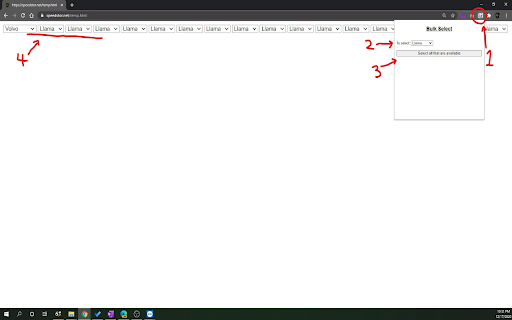
If there are many duplicates of the same kind of dropdown selects, you can use this extension to select them all at once.

To use it:
  1. click on the extension
  2. choose the select option you want
  3. click the button below the select
  4. Done! All the select items that has that option available would be selected to that

Yay!!!


Update: It now also triggers the onChange event, cuz i forgot the first time :)
Technical
- Version
- 0.5.1
- Manifest
- V3
- Size
- 12.83KiB
- Min Chrome
- 88
- Languages
- 1
- Featured
- No
Metadata
- ID
- dhejejdjocpapoejnoodlmodkikffieg
- Developer ID
- u3a1f5402053ed55bfb211fe0160e9958
- Developer Email
- [email protected]
- Created
- Dec 24, 2020
- Last Updated (Store)
- Jan 6, 2025
- Last Scraped
- May 30, 2026
- Website
- speedstor.net
- Support URL
- —
- Privacy Policy
- —
Similar extensions
Alternatives to Bulk Select, ranked by description similarity.

Dropdown Selector
Selects all dropdowns on a page with the chosen option. Use Ctrl+Shift+D to open the popup.
162
★ 5.0

Dropdown Search
Search as You Type in Dropdowns
150
★ 5.0

Click Booster
Choose the button and let us do the job instead you
55
★ 5.0

Copy To Clipboard
Click from a catetgory of snippets dropdown to copy to your clipboard
2

Google Calendar Quick Duplicate
A simple Chrome Extension to quickly duplicate events on Google Calendar.
10.0K
★ 4.1

Copy Dropdown Contents
Copy contents of a dropdown list easily with a right-click.
3.0K
★ 3.4

AutoSave & Recovery
Save input text values for easy retrieval, eliminating rewriting. Quickly access and reuse saved values.
192
★ 3.0

ClickUp copy link
Copy ClickUp tasks as hyperlinks in a human readable format!
462
★ 4.5
Data sourced from the Chrome Web Store · last verified May 30, 2026.