
Just Read
A feature-packed, customizable reader extension.
As of June 2026, Just Read has 200,000 users and a 4.65/5 rating from 906 reviews in the Functionality & UI category.
Usersno change0%
200.0K
200,000
Ratingno change0%
4.65
906 reviews
Reviewsup 0.3 percent+0.3%
906
Version
6.1.1
Manifest V3
90-day change · In the last 90 days this extension 2 version updates.
History
7 snapshotsTracking since Apr 1, 2026.
View as table
| Date | Users | Rating | Reviews | Version |
|---|---|---|---|---|
| Apr 1, 2026 | 200.0K | 4.65 | 903 | 6.0.12 |
| Apr 9, 2026 | 200.0K | 4.65 | 903 | 6.1.0 |
| Apr 16, 2026 | 200.0K | 4.65 | 901 | 6.1.0 |
| May 4, 2026 | 200.0K | 4.65 | 902 | 6.1.0 |
| May 20, 2026 | 200.0K | 4.65 | 903 | 6.1.0 |
| Jun 9, 2026 | 200.0K | 4.65 | 904 | 6.1.1 |
| Jun 24, 2026 | 200.0K | 4.65 | 905 | 6.1.1 |
| Now | 200.0K | 4.65 | 906 | 6.1.1 |
Changelog
- Apr 1, 2026description
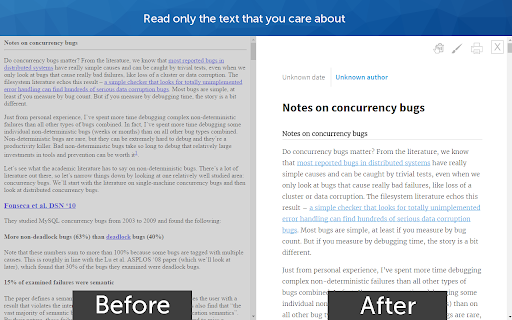
Just Read is a feature-packed and customizable reader view.

With one click (or less!), you can remove distractions like:
- The page's styling
- Ads
- Popups
- Comments

And read the article in a customizable, simplified format - like a read mode but better!

Users can:
- Summarize the article using AI.
- Use the default white and dark themes.
- Modify their theme using a graphical editor or CSS.
- Use a theme someone else has made (found at https://goo.gl/Z59SM4 ).
- Use their very own custom styling.
- Auto-run the reader format on specific sites.
- Use a keyboard shortcut to run the reader.
- Print the custom-styled version of the article.
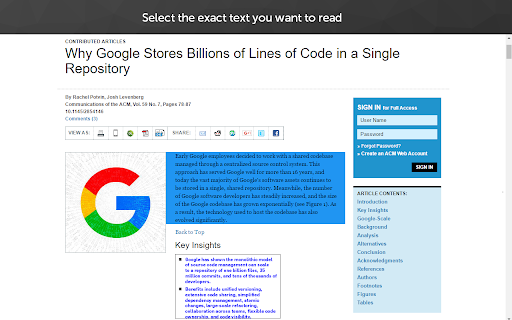
- Use the selection mode to choose exactly which text they want to select for reading.
- Use the deletion mode to remove any unwanted content after selection.
- Edit incorrect meta information generated.
- Control which options the reader uses.
- Go straight to the next chapter from the reader view.

Just Read Premium has even more features!
- Permanently save the reader version of pages
- Share the reader version of pages with others
- Link directly to a section of the page within the shared reader view
- Highlight and annotate pages
- Add comments
- Use a custom scrollbar
- Auto-scroll the article
- Apply domain-specific selectors, which give ultimate control to the content auto-selection

Just Read collects zero data from users by default. If you sign up for an account, only your email address is stored. No analytics are sent to anyone else. Any data that is stored is safely secured and private.

Just Read is completely open source and can be found on GitHub here https://github.com/ZachSaucier/Just-Read

Please read the README in the GitHub link above for more details!
Just Read is a feature-packed and customizable reader view.

With one click (or less!), you can remove distractions like:
- The page's styling
- Ads
- Popups
- Comments

And read the article in a customizable, simplified format - like a read mode but better!

Users can:
- Summarize the article using AI.
- Use the default white and dark themes.
- Modify their theme using a graphical editor or CSS.
- Use a theme someone else has made (found at https://goo.gl/Z59SM4 ).
- Use their very own custom styling.
- Auto-run the reader format on specific sites.
- Auto-run summarization.
- Use a keyboard shortcut to run the reader.
- Print the custom-styled version of the article.
- Use the selection mode to choose exactly which text they want to select for reading.
- Use the deletion mode to remove any unwanted content after selection.
- Edit incorrect meta information generated.
- Control which options the reader uses.
- Go straight to the next chapter from the reader view.

Just Read Premium has even more features!
- Permanently save the reader version of pages
- Share the reader version of pages with others
- Link directly to a section of the page within the shared reader view
- Highlight and annotate pages
- Add comments
- Use a custom scrollbar
- Auto-scroll the article
- Apply domain-specific selectors, which give ultimate control to the content auto-selection

Just Read collects zero data from users by default. If you sign up for an account, only your email address is stored. No analytics are sent to anyone else. Any data that is stored is safely secured and private.

Just Read is completely open source and can be found on GitHub here https://github.com/ZachSaucier/Just-Read

Please read the README in the GitHub link above for more details!
Permissions & access
- Permissions
- tabscontextMenusstoragescripting
- Host access
- *://*/*
Screenshots


About
Just Read is a feature-packed and customizable reader view.

With one click (or less!), you can remove distractions like:
- The page's styling
- Ads
- Popups
- Comments

And read the article in a customizable, simplified format - like a read mode but better!

Users can:
- Summarize the article using AI.
- Use the default white and dark themes.
- Modify their theme using a graphical editor or CSS.
- Use a theme someone else has made (found at https://goo.gl/Z59SM4 ).
- Use their very own custom styling.
- Auto-run the reader format on specific sites.
- Auto-run summarization.
- Use a keyboard shortcut to run the reader.
- Print the custom-styled version of the article.
- Use the selection mode to choose exactly which text they want to select for reading.
- Use the deletion mode to remove any unwanted content after selection.
- Edit incorrect meta information generated.
- Control which options the reader uses.
- Go straight to the next chapter from the reader view.

Just Read Premium has even more features!
- Permanently save the reader version of pages
- Share the reader version of pages with others
- Link directly to a section of the page within the shared reader view
- Highlight and annotate pages
- Add comments
- Use a custom scrollbar
- Auto-scroll the article
- Apply domain-specific selectors, which give ultimate control to the content auto-selection

Just Read collects zero data from users by default. If you sign up for an account, only your email address is stored. No analytics are sent to anyone else. Any data that is stored is safely secured and private.

Just Read is completely open source and can be found on GitHub here https://github.com/ZachSaucier/Just-Read

Please read the README in the GitHub link above for more details!
Technical
- Version
- 6.1.1
- Manifest
- V3
- Size
- 384KiB
- Min Chrome
- 88
- Languages
- 1
- Featured
- Yes
Metadata
- ID
- dgmanlpmmkibanfdgjocnabmcaclkmod
- Developer ID
- ue1e96be8d90112171c89bca34da5291f
- Developer Email
- [email protected]
- Created
- Nov 25, 2015
- Last Updated (Store)
- May 19, 2026
- Last Scraped
- Jun 24, 2026
- Website
- justread.link
- Support URL
- https://github.com/ZachSaucier/Just-Read
- Privacy Policy
- https://github.com/ZachSaucier/Just-Read
Similar extensions
Alternatives to Just Read, ranked by description similarity.

Read it - just read website. text mode
A smart reader that shows only what matters. Convenient reader. Text mode. Read mode.
30.0K
★ 4.9

Reader Mode Plus
Clean reader overlay with font, spacing, themes, TTS, and one-click save.
4

RapidRead: Speed Reader & Focus Mode
Boost your reading speed and comprehension with RSVP (Rapid Serial Visual Presentation) and distraction-free Reader View.
65
★ 4.0

Readwell Screen Reader
Readwell Delivers Ad-Free, Customizable, and Fast Reading Like Never Before!
20.0K
★ 2.6

Clean Text Extractor
Extracts the main article text from the current page and displays it in a clean tab with copy/download.
18
★ 5.0

Read in Color
Change text and background colors for a comfortable reading experience on content-focused websites.
7
★ 5.0

Simple Reader Extension
Applies a simple, readable style to the current page content.
14

Readify: Lightweight Reader View
Lightweight Reader View simplifies web pages to create a clean, easy-to-read format for a smoother, continuous reading experience
17
Data sourced from the Chrome Web Store · last verified Jun 24, 2026.