
Gmail Tactical HUD
Tactical HUD notifications and sounds for Gmail actions.
As of June 2026, Gmail Tactical HUD has 2 users in the Functionality & UI category.
Usersdown 33.3 percent−33.3%
2
2
Ratingno change0%
—
— reviews
Reviewsno change0%
—
Version
1.0.0
Manifest V3
History
3 snapshotsTracking since Apr 1, 2026.
View as table
| Date | Users | Rating | Reviews | Version |
|---|---|---|---|---|
| Apr 1, 2026 | 3 | — | — | 1.0.0 |
| Apr 16, 2026 | 2 | — | — | 1.0.0 |
| May 2, 2026 | 2 | — | — | 1.0.0 |
| Now | 2 | — | — | 1.0.0 |
Permissions & access
- Permissions
- None declared
- Host access
- None declared
Screenshots



About
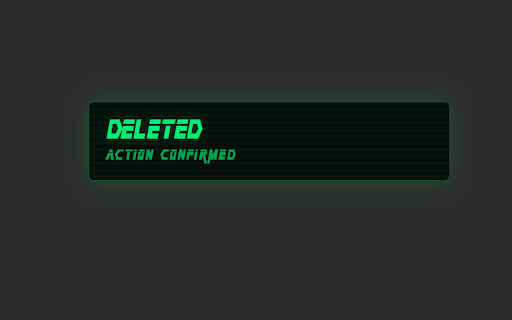
Gmail Tactical HUD enhances Gmail with a tactical, high-tech notification system inspired by command interfaces and operational HUD aesthetics. The extension adds visual HUD notifications and sound feedback for common Gmail actions, providing clear and immediate confirmation when you interact with your inbox. Actions such as sending an email, archiving or deleting conversations, marking messages as read or unread, and reporting spam are acknowledged through a subtle on-screen overlay paired with dedicated sound cues. The experience is designed to feel responsive and immersive while remaining unobtrusive and focused on productivity.

Gmail Tactical HUD works directly inside Gmail and is compatible with Chrome, Brave, and all Chromium-based browsers. It does not modify Gmail features, email content, or message behavior, and it operates entirely on the client side. The extension does not rely on external servers, background processes, or unnecessary permissions, ensuring minimal impact on performance.

Privacy is a core principle of Gmail Tactical HUD. The extension does not read email content, does not access personal data, and does not transmit any information outside the browser. No accounts, configuration, or setup are required. Simply install the extension and open Gmail to experience a more precise, responsive, and visually refined way to manage your email.

Gmail Tactical HUD is built for users who appreciate clean interfaces, clear action confirmation, and a focused, high-tech aesthetic integrated seamlessly into their daily workflow.
Technical
- Version
- 1.0.0
- Manifest
- V3
- Size
- 298KiB
- Min Chrome
- 88
- Languages
- 1
- Featured
- No
Metadata
- ID
- dglfmpbpnfehbaedminimefhdeegllji
- Developer ID
- u6566a98fd9642c0d2db697ff54612ce9
- Developer Email
- [email protected]
- Created
- Jan 21, 2026
- Last Updated (Store)
- Jan 21, 2026
- Last Scraped
- Jun 6, 2026
- Website
- systemofagamer.it
- Support URL
- https://systemofagamer.it/contatti/
- Privacy Policy
- https://systemofagamer.it/privacy-e-cookie/
Similar extensions
Alternatives to Gmail Tactical HUD, ranked by description similarity.

betterGmail
Rearrange Gmail compose reply box to appear at the top of threads
10

Custom Gmail Buttons
Add customizable buttons to your Gmail compose window
242
★ 5.0

Sender Icons for Gmail™
Easily determine the sender of email messages in Gmail without the need to open the message.
7

Tactical Countdown
A minimal countdown timer with a tactical military-style interface. No permissions required.
—

Gmail Group Manager
Simple email group management for Gmail
11
★ 5.0

Custom Fonts for Gmail
Enhance your Gmail with 30 custom fonts. Easy to use, works with all themes for a personalized email experience. 📧🖋️
3.0K
★ 3.3

Custom Notifications for Gmail
🌟 Revive your Gmail! Set unique voice notifications with Custom Voice Notifications and more!
146

Gmail Extra Feature: Click Sender Search
Enhance your Gmail experience with a quick sender search feature.
8
Data sourced from the Chrome Web Store · last verified Jun 6, 2026.