
PhobiaBlocker
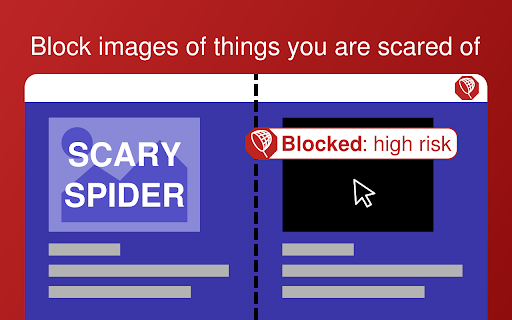
Enjoy a phobia free web. Block scary images from a large list of real-world objects (e.g., insects, animals, plants).
As of June 2026, PhobiaBlocker has 113 users and a 3.40/5 rating from 5 reviews in the Accessibility category.
Usersup 13.0 percent+13.0%
113
113
Ratingno change0%
3.40
5 reviews
Reviewsno change0%
5
Version
1.3.2
Manifest V3
90-day change · In the last 90 days this extension 2 version updates.
History
9 snapshotsTracking since Apr 22, 2026.
View as table
| Date | Users | Rating | Reviews | Version |
|---|---|---|---|---|
| Apr 22, 2026 | 100 | 3.40 | 5 | 1.3.0 |
| Apr 26, 2026 | 100 | 3.40 | 5 | 1.3.0 |
| May 4, 2026 | 95 | 3.40 | 5 | 1.3.0 |
| May 9, 2026 | 92 | 3.40 | 5 | 1.3.0 |
| May 14, 2026 | 103 | 3.40 | 5 | 1.3.0 |
| May 21, 2026 | 113 | 3.40 | 5 | 1.3.0 |
| May 27, 2026 | 122 | 3.40 | 5 | 1.3.0 |
| Jun 3, 2026 | 121 | 3.40 | 5 | 1.3.1 |
| Jun 9, 2026 | 113 | 3.40 | 5 | 1.3.1 |
| Now | 113 | 3.40 | 5 | 1.3.2 |
Changelog
- Jun 9, 2026description
You're on your favorite chat or browsing social media when suddenly a wild and scary image of a spider appears! PhobiaBlocker lets you enjoy a phobia free web.

PhobiaBlocker blocks images related to your phobia. Choose what to block from a large list of real-world objects (e.g., insects, animals, plants).

Features
• Automatically block images representing real-world objects you have chosen
• Manually block or unblock images using the right-click menu
• Block all images across all websites
• Automatically block or trust (to improve performance) images whose src matches a specified regex (blocking takes priority)
• Add trusted websites (domain name with subdomain) to improve performance

Options
• Quick option to block spider-like and insect-like images
• Advanced selection from a long list of real-world objects
• Speed/Accuracy tradeoff of the automatic blocker
• Risk management of the automatic blocker
• Add or remove regex rules to automatically trust or block images using their src
• Pause the automatic blocker (manual blocking remains enabled)
• Enable dark or light mode (dark mode is enabled by default)
• Label trusted websites from the popup menu

Privacy
• No browsing data is sent to an external endpoint
• Images are analysed on your computer but they are not saved, except in a transformed form within a local cache that can be disabled in the options

Technical details and restrictions
• Machine learning models for ImageNet classification are used to analyse images. The list of things to block comes from ImageNet classes. This is why only real-world objects are supported. For instance blocking abstract phobias like heights or gore is not supported.
• The extension analyses <img> and SVG <image> elements. When a new image is added to the DOM or changes, the element is analysed as well. Images from <canvas> elements and the CSS background-image property are not supported.
• Images are temporarily blocked before they are analysed. Images can blink before being temporarily blocked in rare cases.
• Most of the extension's size is due to the machine learning models and the library to execute them.
• The automatic blocker uses a cache of decisions, which can be stored locally or used only temporarily. The cache contains non-cryptographic hashes of images. Both the cache and its persistence mechanism can be disabled in the options.


Changelog
1.3.0 Major update after a long hiatus
• Improved performance: images are analyzed significantly faster
• Updated machine learning models and underlying libraries
• Better handling of image processing with optimized queuing
• Various bug fixes and stability improvements

1.3.1 Bug fixes
• Fixed issues with manual blocking/unblocking
You're on your favorite chat or browsing social media when suddenly a wild and scary image of a spider appears! PhobiaBlocker lets you enjoy a phobia free web.

PhobiaBlocker blocks images related to your phobia. Choose what to block from a large list of real-world objects (e.g., insects, animals, plants).

Features
• Automatically block images representing real-world objects you have chosen
• Manually block or unblock images using the right-click menu
• Block all images across all websites
• Automatically block or trust (to improve performance) images whose src matches a specified regex (blocking takes priority)
• Add trusted websites (domain name with subdomain) to improve performance

Options
• Quick option to block spider-like and insect-like images
• Advanced selection from a long list of real-world objects
• Speed/Accuracy tradeoff of the automatic blocker
• Risk management of the automatic blocker
• Add or remove regex rules to automatically trust or block images using their src
• Pause the automatic blocker (manual blocking remains enabled)
• Enable dark or light mode (dark mode is enabled by default)
• Label trusted websites from the popup menu

Privacy
• No browsing data is sent to an external endpoint
• Images are analysed on your computer but they are not saved, except in a transformed form within a local cache that can be disabled in the options

Technical details and restrictions
• Machine learning models for ImageNet classification are used to analyse images. The list of things to block comes from ImageNet classes. This is why only real-world objects are supported. For instance blocking abstract phobias like heights or gore is not supported.
• The extension analyses <img> and SVG <image> elements. When a new image is added to the DOM or changes, the element is analysed as well. Images from <canvas> elements and the CSS background-image property are not supported.
• Images are temporarily blocked before they are analysed. Images can blink before being temporarily blocked in rare cases.
• Most of the extension's size is due to the machine learning models and the library to execute them.
• The automatic blocker uses a cache of decisions, which can be stored locally or used only temporarily. The cache contains non-cryptographic hashes of images. Both the cache and its persistence mechanism can be disabled in the options.


Changelog
1.3.2 Bug fixes
• Fixed issue in case of unsupported webgpu

1.3.1 Bug fixes
• Fixed issues with manual blocking/unblocking

1.3.0 Major update after a long hiatus
• Improved performance: images are analyzed significantly faster
• Updated machine learning models and underlying libraries
• Better handling of image processing with optimized queuing
• Various bug fixes and stability improvements
- Jun 9, 2026category
productivity/workflow
make_chrome_yours/accessibility
- May 27, 2026description
You're on your favorite chat or browsing social media when suddenly a wild and scary image of a spider appears! PhobiaBlocker lets you enjoy a phobia free web.

PhobiaBlocker blocks images related to your phobia. Choose what to block from a large list of real-world objects (e.g., insects, animals, plants).

Features
• Automatically block images representing real-world objects you have chosen
• Manually block or unblock images using the right-click menu
• Block all images across all websites
• Automatically block or trust (to improve performance) images whose src matches a specified regex (blocking takes priority)
• Add trusted websites (domain name with subdomain) to improve performance

Options
• Quick option to block spider-like and insect-like images
• Advanced selection from a long list of real-world objects
• Speed/Accuracy tradeoff of the automatic blocker
• Risk management of the automatic blocker
• Add or remove regex rules to automatically trust or block images using their src
• Pause the automatic blocker (manual blocking remains enabled)
• Enable dark or light mode (dark mode is enabled by default)
• Label trusted websites from the popup menu

Privacy
• No browsing data is sent to an external endpoint
• Images are analysed on your computer but they are not saved, except in a transformed form within a local cache that can be disabled in the options

Technical details and restrictions
• Machine learning models for ImageNet classification are used to analyse images. The list of things to block comes from ImageNet classes. This is why only real-world objects are supported. For instance blocking abstract phobias like heights or gore is not supported.
• The extension analyses <img> and SVG <image> elements. When a new image is added to the DOM or changes, the element is analysed as well. Images from <canvas> elements and the CSS background-image property are not supported.
• Images are temporarily blocked before they are analysed. Images can blink before being temporarily blocked in rare cases.
• Most of the extension's size is due to the machine learning models and the library to execute them.
• The automatic blocker uses a cache of decisions, which can be stored locally or used only temporarily. The cache contains non-cryptographic hashes of images. Both the cache and its persistence mechanism can be disabled in the options.
You're on your favorite chat or browsing social media when suddenly a wild and scary image of a spider appears! PhobiaBlocker lets you enjoy a phobia free web.

PhobiaBlocker blocks images related to your phobia. Choose what to block from a large list of real-world objects (e.g., insects, animals, plants).

Features
• Automatically block images representing real-world objects you have chosen
• Manually block or unblock images using the right-click menu
• Block all images across all websites
• Automatically block or trust (to improve performance) images whose src matches a specified regex (blocking takes priority)
• Add trusted websites (domain name with subdomain) to improve performance

Options
• Quick option to block spider-like and insect-like images
• Advanced selection from a long list of real-world objects
• Speed/Accuracy tradeoff of the automatic blocker
• Risk management of the automatic blocker
• Add or remove regex rules to automatically trust or block images using their src
• Pause the automatic blocker (manual blocking remains enabled)
• Enable dark or light mode (dark mode is enabled by default)
• Label trusted websites from the popup menu

Privacy
• No browsing data is sent to an external endpoint
• Images are analysed on your computer but they are not saved, except in a transformed form within a local cache that can be disabled in the options

Technical details and restrictions
• Machine learning models for ImageNet classification are used to analyse images. The list of things to block comes from ImageNet classes. This is why only real-world objects are supported. For instance blocking abstract phobias like heights or gore is not supported.
• The extension analyses <img> and SVG <image> elements. When a new image is added to the DOM or changes, the element is analysed as well. Images from <canvas> elements and the CSS background-image property are not supported.
• Images are temporarily blocked before they are analysed. Images can blink before being temporarily blocked in rare cases.
• Most of the extension's size is due to the machine learning models and the library to execute them.
• The automatic blocker uses a cache of decisions, which can be stored locally or used only temporarily. The cache contains non-cryptographic hashes of images. Both the cache and its persistence mechanism can be disabled in the options.


Changelog
1.3.0 Major update after a long hiatus
• Improved performance: images are analyzed significantly faster
• Updated machine learning models and underlying libraries
• Better handling of image processing with optimized queuing
• Various bug fixes and stability improvements

1.3.1 Bug fixes
• Fixed issues with manual blocking/unblocking
Permissions & access
- Permissions
- storagecontextMenusoffscreen
- Host access
- <all_urls>
Screenshots



About
You're on your favorite chat or browsing social media when suddenly a wild and scary image of a spider appears! PhobiaBlocker lets you enjoy a phobia free web.

PhobiaBlocker blocks images related to your phobia. Choose what to block from a large list of real-world objects (e.g., insects, animals, plants).

Features
• Automatically block images representing real-world objects you have chosen
• Manually block or unblock images using the right-click menu
• Block all images across all websites
• Automatically block or trust (to improve performance) images whose src matches a specified regex (blocking takes priority)
• Add trusted websites (domain name with subdomain) to improve performance

Options
• Quick option to block spider-like and insect-like images
• Advanced selection from a long list of real-world objects
• Speed/Accuracy tradeoff of the automatic blocker
• Risk management of the automatic blocker
• Add or remove regex rules to automatically trust or block images using their src
• Pause the automatic blocker (manual blocking remains enabled)
• Enable dark or light mode (dark mode is enabled by default)
• Label trusted websites from the popup menu

Privacy
• No browsing data is sent to an external endpoint
• Images are analysed on your computer but they are not saved, except in a transformed form within a local cache that can be disabled in the options

Technical details and restrictions
• Machine learning models for ImageNet classification are used to analyse images. The list of things to block comes from ImageNet classes. This is why only real-world objects are supported. For instance blocking abstract phobias like heights or gore is not supported.
• The extension analyses <img> and SVG <image> elements. When a new image is added to the DOM or changes, the element is analysed as well. Images from <canvas> elements and the CSS background-image property are not supported.
• Images are temporarily blocked before they are analysed. Images can blink before being temporarily blocked in rare cases.
• Most of the extension's size is due to the machine learning models and the library to execute them.
• The automatic blocker uses a cache of decisions, which can be stored locally or used only temporarily. The cache contains non-cryptographic hashes of images. Both the cache and its persistence mechanism can be disabled in the options.


Changelog
1.3.2 Bug fixes
• Fixed issue in case of unsupported webgpu

1.3.1 Bug fixes
• Fixed issues with manual blocking/unblocking

1.3.0 Major update after a long hiatus
• Improved performance: images are analyzed significantly faster
• Updated machine learning models and underlying libraries
• Better handling of image processing with optimized queuing
• Various bug fixes and stability improvements
Technical
- Version
- 1.3.2
- Manifest
- V3
- Size
- 65.09MiB
- Min Chrome
- 88
- Languages
- 1
- Featured
- No
Metadata
- ID
- dglbodgngpkmgceoiihoaopibimkihnb
- Developer ID
- u4ab1df8797e1a554c95678eee382a05e
- Developer Email
- [email protected]
- Created
- May 4, 2020
- Last Updated (Store)
- Jun 8, 2026
- Last Scraped
- Jun 9, 2026
- Website
- —
- Privacy Policy
- —
Data sourced from the Chrome Web Store · last verified Jun 9, 2026.