
WebNote & Capture
Ultimate tool for annotating and capturing web pages. Easily add and save comments on any part of a web page.
As of June 2026, WebNote & Capture has 19 users and a 5.00/5 rating from 4 reviews in the Developer Tools category.
Usersup 46.2 percent+46.2%
19
19
Ratingno change0%
5.00
4 reviews
Reviewsno change0%
4
Version
1.1
Manifest V3
History
3 snapshotsTracking since Apr 1, 2026.
View as table
| Date | Users | Rating | Reviews | Version |
|---|---|---|---|---|
| Apr 1, 2026 | 13 | 5.00 | 4 | 1.1 |
| May 2, 2026 | 14 | 5.00 | 4 | 1.1 |
| Jun 1, 2026 | 13 | 5.00 | 4 | 1.1 |
| Now | 19 | 5.00 | 4 | 1.1 |
Permissions & access
- Permissions
- storageactiveTabcontextMenusscripting
- Host access
- None declared
Screenshots
About
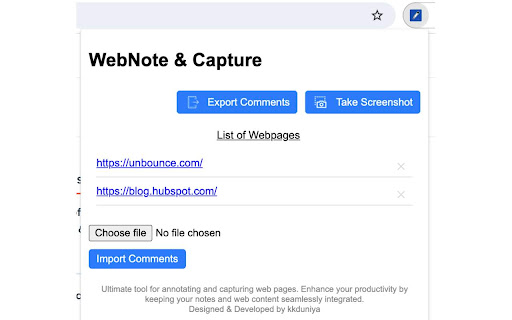
Transform your web browsing experience with WebNote & Capture, the ultimate tool for annotating and capturing web pages.

Features:

Pin Comments: Easily add and save comments on any part of a web page. Your notes will be there when you return, making it perfect for research, project collaboration, and more.
Organized Annotations: Comments are saved by page URL, ensuring your notes are always relevant to the content you're viewing.
Edit & Delete: Modify or remove your comments at any time to keep your annotations up to date.
Full-Page Screenshots: Capture the entire webpage with a single click. No more scrolling and piecing together screenshots.
Export & Import: Easily export your comments and screenshots to share with others or import them to another device.
Whether you're a student, researcher, or professional, WebNote & Capture enhances your productivity by keeping your notes and web content seamlessly integrated. Try it now and take control of your web experience!
Technical
- Version
- 1.1
- Manifest
- V3
- Size
- 73.03KiB
- Min Chrome
- 88
- Languages
- 1
- Featured
- No
Metadata
- ID
- dgkllnfbndknaoikmkindfmckfelfkpg
- Developer ID
- u1cfe3ad498fcacd34fe93e231a7c3e19
- Developer Email
- [email protected]
- Created
- Aug 8, 2024
- Last Updated (Store)
- Aug 8, 2024
- Last Scraped
- Jun 1, 2026
- Website
- —
- Support URL
- —
- Privacy Policy
- https://kkduniya.com/privacy-policy-for-webnote-capture/
Similar extensions
Alternatives to WebNote & Capture, ranked by description similarity.

uGrabber
Capture, annotate, and save webpage screenshots.
2

WebPage Annotator
WebPage Annotator: Annotate and highlight webpages.
1

ATCapture · Web Element Capture
Capture any webpage element in one click—images, sections, tables, or UI components. No full-page screenshots needed.
21

Page Feedback Annotator
Click any element to add feedback. Export structured annotations as markdown for AI agents, QA, and design reviews.
16

Screencap
Fast, beautiful screenshot capture and enhancement
90
★ 5.0

SnipSnap Screenshot - Full Page Capture & Editor
Fast, reliable full page screenshot tool. Capture, annotate, edit, and share browser screen captures in seconds.
14

Ano — QA Bug Reporting
QA bug reporting on any page. Highlight, pin, draw, and record — export structured context for developers and AI.
7
★ 5.0

Screen Annotator
Capture and annotate screenshots with shapes, arrows, text, and more. Press Ctrl+Shift+S to capture.
20
Data sourced from the Chrome Web Store · last verified Jun 1, 2026.