
rawfeed
Offline-first error capture and log dashboard for developers
As of June 2026, rawfeed has 3 users in the Developer Tools category.
Usersno change0%
3
3
Ratingno change0%
—
— reviews
Reviewsno change0%
—
Version
2.0.0
Manifest V3
History
5 snapshotsTracking since May 7, 2026.
View as table
| Date | Users | Rating | Reviews | Version |
|---|---|---|---|---|
| May 7, 2026 | — | — | — | 2.0.0 |
| May 11, 2026 | — | — | — | 2.0.0 |
| May 17, 2026 | 1 | — | — | 2.0.0 |
| May 23, 2026 | 3 | — | — | 2.0.0 |
| Jun 5, 2026 | 4 | — | — | 2.0.0 |
| Now | 3 | — | — | 2.0.0 |
Permissions & access
- Permissions
- storagealarmstabssidePanelwebRequestmanagement
- Host access
- <all_urls>
Screenshots


About
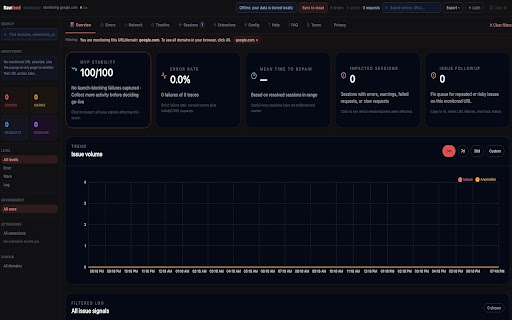
Rawfeed is a developer diagnostics extension for launch-readiness triage. It helps developers capture, inspect, and organize browser errors and network issues for websites and web apps they are authorized to debug.

Rawfeed captures console errors, warnings, optional verbose logs, failed requests, slow requests, CORS-like failures, session metadata, and optional performance signals for user-selected domains.

Rawfeed is local-first. Captured diagnostics are stored in the browser by default and can be cleared or exported by the user. RawCapture cloud sync is optional and only runs after the user connects a provisioning key and manually uploads selected data or enables auto-sync.

Use Rawfeed to:

- Monitor a current app domain across tabs.
- Group repeated issues into launch blockers and lower-priority noise.
- Inspect failed and slow network requests.
- Copy focused debug packets for AI tools, GitHub issues, or team chat.
- Export local diagnostic data.
- Optionally sync selected events to RawCapture.

Rawfeed is intended only for lawful, authorized debugging.
Technical
- Version
- 2.0.0
- Manifest
- V3
- Size
- 410KiB
- Min Chrome
- 88
- Languages
- 1
- Featured
- No
Metadata
- ID
- dghkkacmakhpekpmfiadljlhamhbmcab
- Developer ID
- u6e6b2f0f458d44095423db7ef5c5a9d9
- Developer Email
- [email protected]
- Created
- May 6, 2026
- Last Updated (Store)
- May 6, 2026
- Last Scraped
- Jun 13, 2026
- Website
- —
- Support URL
- https://www.rawfeed.xyz/help
- Privacy Policy
- https://www.rawfeed.xyz/privacy/rawfeed-extension
Data sourced from the Chrome Web Store · last verified Jun 13, 2026.