
Open Tab Blocker
Block distracting websites by organizing them into time-controlled buckets
As of June 2026, Open Tab Blocker has 28 users and a 3.00/5 rating from 2 reviews in the Productivity category.
Usersdown 6.7 percent−6.7%
28
28
Ratingno change0%
3.00
2 reviews
Reviewsno change0%
2
Version
1.0.5
Manifest V3
History
7 snapshotsTracking since Apr 1, 2026.
View as table
| Date | Users | Rating | Reviews | Version |
|---|---|---|---|---|
| Apr 1, 2026 | 30 | 3.00 | 2 | 1.0.5 |
| Apr 16, 2026 | 29 | 3.00 | 2 | 1.0.5 |
| Apr 24, 2026 | 27 | 3.00 | 2 | 1.0.5 |
| May 7, 2026 | 30 | 3.00 | 2 | 1.0.5 |
| May 14, 2026 | 28 | 3.00 | 2 | 1.0.5 |
| May 23, 2026 | 26 | 3.00 | 2 | 1.0.5 |
| Jun 2, 2026 | 27 | 3.00 | 2 | 1.0.5 |
| Now | 28 | 3.00 | 2 | 1.0.5 |
Permissions & access
- Permissions
- storagewebNavigationtabsactiveTabalarms
- Host access
- None declared
Screenshots

About
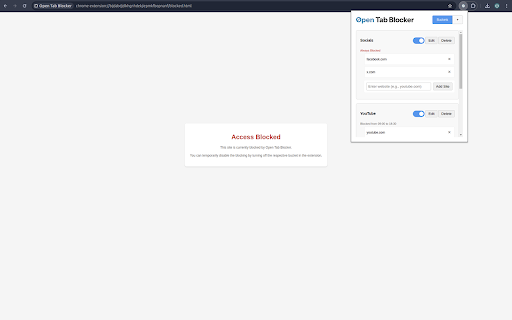
Open Tab Blocker is a Chrome extension designed to help you manage your browsing habits by grouping tabs into buckets and restricting access to certain sites based on predefined rules. This extension helps improve your productivity by limiting distractions and promoting focused browsing.

💻 Fully open-source, contribute on GitHub: https://github.com/stilliard/open-tab-blocker

Features:
- Group tabs into customizable buckets.
- Set rules to restrict access to specific sites during certain times.
- Select which days of the week, and up to 2 different time frames on those days to block between.
- Supports full domain or partial URLs (e.g. to specifically block all https://youtube.com/shorts/).
- Block access to restricted sites altogether.
- Easily switch between on/off tab buckets.
- NEW Friction mode: disabled by default but when enabled, requires typing a random sentence before unlocking a bucket, deleting a site or bucket, or when disabling the setting again after.
- NEW Unlock history: disabled by default but when enabled, records each unlock and lock for 7 days with timestamps to show when and for how long you procrastinated.
- NEW Focus sessions: when you enable a focus mode for 15/25/45/60 minutes it enables all buckets regardless of time schedules until the focus time runs out.
- NEW Take a break: disabled by default but when enabled you can take one 5 minute break per day at any time, it then prevents taking another break for the rest of the day.

Group sites by buckets, each site can be a domain/hostname, or prefix of a URL which allows for more granular site blocking.
Technical
- Version
- 1.0.5
- Manifest
- V3
- Size
- 326KiB
- Min Chrome
- 88
- Languages
- 1
- Featured
- No
Metadata
- ID
- dgfmiekjljfokambomhmielfjlbjlebb
- Developer ID
- u9b3922b21355ce0d76ba559393126c9d
- Developer Email
- [email protected]
- Created
- Feb 8, 2025
- Last Updated (Store)
- Feb 3, 2026
- Last Scraped
- Jun 2, 2026
- Website
- —
- Privacy Policy
- —
Similar extensions
Alternatives to Open Tab Blocker, ranked by description similarity.

URL Blocker & Focus Mode
A powerful URL blocker with Focus Mode, synchronization, and password protection.
2

sorry-were-closed
Block distracting websites after spending a set amount of time on them. Set per-site visit thresholds and block durations.
4

Simple Website Blocker
Block distracting websites with scheduling and password protection.
9

CloseTab: Tab Organizer & Workspace Manager
Transform 100+ messy tabs into clean, visual workspace. Reclaim your focus and your RAM.
27
★ 5.0

Tab Limiter
Closes the oldest open tabs if the total number exceeds a user-specified limit.
206
★ 5.0

Focus Blocker: Minimal Web Distraction Filter
Boost productivity with a clean, minimalist website blocker. Eliminate distractions and stay focused effortlessly.
3

Lockout
Dead-simple site blocker. No tracking, no bloat, no excuses.
30
★ 5.0

URL Blocker
Block distracting websites and stay focused. Patterns sync across devices. 100% free - no ads, no limits, no premium.
7
Data sourced from the Chrome Web Store · last verified Jun 2, 2026.