
Webflow Collection Reorder
Effortlessly rearrange CMS collection items in Webflow with a simple drag and drop interface.
As of June 2026, Webflow Collection Reorder has 712 users and a 3.00/5 rating from 15 reviews in the Developer Tools category.
Usersdown 4.4 percent−4.4%
712
712
Ratingdown 4.5 percent−4.5%
3.00
15 reviews
Reviewsup 7.1 percent+7.1%
15
Version
1.0.0
Manifest V3
History
3 snapshotsTracking since Apr 1, 2026.
View as table
| Date | Users | Rating | Reviews | Version |
|---|---|---|---|---|
| Apr 1, 2026 | 745 | 3.14 | 14 | 1.0.0 |
| May 2, 2026 | 737 | 3.14 | 14 | 1.0.0 |
| Jun 1, 2026 | 715 | 3.00 | 15 | 1.0.0 |
| Now | 712 | 3.00 | 15 | 1.0.0 |
Permissions & access
- Permissions
- storage
- Host access
- https://*.webflow.com/*
Screenshots


About
## Overview
Welcome to the Webflow Collection Sorter Chrome extension! If you use Webflow to build websites, you know it can be tedious to manually sort the items in a CMS collection. That's where our extension comes in. With Webflow Collection Sorter, you can easily and quickly rearrange the order of your CMS collection items using a simple drag-and-drop interface. No more wasted time trying to manually sort your collection items - just install the extension and organise your content.

## How to Sort CMS Collection Items

1. Once you have installed the Chrome extension, you will see a new "Sort" button on the collection listing page in Webflow.

2. Before you can use the Sort button, you need to make sure that your Collection has a "Sort Order" number field. Note that the field type should be “Number” and the field name should exactly be “Sort Order”. If this field is not present, you will need to add it in order to enable the "Sort" button.

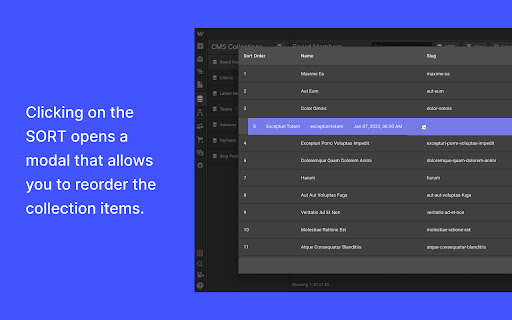
3. Click the "Sort" button to open the modal. The modal displays only the Name, Slug, Sort Order, and Creation Date fields.

4. You can sort the collection items by dragging and dropping them into the desired order. When you are finished, click the "Save" button.

5. The "Sort Order" field will be updated for each collection item to reflect the new order of the items.

6. To view the updated order on the front-end of your website, make sure that your collection is sorted by the "Sort Order" field. This will ensure that the order is displayed correctly on the front-end pages.
Technical
- Version
- 1.0.0
- Manifest
- V3
- Size
- 247KiB
- Min Chrome
- 88
- Languages
- 1
- Featured
- Yes
Metadata
- ID
- dgfmdefiehjbcnocbmjepgeichkociih
- Developer ID
- u5ca02ea23c707b4c93301a548badff9d
- Developer Email
- [email protected]
- Created
- Jan 8, 2023
- Last Updated (Store)
- Jan 8, 2023
- Last Scraped
- Jun 1, 2026
- Website
- —
- Privacy Policy
- —
Similar extensions
Alternatives to Webflow Collection Reorder, ranked by description similarity.

kopytok.tools
**✨ Different designs for collection template pages in Webflow 🎨📄**
—
Save Webflow CSS to File
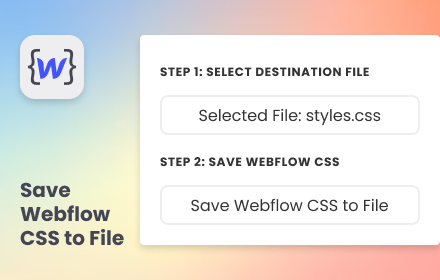
Simplify your development flow by pre-select a destination CSS file and save Webflow CSS directly into it.
94
★ 5.0

Client-First Class Checker
Scan Webflow classes and validate Client-First naming.
7

PocketBase Folders
Organize PocketBase collections into folders for better management.
11

LLMs.txt Generator
Generate llms.txt files for your website. Collect pages, add content, and create structured markdown files.
79
★ 5.0

Layout Collector
Capture screenshots, metadata, and categorize web page layouts. Save to Supabase and browse your design reference gallery.
—

Flowdrive Webflow CMS Widget
Adds a button inside Webflow CMS fields.
11

Cloud Canal Extension for Webflow
Build web apps inside the Webflow Designer with Cloud Canal, an ecosystem of tools to supercharge your Webflow development process.
12
★ 5.0
Data sourced from the Chrome Web Store · last verified Jun 1, 2026.