
AI Website Dev Annotator: AI Notes & Markdown Export
Annotate any website element with notes, then copy/export as clean Markdown for Cursor, Claude Code, Copilot, and other AI agents.
As of June 2026, AI Website Dev Annotator: AI Notes & Markdown Export has — users in the Developer Tools category.
Usersno change0%
—
—
Ratingno change0%
—
— reviews
Reviewsno change0%
—
Version
1.0.0
Manifest V3
History
1 snapshotsTracking since May 20, 2026.
Not enough history yet for this metric — the chart fills in as we collect more snapshots.
View as table
| Date | Users | Rating | Reviews | Version |
|---|---|---|---|---|
| May 20, 2026 | — | — | — | 1.0.0 |
| Now | — | — | — | 1.0.0 |
Permissions & access
- Permissions
- storagealarms
- Host access
- <all_urls>
Screenshots


About
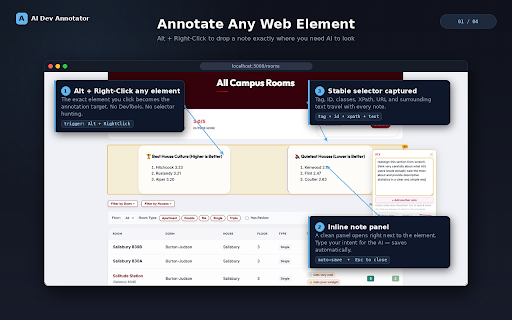
AI Website Dev Annotator is a Chrome extension for developers who use AI coding assistants. Hold Alt (or your chosen modifier) + Right-Click any element on any website to annotate it — bug, copy fix, layout note, design nit — then export all your notes as clean, structured Markdown that you paste straight into Cursor, Claude, ChatGPT, GitHub Copilot, v0, or any AI agent.

Every annotation captures a stable CSS selector, the element's text snippet, your note, and the URL. Your AI agent gets all the context it needs to find and fix the issue — no screenshots, no manual selector copying, no reformatting.

──────────────────────────────
HOW IT WORKS
──────────────────────────────
1. Open any http or https page (staging, production, localhost, or a competitor's site).
2. Hold Alt + Right-Click any element. Type your note, press Esc or click outside to save. Empty notes are auto-discarded.
3. While the edit panel is open, hold Alt and click other elements to attach them as extra selector context on the same annotation.
4. Open the popup (toolbar icon or Alt+Shift+A). Annotations are grouped by page URL. Edit inline, click any pink selector or blue URL header to jump back to that element.
5. Hit Copy All to copy a clean Markdown payload to your clipboard (list stays intact). Right-click the same button for Cut All (copy + clear). Paste into your AI tool. The agent ships the PR.

──────────────────────────────
FREE FEATURES
──────────────────────────────
• Modifier + Right-Click annotation (default Alt) — change modifier in Settings → Shortcuts
• Keyboard shortcut: Alt+Shift+A to open popup (customizable in chrome://extensions/shortcuts)
• Unlimited annotations grouped by page URL
• Multi-element annotations (modifier + click while edit panel is open)
• Markdown export: Copy All (default) or Cut All (right-click)
• Inline editing with auto-expanding textboxes and auto-save
• Per-row delete that moves notes to History instead of erasing them
• Multi-step Undo / Redo (↶ ↷ in popup header)
• History view with timestamps and restore
• Save for Later — stash the current list and restore from History
• Copy Log — every export event logged with full output preview
• Search (⌘/Ctrl+F or 🔍) across annotations, History, Copy Log, and Settings
• Click any pink selector or blue URL to navigate directly to the annotated element
• Clear All shows a 5-second Undo banner instead of a destructive confirmation dialog
• Auto Backup to chrome.storage.sync (on by default; disable in Settings to stop sync)
• Manifest V3 — no background page, no telemetry, works offline
• MIT licensed

──────────────────────────────
PREMIUM — $9.99 ONE-TIME
──────────────────────────────
• Polished dark mode for the popup
• Custom prepend and append text — wrap every Markdown export with your own AI system prompts, headers, or footers
• Multiple notes per element — each renders as its own bullet under the selector in Markdown output
• All future Premium features
• License verified locally with an Ed25519 signature — works fully offline, no subscription

──────────────────────────────
PRIVACY
──────────────────────────────
No annotation data is sent to an app server. No analytics. No telemetry. Annotations live in chrome.storage.local on your device. Auto Backup optionally mirrors a compressed snapshot to chrome.storage.sync via your Google Account (on by default; disable in Settings). Premium checkout uses Stripe; license keys are verified locally and never call a server after activation.

The extension reads the page's DOM only when you actively annotate, and only to compute a stable CSS selector and capture up to 240 characters of the clicked element's text. It does not read passwords, form values, cookies, or storage.

──────────────────────────────
KNOWN LIMITATIONS
──────────────────────────────
• Elements inside iframes (Stripe Checkout, Calendly, YouTube embeds) attach to the iframe container. Open the embedded page in its own tab to annotate inner elements.
• Closed shadow roots cannot be pierced. Open shadow roots are supported.
• Only works on http:// and https:// pages — not file:// or chrome:// URLs.
• Some heavily dynamic SPAs may regenerate class names; re-click the element to re-anchor.

──────────────────────────────
LINKS
──────────────────────────────
• Homepage & docs: https://asharma2027.github.io/ai-dev-annotator/
• Source code (MIT): https://github.com/asharma2027/ai-dev-annotator/tree/release
• Support: [email protected]
• Get Premium ($9.99): https://buy.stripe.com/6oU9AS4Kjc9h6x1bxocfK01
Technical
- Version
- 1.0.0
- Manifest
- V3
- Size
- 93.19KiB
- Min Chrome
- 88
- Languages
- 1
- Featured
- No
Metadata
- ID
- dgcnafanfiogafgojelammeehbhcbjlk
- Developer ID
- u02accfeca3d6de0ac5e6010283f70121
- Developer Email
- [email protected]
- Created
- May 19, 2026
- Last Updated (Store)
- May 19, 2026
- Last Scraped
- Jun 8, 2026
- Website
- —
Data sourced from the Chrome Web Store · last verified Jun 8, 2026.