
SnapGen Flow - Veo Bulk Video & Image
Supercharge Google Veo! Automate bulk AI video generation with smart prompts & image batching
As of June 2026, SnapGen Flow - Veo Bulk Video & Image has 2,000 users and a 4.81/5 rating from 21 reviews in the Productivity category.
Usersno change0%
2.0K
2,000
Ratingno change0%
4.81
21 reviews
Reviewsno change0%
21
Version
4.0.42
Manifest V3
Permissions & access
- Permissions
- sidePanelactiveTabscriptingstoragetabsdownloads
- Host access
- https://labs.google/*, https://gist.githubusercontent.com/*, https://raw.githubusercontent.com/*
Screenshots
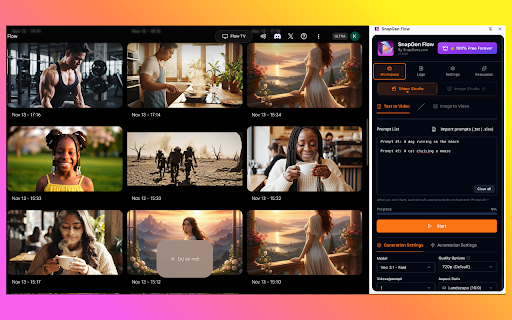


About
🚀 SnapGen Flow - Automate Your Google Flow Video Creation

Transform your Google Flow workflow with powerful automation for Text-to-Video and Image-to-Video creation. Create hundreds of videos in minutes, not hours.

Changelog v4.0.42
What's New:

🎬 Portrait Mode for Ingredients

- Added 9:16 vertical aspect ratio support for Ingredients mode in Image-to-Video
- Now you can create stunning portrait videos for TikTok, Reels, and Shorts using your ingredient sets

Coming Soon:

🚀 HD & 4K Video Export (In Development)

- Upscale and download videos at 1080p Full HD resolution
- 4K Ultra HD export for professional-quality output
- Stay tuned for the next update!

-----------------------------

Changelog v3.2.0 → v4.0.39
What's New in v4.0.39
🎨 Image Studio (NEW)

Full Image Studio support with Text-to-Image automation
Auto-download images via Chrome API (same as Video Studio)
Image Quality options: 1K (default), 2K & 4K (coming soon)
Image Model selection: Imagen 4, Nano Banana, Nano Banana Pro
"Ingredients to Image" mode (coming soon)
🔧 Improvements

Studio Tabs: Easy switching between Video Studio and Image Studio
Blocking Dialog Handler: Auto-dismiss Google popups ("I agree", "OK", etc.)
Smart image scanning: Filters UI elements, downloads only generated images
Unified settings layout for both studios

📦 v3.2.5 Updates
Import Folder: Select entire folder for Image-to-Video Single Mode
Faster image batch processing

📦 v3.2.3 Updates
Storage Stats: View extension storage usage
Clear Cache: Free up storage space with one click
Custom Filename Prefix: Personalize downloaded file names

📦 v3.2.0 Updates
Multi-line Prompts: Support complex prompts with line breaks
News Popup System: Stay updated with latest features

------------------------------------------------
Update 10.12.2025:
What's New in v3.2.0:

📝 Multi-line Prompts Support (NEW!)

- Write long prompts across multiple lines, auto-merged
- Split prompts using `--` or blank lines
- Prefix support: `P1:`, `Prompt#1`, `#1` (auto-stripped)
- Backward compatible: each line = one prompt

📢 News Popup System

- Announcements and update notifications
- Show-once functionality

🎨 UI Improvements

- Beautiful bundle naming dialog
- Better positioned close buttons

✨ Full Features:

- Text-to-Video automation
- Image-to-Video 3 modes: Single, Start-End, Ingredients
- VEO 2 and VEO 3.1 support
- Auto-download videos
- 12 languages supported
-------------------------------
Update 05.12.2025:
🎬 Image-to-Video with 3 Powerful Modes

Transform your images into stunning videos with our enhanced Image-to-Video automation:

1. Single Image Mode

- Upload one image and generate multiple videos with different prompts
- Or match N images with N prompts for batch processing
- Toggle between 1→N and N→N mapping modes

2. Start-End Mode

- Create smooth video transitions between two images
- Set a START image and END image for each video
- Lock options: Use the same start/end image across all tasks
- Perfect for morphing effects and scene transitions

3. Ingredients Mode (VEO 3.1)

- Upload 1-3 reference images (faces, clothing, objects, scenes)
- VEO automatically recognizes and maps your ingredients
- Generate consistent videos across multiple prompts
- No manual labeling needed - AI handles the matching

Additional Features:

- Excel template import for bulk prompts
- Persistent data across browser sessions
- Real-time preview and status tracking
----------------------------------------------------------------------

✨ KEY FEATURES

📝 Text-to-Video Automation
• Batch process multiple prompts
• Auto-apply model & aspect ratio settings
• Smart retry logic with error handling
• Real-time progress tracking with ETA

🖼️ Image-to-Video Automation
• Upload images in bulk with auto-sorting
• 1:1 image-to-prompt pairing
• Support for landscape & portrait ratios
• Smart crop tool automation

⚡ Automation Features
• Configurable start position
• Randomized wait times (30-180s)
• Policy error detection & skip
• Auto-download generated videos
• Pause/Resume/Stop controls

🎨 User Interface
• Beautiful dark theme with glass morphism
• Dual studio selector (Video/Image)
• Organized settings tabs
• Real-time logs & failed tasks tracking
• 12 languages support

📊 Progress Tracking
• Live progress bar
• Downloaded video counter
• Estimated completion time
• Failed prompts with reasons
• Copy failed tasks for retry

🌍 Multi-language
• English, Vietnamese, Japanese, Korean
• Chinese, Spanish, French, German
• Indonesian, Thai, Hindi, Portuguese

💎 Premium Features (All Free)
• Unlimited automation
• No subscription required
• All features included
• Regular updates

🔒 Privacy & Security
• No data collection
• Works offline (after config load)
• Local storage only
• Open source friendly

📚 How to Use

1. Navigate to labs.google/fx/tools/flow
2. Open SnapGen Flow side panel
3. Choose Text-to-Video or Image-to-Video mode
4. Configure your settings
5. Import/paste your prompts or select images
6. Click Start and let automation do the work!

💡 Perfect For
• Content creators
• Marketing teams
• Social media managers
• Video producers
• AI enthusiasts

🎯 Requirements
• Google Flow access
• Chrome browser (latest)
• Valid Google account

⚙️ Advanced Settings
• Dynamic model selection
• Customizable video counts
• Flexible wait time ranges
• Auto-download configuration
• Theme customization

🔄 Regular Updates
• New features monthly
• Bug fixes weekly
• Remote config updates
• Model list auto-sync

📞 Support
• Email: [email protected]
• Documentation: Full guides included

🏆 Why Choose SnapGen Flow?

✅ Save 10x time on bulk video creation
✅ Professional automation features
✅ Clean, intuitive interface
✅ Completely free forever
✅ Active development & support
✅ Privacy-focused (no tracking)

⭐ Made with ❤️ by SnapGens.com

Start automating your Google Flow videos today!
Technical
- Version
- 4.0.42
- Manifest
- V3
- Size
- 2.12MiB
- Min Chrome
- 88
- Languages
- 2
- Featured
- No
Metadata
- ID
- dfmjpmehlgleodcliobegjhlncemnlfn
- Developer ID
- u7e94e6e3affd99dd85a28f5b8ad6d74d
- Developer Email
- [email protected]
- Created
- Nov 18, 2025
- Last Updated (Store)
- Jan 19, 2026
- Last Scraped
- Jun 6, 2026
- Website
- snapgens.com
- Support URL
- https://www.snapgens.com/common-issues
- Privacy Policy
- https://www.snapgens.com/privacy-policy
Similar extensions
Alternatives to SnapGen Flow - Veo Bulk Video & Image, ranked by description similarity.

Flow Automation - Bulk AI Video Generation
Automate Google Labs Flow video generation. Bulk create AI videos with custom settings, models, and aspect ratios.
2.0K
★ 4.1

Alzig Flow Pro - Bulk Video Automation
Automate bulk AI video generation with Google Flow. Queue prompts, batch process, auto-download videos.
29
★ 1.0

Auto Flow
Auto Flow generation queue for Google Flow.
50.0K
★ 3.8

AI Video Automation for TikTok YouTube Instagram - Flow & Whisk
Automate AI video creation with VEO Flow & Whisk. Batch generate viral content for TikTok, Instagram Reels, YouTube Shorts & FB.
244
★ 3.7

Veo 3 AI Video Generator | Create Video from Text & Image
Generate cinematic AI videos from text or images with Veo 3.1. Features synchronized, realistic physics, and multi-shot control.
1.0K
★ 5.0

Auto Flow Pro - Automation for VEO AI
Automate video generation on Google Flow with batch processing. Free tier: 50 videos/day. Developed by Flow Automation.
8.0K
★ 4.0

Flow Automator - Bulk AI Video Generation Toolkit for Google Flow & VEO AI
Automate Google Labs Flow video generation. Bulk create AI videos with custom settings, models, and aspect ratios.
4.0K
★ 3.1

Auto Flow Panel (Scene Queue)
Queue multiple Veo/Flow prompts, auto-split big scripts by scenes.
440
★ 4.0
Data sourced from the Chrome Web Store · last verified Jun 6, 2026.