
Odexly Workspaces – Visual Project Workspace
Save tabs, notes, tasks, deadlines, daily logs, canvas sketches, and mind maps inside project workspaces.
As of June 2026, Odexly Workspaces – Visual Project Workspace has — users in the Workflow & Planning category.
Usersno change0%
—
—
Ratingno change0%
—
— reviews
Reviewsno change0%
—
Version
1.1.0
Manifest V3
History
1 snapshotsTracking since Jun 17, 2026.
Not enough history yet for this metric — the chart fills in as we collect more snapshots.
View as table
| Date | Users | Rating | Reviews | Version |
|---|---|---|---|---|
| Jun 17, 2026 | — | — | — | 1.1.0 |
| Now | — | — | — | 1.1.0 |
Permissions & access
- Permissions
- tabstabGroupsstoragealarmsnotifications
- Host access
- None declared
Screenshots



About
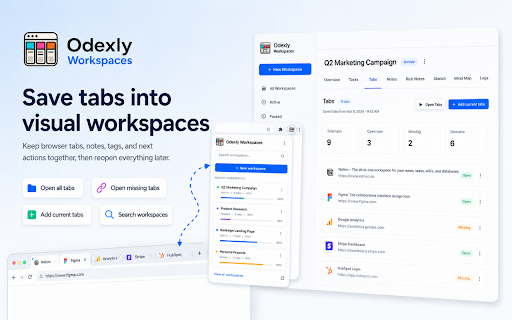
Odexly Workspaces is a visual project workspace for organizing browser-based work in a cleaner and more structured way.

It helps keep tabs, notes, tasks, deadlines, daily logs, sketches, and mind maps together inside separate workspaces. Each workspace can be used for a project, idea, research topic, study session, client task, workflow, or personal plan.

✨ Visual workspaces
Create separate workspaces for different projects, topics, tasks, clients, or browsing sessions. Each workspace can include saved tabs, notes, tags, status, priority, deadlines, and progress.

📌 Tab organization
Save browser tabs into a workspace and return to them later with more context. Tabs can be managed, reopened, searched, and organized by workspace.

✅ Task management
Each workspace includes a simple task board with Todo, Doing, and Done columns. This makes it easier to track what needs attention, what is in progress, and what has already been completed.

⏰ Deadlines and reminders
Add deadlines to workspaces or tasks to help identify overdue items, upcoming due dates, and active priorities.

📝 Rich notes
Write detailed notes inside each workspace with formatting options such as bold, italic, underline, headings, lists, quotes, links, checklists, and clear formatting.

📅 Daily logs
Record short daily updates for each workspace. Logs are useful for tracking progress, decisions, research history, study notes, or project activity over time.

🖊️ Sketches
Use the lightweight sketch area to draw simple ideas, rough wireframes, flows, diagrams, or visual notes.

🧠 Mind maps
Create simple mind maps to structure ideas, concepts, plans, and project relationships visually.

📊 Workspace analytics
The Analytics section provides an overview of workspace activity, task progress, deadlines, logs, saved tabs, and other project statistics.

🗂️ Workspace status
Workspaces can be marked as Active, Paused, Archived, or moved to Trash. This helps keep the main workspace list focused and organized.

🔍 Search
Search across workspace names, notes, rich notes, tasks, logs, tags, mind map nodes, tab titles, URLs, and domains.

💾 Backup and restore
Export and import workspace data as JSON backups, including tabs, notes, tasks, logs, sketches, and mind maps.

🔒 Local-first privacy
Workspace data is stored locally in the browser. The extension is designed for organizing user-created workspace content and saved tabs, without reading page content, form input, passwords, or private website data.

Odexly Workspaces is useful for:

🎯 Project planning
📚 Study and research
💼 Client or freelance work
🧩 Product ideas
🛠️ Development workflows
🧠 Personal knowledge organization
📌 Browser session organization
🗂️ Long-term workspace management

Odexly Workspaces is more than a tab saver. It is a lightweight project cockpit for keeping browser work organized, visual, and easier to resume.
Technical
- Version
- 1.1.0
- Manifest
- V3
- Size
- 670KiB
- Min Chrome
- 88
- Languages
- 1
- Featured
- No
Metadata
- ID
- dfmciljclhifdmkomkhnpbfhpjngbjgo
- Developer ID
- u87bbb70b5a3b2f5c98d17dfac150f88c
- Developer Email
- [email protected]
- Created
- Jun 16, 2026
- Last Updated (Store)
- Jun 16, 2026
- Last Scraped
- Jun 17, 2026
- Website
- —
- Support URL
- —
- Privacy Policy
- —
Data sourced from the Chrome Web Store · last verified Jun 17, 2026.