
FlowScribe
From Navigation to Automation
As of June 2026, FlowScribe has 15 users in the Developer Tools category.
Usersup 114.3 percent+114.3%
15
15
Ratingno change0%
—
— reviews
Reviewsno change0%
—
Version
4.0
Manifest V3
90-day change · In the last 90 days this extension 1 version update.
History
10 snapshotsTracking since Apr 1, 2026.
View as table
| Date | Users | Rating | Reviews | Version |
|---|---|---|---|---|
| Apr 1, 2026 | 7 | — | — | 3.0 |
| Apr 16, 2026 | 6 | — | — | 3.0 |
| Apr 22, 2026 | 8 | — | — | 3.0 |
| Apr 27, 2026 | 8 | — | — | 4.0 |
| May 10, 2026 | 8 | — | — | 4.0 |
| May 15, 2026 | 9 | — | — | 4.0 |
| May 21, 2026 | 8 | — | — | 4.0 |
| May 27, 2026 | 10 | — | — | 4.0 |
| Jun 3, 2026 | 12 | — | — | 4.0 |
| Jun 9, 2026 | 14 | — | — | 4.0 |
| Now | 15 | — | — | 4.0 |
Permissions & access
- Permissions
- activeTabstoragetabsscriptingwebRequest
- Host access
- <all_urls>
Screenshots


About
## **FlowScribe - Chrome Web Store Description**

**Navigation to Automation**

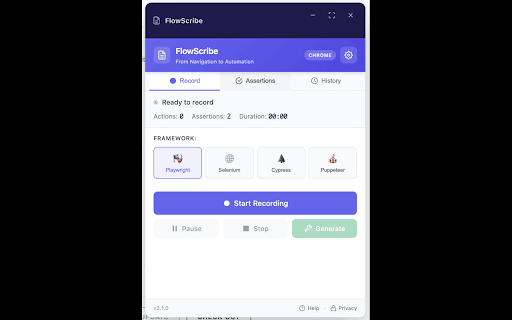
FlowScribe is a revolutionary Chrome extension that records your web interactions and automatically generates professional automation test scripts using advanced AI technology. Whether you're a QA engineer, developer, or automation specialist, FlowScribe streamlines your testing workflow from navigation to automation.

### **🚀 Key Features**

**🤖 AI-Powered Script Generation**
- Leverage OpenAI GPT-4o, Anthropic Claude, or Google Gemini
- Intelligent locator generation with stable, reliable selectors
- Comprehensive assertions and error handling
- Self-healing test capabilities

**📹 Smart Recording Engine**
- Records clicks, form inputs, navigation, and user interactions
- Cross-frame recording support for complex web applications
- Automatic element detection with semantic understanding
- Real-time action tracking with visual indicators

**🎯 Multi-Framework Support**
- **Playwright** - Modern, fast, and reliable automation
- **Selenium** - Industry-standard web automation
- **Cypress** - Developer-friendly testing framework
- **Puppeteer** - Chrome DevTools Protocol automation

**🛡️ Enterprise-Grade Features**
- **Self-Healing Selectors** - Automatically fix broken locators
- **Network Recording** - Capture API calls and responses (headers)
- **Page Object Model** - Generate maintainable test architecture
- **CI/CD Integration** - Export ready-to-use pipeline configurations

**⚙️ Advanced Configuration**
- Multiple AI provider support with model selection
- Customizable assertion strategies
- Export options: Scripts, POM classes, CI/CD configs
- Persistent settings across browser sessions

### **💡 Perfect For**

- **QA Engineers** - Create comprehensive test suites faster
- **Developers** - Generate integration tests from user workflows
- **Product Teams** - Document user journeys with executable tests
- **Automation Specialists** - Scale test coverage efficiently

### **🔧 How It Works**

1. **Record**: Click the record button and interact with your web application
2. **Enhance**: Let AI analyze your actions and generate intelligent locators
3. **Export**: Get production-ready scripts with assertions and error handling
4. **Deploy**: Run tests in your preferred framework and CI/CD pipeline

### **✨ What Makes FlowScribe Special**

**Intelligent Locator Strategy:**
- Prioritizes `data-testid` and semantic attributes
- Avoids brittle selectors like nth-child and dynamic classes
- Generates multiple fallback strategies for reliability
- Uses AI to understand element context and purpose

**Comprehensive Test Coverage:**
- Element presence and visibility validation
- Text content and attribute verification
- URL pattern matching and navigation checks
- Form validation and submission handling
- Loading state and dynamic content waits

**Production-Ready Output:**
- Clean, maintainable code with detailed comments
- Error handling and retry mechanisms
- Cross-browser compatibility considerations
- Best practices for test automation

### **🔒 Privacy & Security**

FlowScribe prioritizes your privacy:
- All recording happens locally in your browser
- No data sent to external servers without your explicit configuration
- AI processing only occurs when you provide API keys
- Complete control over what gets recorded and exported

### **🚀 Get Started**

1. Install FlowScribe from the Chrome Web Store
2. Configure your preferred testing framework
3. (Optional) Add AI API key for enhanced script generation
4. Start recording your first automation script!

### **🔗 Support & Resources**

- **Documentation**: Comprehensive guides and examples
- **GitHub**: Open source with active community
- **Support**: [email protected] for technical assistance
- **Updates**: Regular feature releases and improvements

### **📊 Compatible With**

- Chrome Manifest V3 (latest security standards)
- All modern web applications and frameworks
- Single-page applications (SPAs) and traditional websites
- Cross-origin frames and complex DOM structures

**Transform your manual testing into automated workflows. Install FlowScribe today and experience the future of test automation!**

---

**Keywords**: automation testing, test recording, AI testing, Playwright, Selenium, Cypress, QA tools, web testing, test generation, script automation
Technical
- Version
- 4.0
- Manifest
- V3
- Size
- 468KiB
- Min Chrome
- 88
- Languages
- 1
- Featured
- No
Metadata
- ID
- dfkhhkfjkggkcmmjggecohdamofahlbc
- Developer ID
- uc736cf49f19ca8e107143103fffd6c58
- Developer Email
- [email protected]
- Created
- Sep 19, 2025
- Last Updated (Store)
- Jun 2, 2026
- Last Scraped
- Jun 9, 2026
- Website
- —
Similar extensions
Alternatives to FlowScribe, ranked by description similarity.

Playwright Recorder
Record browser actions and generate Playwright test scripts in JavaScript, TypeScript, Python, Java, and C# (.NET).
1.0K
★ 5.0

First QA Recorder Extension
Records UI interactions for Playwright POM generation
73

Scriptify - Web Automation Recorder
Record browser interactions and generate automated test scripts with AI assistance
36

autotest.tech - Automated Test Script Generator
Generate automation scripts in all most popular test frameworks (Playwright, Nightwatch, Puppeteer, Cypress).
72

XHRScribe - AI-Powered API Test Generator
Turn traffic into tests
18

Auto Test Recorder for Robot & Playwright
Record web interactions and instantly generate automated test scripts for Robot Framework and Playwright.
16

Test Flows AI – Record & Automate UI Test Flows
Record, replay, and automate UI tests with AI. Capture user journeys, generate resilient flows, and sync with your dashboard.
63

AutoCaseGen - Test Recorder & Code Generator
Record clicks, inputs & navigation and generate Playwright or Cypress test code with POM support. No server required.
1
Data sourced from the Chrome Web Store · last verified Jun 9, 2026.