
Multi Find: Search and Highlight
Find and highlight multiple words on webpages. Count occurrences, scroll to the results and locate words with scrollbar marks.
As of June 2026, Multi Find: Search and Highlight has 90,000 users and a 4.16/5 rating from 186 reviews in the Productivity category.
Usersup 50.0 percent+50.0%
90.0K
90,000
Ratingup 0.5 percent+0.5%
4.16
186 reviews
Reviewsup 4.5 percent+4.5%
186
Version
1.98.5
Manifest V3
90-day change · In the last 90 days this extension gained 30.0K users, 3 version updates.
History
15 snapshotsTracking since Apr 5, 2026.
View as table
| Date | Users | Rating | Reviews | Version |
|---|---|---|---|---|
| Apr 5, 2026 | 60.0K | 4.14 | 178 | 1.97.7 |
| Apr 8, 2026 | 60.0K | 4.14 | 178 | 1.98 |
| Apr 16, 2026 | 60.0K | 4.15 | 179 | 1.98.2 |
| Apr 20, 2026 | 70.0K | 4.15 | 180 | 1.98.2 |
| Apr 23, 2026 | 80.0K | 4.15 | 181 | 1.98.2 |
| Apr 26, 2026 | 70.0K | 4.15 | 181 | 1.98.2 |
| Apr 29, 2026 | 80.0K | 4.15 | 182 | 1.98.2 |
| May 11, 2026 | 80.0K | 4.15 | 182 | 1.98.3 |
| May 13, 2026 | 90.0K | 4.15 | 182 | 1.98.3 |
| May 20, 2026 | 90.0K | 4.15 | 183 | 1.98.3 |
| May 25, 2026 | 90.0K | 4.15 | 184 | 1.98.4 |
| May 28, 2026 | 100.0K | 4.15 | 184 | 1.98.4 |
| Jun 3, 2026 | 100.0K | 4.15 | 184 | 1.98.5 |
| Jun 8, 2026 | 100.0K | 4.16 | 185 | 1.98.5 |
| Jun 22, 2026 | 100.0K | 4.16 | 186 | 1.98.5 |
| Now | 90.0K | 4.16 | 186 | 1.98.5 |
Changelog
- Apr 8, 2026description
Multi Find is a powerful browser extension that allows you to search for and highlight multiple words, fragments, or phrases simultaneously on any webpage. Designed for researchers, professionals, and everyday users, Multi Find makes it easy to locate important information quickly and efficiently. With customizable colors, a flexible search window, advanced search options, and seamless navigation, you can stay focused and in control of your reading experience.

Key Features:
✔ Multi-Word Highlighting – Enter multiple words, fragments, or phrases and see them highlighted instantly in different colors.
✔ Instant Word Count – Displays the number of occurrences of each found word directly in the search panel.
✔ Customizable Search – Use options like case sensitivity, whole-word search, and diacritic sensitivity for precise results.
✔ Up to 20 Customizable Colors – Choose from regular or glow highlights to visually distinguish different search terms.
✔ Advanced Navigation – Quickly jump between search results using keyboard shortcuts or an interactive panel.
✔ Automatic Re-Highlighting – Your saved words remain highlighted even after reloading the page or navigating within dynamic websites.
✔ Flexible Search Window – Move the search window to any corner of the screen, resize it, or make it transparent for an unobtrusive experience.
✔ Search Panel Matches Webpage Highlights – The displayed search results in the panel always match exactly what is highlighted on the webpage.
✔ Bulk Import & Export – Easily manage large word lists with text file import and export.
✔ Performance Optimized – Efficiently scans even large pages without slowing down your browser.
✔ Privacy-Focused – No tracking, no ads—your data stays private.

Four Easy Ways to Add Words to Your Search List:
1️⃣ Type directly into the search window.
2️⃣ Copy and paste words or phrases.
3️⃣ Load a text file with multiple words at once.
4️⃣ Right-click on a word in a webpage and select "Add to Multi Find" from the context menu.

Upgrade your browsing experience with Multi Find—a smarter way to search and highlight!
Multi Find: Highlight Multiple Words at Once on Any Webpage

Searching for several terms at once shouldn't mean running the same search over and over. Multi Find lets you highlight multiple words, phrases, or fragments simultaneously, each in a distinct and customizable color, so you can scan any webpage at a glance without losing context.
Built for researchers, analysts, students, and professionals who work with dense content every day.

Key Features
✔ Multi-Word Highlighting: Enter multiple search terms and see each one highlighted instantly in its own color, directly on the page.
✔ Up to 20 Customizable Colors: Choose between solid or glow-style highlights to visually distinguish each search term.
✔ Instant Occurrence Count: See exactly how many times each term appears, displayed in real time within the search panel.
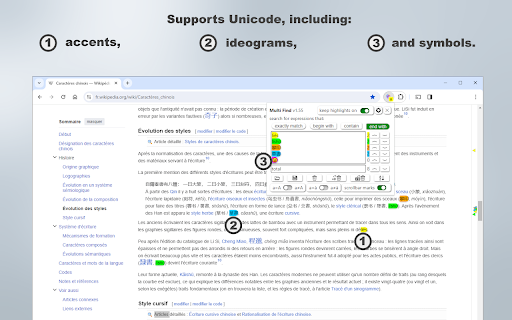
✔ Precise Search Options: Toggle case sensitivity, whole-word matching, and diacritic sensitivity for accurate, tailored results.
✔ Persistent Highlights: Your search terms stay highlighted across page reloads and dynamic navigation, no need to re-enter them.
✔ Keyboard Shortcuts & Panel Navigation: Jump between results quickly without interrupting your reading flow.
✔ Flexible Search Window: Drag it to any corner, or enable transparency to keep it out of the way.
✔ Panel Always in Sync: What you see in the search panel always matches exactly what is highlighted on the page.
✔ Bulk Import & Export: Load a text file with dozens of terms at once, or export your current list for later use.
✔ Lightweight & Fast: Optimized to handle large pages without slowing down your browser.
✔ No Tracking, No Ads: Multi Find works entirely locally. Your searches and data never leave your device.

Four Ways to Add Words to Your List:
-	Type directly into the search panel
-	Paste words or phrases from anywhere
-	Import a text file with multiple terms at once
-	Right-click any word on a page → "Add to Multi Find"

Multi Find is free to use, with no account required and no hidden permissions.

Upgrade your browsing experience with Multi Find, a smarter way to search and highlight!
Permissions & access
- Permissions
- storagecontextMenus
- Host access
- None declared
Screenshots



About
Multi Find: Highlight Multiple Words at Once on Any Webpage

Searching for several terms at once shouldn't mean running the same search over and over. Multi Find lets you highlight multiple words, phrases, or fragments simultaneously, each in a distinct and customizable color, so you can scan any webpage at a glance without losing context.
Built for researchers, analysts, students, and professionals who work with dense content every day.

Key Features
✔ Multi-Word Highlighting: Enter multiple search terms and see each one highlighted instantly in its own color, directly on the page.
✔ Up to 20 Customizable Colors: Choose between solid or glow-style highlights to visually distinguish each search term.
✔ Instant Occurrence Count: See exactly how many times each term appears, displayed in real time within the search panel.
✔ Precise Search Options: Toggle case sensitivity, whole-word matching, and diacritic sensitivity for accurate, tailored results.
✔ Persistent Highlights: Your search terms stay highlighted across page reloads and dynamic navigation, no need to re-enter them.
✔ Keyboard Shortcuts & Panel Navigation: Jump between results quickly without interrupting your reading flow.
✔ Flexible Search Window: Drag it to any corner, or enable transparency to keep it out of the way.
✔ Panel Always in Sync: What you see in the search panel always matches exactly what is highlighted on the page.
✔ Bulk Import & Export: Load a text file with dozens of terms at once, or export your current list for later use.
✔ Lightweight & Fast: Optimized to handle large pages without slowing down your browser.
✔ No Tracking, No Ads: Multi Find works entirely locally. Your searches and data never leave your device.

Four Ways to Add Words to Your List:
-	Type directly into the search panel
-	Paste words or phrases from anywhere
-	Import a text file with multiple terms at once
-	Right-click any word on a page → "Add to Multi Find"

Multi Find is free to use, with no account required and no hidden permissions.

Upgrade your browsing experience with Multi Find, a smarter way to search and highlight!
Technical
- Version
- 1.98.5
- Manifest
- V3
- Size
- 346KiB
- Min Chrome
- 88
- Languages
- 6
- Featured
- Yes
Metadata
- ID
- dffaiikpbncahnghlfnkhagffaemhgfo
- Developer ID
- u59dc4558a0988d97c79130985c686859
- Developer Email
- [email protected]
- Created
- Feb 12, 2023
- Last Updated (Store)
- May 27, 2026
- Last Scraped
- Jun 22, 2026
- Website
- https://multifind.vgreco.fr/
- Support URL
- —
- Privacy Policy
- —
Similar extensions
Alternatives to Multi Find: Search and Highlight, ranked by description similarity.

Multi Find - Multi-Keyword Search Extension
Powerful multi-keyword search extension with color highlighting. Perfect for research, development, and productivity.
54

Multi-Finder Pro
Find and highlight multiple words on a webpage.
93
★ 2.0

Multi Highlight and Search on Webpage
Automatically identifies and highlight words on the web page based on your specified list.
99

Better Finder
Multi-keyword search and highlight with individual colors, match case, and whole word options
61
★ 5.0

Lexcope – Multi Find, Multi Search & Multi Highlight Tool
⚡Lexcope is the ultimate Multi word search, multi find, and super highlight extension for Chrome
55
★ 5.0

HD Multiple Search
A Chrome extension that allows you to highlight multiple terms on web pages.
87
★ 4.5

MultiHighlight
Advanced text highlighting with real-time style updates for any webpage.
996
★ 3.5

Multi Keyword Highlighter
Highlights user-defined words on webpages.
37
★ 5.0
Data sourced from the Chrome Web Store · last verified Jun 22, 2026.