
多显示器窗口管理
该扩展支持在多个显示器之间进行窗口切换、最大化、居中、贴边、垂直/水平排列、标签页从窗口分离/合并、以及快捷键支持。
As of June 2026, 多显示器窗口管理 has 1,000 users and a 5.00/5 rating from 7 reviews in the Workflow & Planning category.
Usersno change0%
1.0K
1,000
Ratingno change0%
5.00
7 reviews
Reviewsno change0%
7
Version
4.0.0
Manifest V3
Permissions & access
- Permissions
- tabssystem.display
- Host access
- None declared
Screenshots
About
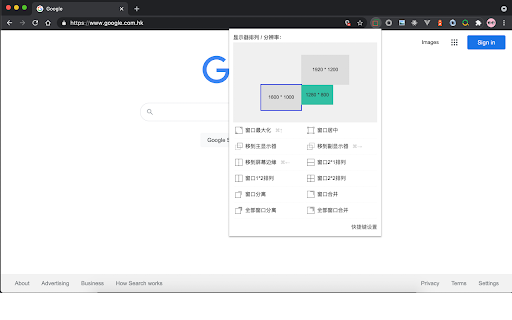
1. 窗口可以在多个显示器之间快速移动,而无需拖动;
2. 窗口最大化、居中、贴边;
3. 窗口1x2、2x1、2x2排列;
4. 窗口标签页从窗口分离、合并;
当你的电脑连接有扩展显示器时,调整窗口位置与大小会非常方便
默认支持以下快捷键:
1. 在多个显示器之间切换(windows: ctrl+→,Mac: ⌘+→)
2. 调整窗口大小且循环切换(windows: ctrl+↑,Mac: ⌘+↑)
3. 窗口依次在屏幕左、上、右、下贴边切换(windows: ctrl+←,Mac: ⌘+←)
其他快捷键可自定义设置。

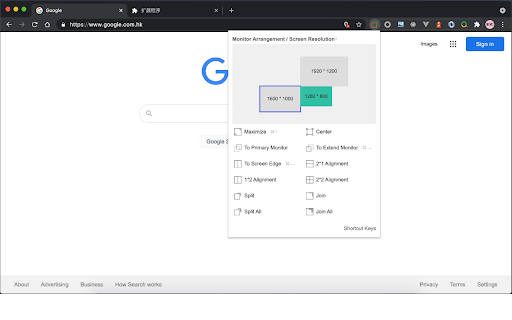
1. The window can move among multiple displays without dragging;
2. Window maximization, centering and edge;
3. The windows arrange in 1x2, 2x1 and 2x2;
4. The window tab is separated and merged from the window;
When your computer is connected with an extended display, it is very easy to adjust the window position and size

The following shortcut keys are supported by default:
1. Switch between multiple monitors (Windows: Ctrl + →, MAC: ⌘ + →)
2. Resize the window size (Windows: Ctrl + ↑, MAC: ⌘ + ↑)
3. Move the window to the screen left、top、right and bottom (Windows: Ctrl + ←, MAC: ⌘ + ←)
Other shortcut keys can be customized.
Technical
- Version
- 4.0.0
- Manifest
- V3
- Size
- 58.75KiB
- Min Chrome
- 88
- Languages
- 2
- Featured
- No
Metadata
- ID
- dfdnmbkcfddekonmblhmagdggecjboeb
- Developer ID
- uadebdac385016a81be247ec78fb2fe07
- Developer Email
- [email protected]
- Created
- May 11, 2017
- Last Updated (Store)
- Nov 23, 2024
- Last Scraped
- Jun 1, 2026
- Website
- —
- Support URL
- —
- Privacy Policy
- http://www.so.com/help/help_uagreement.html
Similar extensions
Alternatives to 多显示器窗口管理, ranked by description similarity.

nTools 效率工具箱
这是一款浏览器上的多功能效率工具
53

Where is my tab ?
Search for tabs in the opened window, can also increase your speed of switching tabs.
57
★ 5.0

EverTabs
标签页空间管理器
35
★ 4.0

Tab Manager
Pltab: Management of all windows and tabs. You can quickly find tabs. Includes pinning, copying, deleting, sorting, reordering,…
220
★ 5.0

Window Opener
Open a window with customized size and position in one click
263
★ 2.0

Show Window Size
Show the inner size of window
340
★ 4.0

Hyper Tiler
Hyper Tiler allows you to open links in new windows spaced evenly around your monitor.
5

Window Resizer
Resize and align the current window to the predefined position with multi-monitor support
4.0K
★ 4.1
Data sourced from the Chrome Web Store · last verified Jun 1, 2026.