
ProductivityToolbox
A toolbox to boost productivity with tools like converting GitHub URLs to Raw URLs and a datetime converter.
As of May 2026, ProductivityToolbox has 16 users in the Productivity category.
Usersdown 5.9 percent−5.9%
16
16
Ratingno change0%
—
— reviews
Reviewsno change0%
—
Version
1.0.7
Manifest V3
History
2 snapshotsTracking since Apr 24, 2026.
View as table
| Date | Users | Rating | Reviews | Version |
|---|---|---|---|---|
| Apr 24, 2026 | 17 | — | — | 1.0.7 |
| May 19, 2026 | 15 | — | — | 1.0.7 |
| Now | 16 | — | — | 1.0.7 |
Permissions & access
- Permissions
- None declared
- Host access
- None declared
Screenshots
About
Productivity Toolbox
Boost your efficiency with a suite of handy tools designed to simplify your workflow. The Productivity Toolbox includes:

1.Convert GitHub URLs to Raw URLs
2.PDF Editor in Your Local Browser. No Worry About Privacy Issues
3.Datetime Converter
---

1. Convert GitHub URLs to Raw URLs
TL;DR
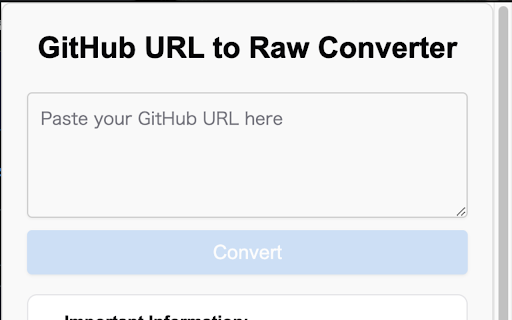
Quickly transform multiple GitHub URLs into their corresponding https://raw.githubusercontent.com/ links in seconds.

How to Use
Click the Extension Icon
Locate the extension icon in your Chrome toolbar and click it to open the converter.

Paste the GitHub File URLs
Input the GitHub file URLs you want to convert into the provided field.

Click "Convert"
Press the "Convert" button, and the raw URLs will be generated instantly.

Use the Raw URLs
The raw URLs will be displayed and automatically copied to your clipboard for easy access.

Important Information

1. **GitHub API Rate Limits**
   - **Unauthenticated Requests:** Subject to GitHub API rate limits. If you encounter rate limit issues, please wait before making additional requests or consider authenticating your requests.
   - **403 Forbidden Error:** Indicates that you have exceeded the GitHub API rate limits. Please try again later.

2. **Private Repositories**
   Accessing private repositories requires authentication tokens, which are not supported in this tool.

3. **URL Formatting**
   Ensure that the GitHub URLs are correctly formatted and that the repository, branch, and file path exist.

4. **Performance Considerations**
   Some directories may contain a large number of files, which could impact the tool's performance.

---
2. PDF Editor in Your Local Browser. No Worry About Privacy Issues
TL;DR
Edit your PDF files directly in your browser without uploading them to any server, ensuring complete privacy and security.

How to Use
Access the PDF Editor
Open the Productivity Toolbox by clicking the extension icon and navigate to the PDF Editor tool.

Upload Your PDF File
Click on the "Choose File" button to select the PDF document you wish to edit. The file will be processed locally in your browser.

Edit Your PDF
Utilize the various editing tools to make changes to your PDF. This includes adding annotations, highlighting text, inserting images, and more.

Save and Download
Once you've completed your edits, click the "Save" button to download the modified PDF file to your device.

Important Information
Privacy Assurance

Local Processing: All PDF files are processed locally in your browser. No data is sent to external servers, guaranteeing your privacy.
No Data Retention: Since the editing is done locally, none of your files or edits are stored or cached by the tool.
---
3. Datetime Converter
TL;DR
Easily convert and format dates and times between different formats and time zones.

How to Use
Access the Datetime Converter
Open the Productivity Toolbox by clicking the extension icon and navigate to the Datetime Converter tool.

Enter the Date/Time
Input the date and time you wish to convert. You can enter in various formats (e.g., YYYY-MM-DD, MM/DD/YYYY, etc.).

Select Conversion Options
Choose the desired format and time zone for the conversion.

Convert and Copy
Click the "Convert" button to see the formatted date/time, which will be automatically copied to your clipboard.

Important Information
Supported Formats
The tool supports a wide range of date and time formats. Ensure that your input matches one of the supported formats for accurate conversion.

Time Zone Accuracy
When converting time zones, verify that the selected time zones are correct to avoid discrepancies.

Bulk Conversions
Currently, the Datetime Converter handles one conversion at a time. For bulk operations, consider using external scripts or tools.

Localization
Date and time formats may vary based on locale settings. Ensure consistency by selecting the appropriate locale if applicable.
Technical
- Version
- 1.0.7
- Manifest
- V3
- Size
- 1.08MiB
- Min Chrome
- 88
- Languages
- 1
- Featured
- No
Metadata
- ID
- depfoaijmbnffligjlofhgcfkphnhona
- Developer ID
- u37469f9f5ef29a24520e657dff327d3f
- Developer Email
- [email protected]
- Created
- Oct 19, 2024
- Last Updated (Store)
- Nov 28, 2024
- Last Scraped
- May 19, 2026
- Website
- goastro.website
- Support URL
- https://goastro.website/dashboard/
- Privacy Policy
- https://guo-astro.github.io/github-raw-url-converter/
Similar extensions
Alternatives to ProductivityToolbox, ranked by description similarity.

Utilzy - All-in-One Productivity Tools
Access 130+ free digital tools instantly. Edit PDFs, convert images, manage dev workflows, format text, and sync your favorites.
10

All In One Super Tool Box
A collection of useful tools in one Chrome extension.
7

Tools Free - Extension Native
200+ tiện ích văn phòng miễn phí
2

Productivity Tools Pro
All-in-one productivity suite with 50+ privacy-focused tools: JSON Formatter, Pomodoro, SEO Tools, & more!
3
★ 5.0

Tooly: The All-in-One Utility Box
The ultimate developer toolbox. Instant JSON formatting, color conversion, unit math, and text utilities in one lightweight app
4
★ 5.0

DevToolkit
Essential toolkit for developers. String transformations, number converters, calculator, and math operations - all in one place.
5

CaoLu Toolbox
A practical toolbox for developers and users to quickly perform data conversion and processing tasks, improving work efficiency.
8

PDF Total Privacy
Advanced tool to manage, modify, and process PDF files quickly.
9
Data sourced from the Chrome Web Store · last verified May 19, 2026.