Google Forms Autocomplete
Extension that enables the autocomplete system on Google Forms
As of May 2026, Google Forms Autocomplete has 2,000 users and a 3.67/5 rating from 3 reviews in the Workflow & Planning category.
Usersno change0%
2.0K
2,000
Ratingno change0%
3.67
3 reviews
Reviewsno change0%
3
Version
1.0.0.0
Manifest V3
History
1 snapshotsTracking since Apr 24, 2026.
View as table
| Date | Users | Rating | Reviews | Version |
|---|---|---|---|---|
| Apr 24, 2026 | 2.0K | 3.67 | 3 | 1.0.0.0 |
| Now | 2.0K | 3.67 | 3 | 1.0.0.0 |
Permissions & access
- Permissions
- storage
- Host access
- None declared
Screenshots
About
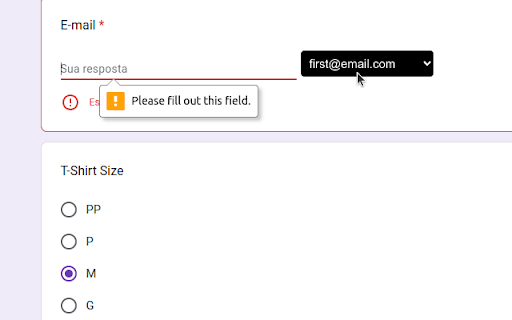
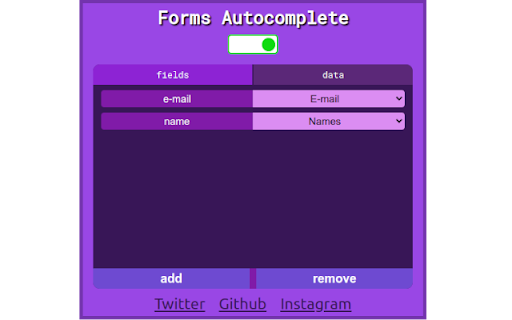
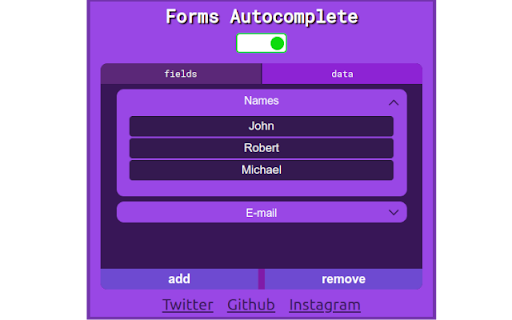
Optimize your forms and have a more productive work cycle with a fully customizable forms autocomplete. *HOW TO USE: The extension have two windows: "fields" and "data". The "fields" window is where the user will select which fields should trigger autofill. In addition, in this window the user selects which data collection will be triggered for that field. The "data" window is where the user will create the data collections. A "data collection" is basically a set of values that will appear when a field is triggered. For example, if I want to autofill my emails in forms, I would first go to the "data" window and create an email data collection. In this data collection I would define my emails, such as "[email protected]" or "[email protected]". After that I would go to the "fields" window and create a field called "email", and select the email data collection. The data collection system allows you to trigger the same data collection for multiple field names. For example, the form field could be named "phone", or "phone number", or "mobile". To allow the extension to trigger autocomplete on all of them, you just need to create a data collection and bind it to all the different ways of naming the same field.
Technical
- Version
- 1.0.0.0
- Manifest
- V3
- Size
- 36.46KiB
- Min Chrome
- 88
- Languages
- 1
- Featured
- Yes
Metadata
- ID
- depehdamecodbkkcofaplnnbcoagijdp
- Developer ID
- u664a49ac9ecce49b2b381e8230cb77cb
- Developer Email
- [email protected]
- Created
- Apr 2, 2023
- Last Updated (Store)
- Aug 26, 2024
- Last Scraped
- May 19, 2026
- Website
- —
- Support URL
- —
- Privacy Policy
- —
Similar extensions
Alternatives to Google Forms Autocomplete, ranked by description similarity.

Form Auto Filler
Select your input fields, save your answers, and click 'Auto-Fill Form; to instantly fill Forms with your custom data.
70
★ 5.0

Web Guide
Prefill common form fields with data you've entered elsewhere and save time online.
3

SimpleFill - Autofill Forms
Browser extension that fills out forms with smart auto-suggestions in dropdowns and right-click menu.
8.0K
★ 3.7

AutoSave & Recovery
Save input text values for easy retrieval, eliminating rewriting. Quickly access and reuse saved values.
192
★ 3.0

Grebble Autofill Forms
Save time by filling out forms with just one click. This extension will automatically fill in your information on any website.
12

QuickFill – Auto Form Filler
Paste clipboard key-value data into matching form fields in one click.
4
★ 5.0

One-Click Submit
Submit Google Autocomplete forms effortlessly. Avoid clicking on each field to remove the blue background, we do this for you!
93
★ 5.0

Autofillr Copilot: Autofill Job & other Forms
Autofillr is an autofill extension aiming to save you time doing repetitive work
1.0K
★ 3.5
Data sourced from the Chrome Web Store · last verified May 19, 2026.