
Tintify - Color Filter and Screen Shader
A lightweight extension that adds a screen overlay tint
As of June 2026, Tintify - Color Filter and Screen Shader has 76 users in the Accessibility category.
Usersup 5.6 percent+5.6%
76
76
Ratingno change0%
—
— reviews
Reviewsno change0%
—
Version
1.0.4
Manifest V3
History
5 snapshotsTracking since Apr 18, 2026.
View as table
| Date | Users | Rating | Reviews | Version |
|---|---|---|---|---|
| Apr 18, 2026 | 72 | — | — | 1.0.4 |
| Apr 28, 2026 | 75 | — | — | 1.0.4 |
| May 7, 2026 | 74 | — | — | 1.0.4 |
| May 19, 2026 | 80 | — | — | 1.0.4 |
| Jun 2, 2026 | 79 | — | — | 1.0.4 |
| Now | 76 | — | — | 1.0.4 |
Permissions & access
- Permissions
- storage
- Host access
- <all_urls>
Screenshots



About
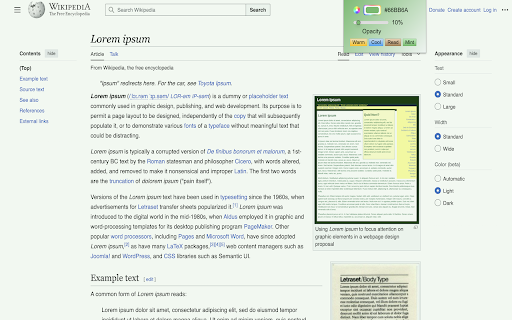
Light weight tint overlay tool that puts a colored tint on every website. Colors can be selected with a color wheel and opacity can also be set. Preset color configurations are also options. Selected tints are applied to every website and are saved even after closing the tab, window, or browser. Good for changing all white pages with text to have a subtle color applied to make it easier on your eyes and to read.


There's also 4 preset tint configurations; Warm: Gives a warm yellowish orangish temperature feel, Cool: Gives a cool light blue temperature vibe, Read: Applies a soft sepia filter designed for reading and that's easy on the eyes, Mint: Creates a light green tint similar to mint ice cream.


Version 1.0.1:
- Added toggle for on/off
- Updated icon images
Technical
- Version
- 1.0.4
- Manifest
- V3
- Size
- 18.68KiB
- Min Chrome
- 88
- Languages
- 1
- Featured
- No
Metadata
- ID
- demjpjoogcbfhfkhdodnpaalcijadddl
- Developer ID
- uc7160cf224b20050f4d63b41d46d6332
- Developer Email
- [email protected]
- Created
- Sep 9, 2025
- Last Updated (Store)
- Nov 1, 2025
- Last Scraped
- Jun 2, 2026
- Website
- —
- Support URL
- —
- Privacy Policy
- —
Similar extensions
Alternatives to Tintify - Color Filter and Screen Shader, ranked by description similarity.

Shades - Because the web is too bright
Protect your eyes while browsing the web. Apply color filters to reduce eye strain, filter blue light, and enhance visual comfort.
6

Web Tones – Cinematic Color Filters for Any Site
Cinematic color filters for any site—film looks, warmth, low‑blue, high‑contrast. Per‑site control, instant on/off.
420

WhiteToBlack
Switch between light and dark themes with customizable hue.
5

Accessibility - A Powerful Web Assistant
Award winning technology to make text easier to read, modify contrast, remove distracting content from websites and more!
1.0K
★ 4.5

Bear Tab Dimmer
Adds a screen dimmer overlay to the current tab.
80
★ 4.3

NeutralView
Adjust opacity and switch to grayscale mode to stay focused and reduce visual distractions while browsing.
26

Vinci's Palette
Visual filters for websites with per-site persistence.
13
★ 5.0

Telsia: Eye Strain Reduction
Reduce eye strain with custom colour overlays. Improves readability for Dyslexia, SSS, Photophobia, Visual Stress & more.
—
★ 5.0
Data sourced from the Chrome Web Store · last verified Jun 2, 2026.