
dTools - member list saver for Discord
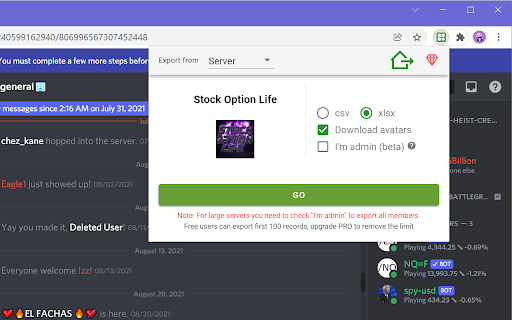
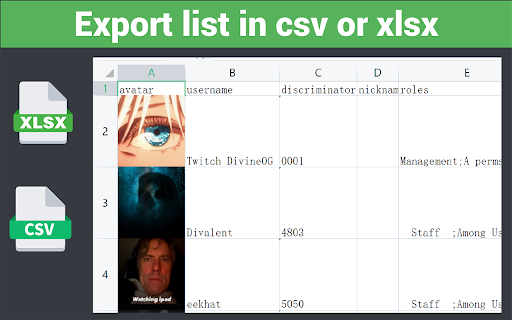
To export list of members that contains username, roles, activity, avatar, join date from Discord servers, and save as csv/xlsx
As of June 2026, dTools - member list saver for Discord has 1,000 users and a 4.44/5 rating from 43 reviews in the Productivity category.
Usersno change0%
1.0K
1,000
Ratingup 2.1 percent+2.1%
4.44
43 reviews
Reviewsup 16.2 percent+16.2%
43
Version
1.0.7
Manifest V3
History
4 snapshotsTracking since Apr 18, 2026.
View as table
| Date | Users | Rating | Reviews | Version |
|---|---|---|---|---|
| Apr 18, 2026 | 1.0K | 4.35 | 37 | 1.0.7 |
| Apr 28, 2026 | 1.0K | 4.37 | 38 | 1.0.7 |
| May 7, 2026 | 1.0K | 4.38 | 39 | 1.0.7 |
| May 24, 2026 | 1.0K | 4.43 | 42 | 1.0.7 |
| Now | 1.0K | 4.44 | 43 | 1.0.7 |
Permissions & access
- Permissions
- activeTabstoragedownloadsalarms
- Host access
- https://automatism.works/
Screenshots

About
Boost Your Discord Server Management with dTools – The Ultimate Member List Saver! 🚀

Are you tired of manually tracking each member in your Discord server? Say goodbye to the hassle! dTools is here to simplify your life. With just a few clicks, you can export a complete list of members from your Discord server, making your management tasks easier than ever.

🎯 Key Features
Effortlessly export member IDs and usernames.
Save member roles in a snap.
Download avatar pictures directly to your device.
Keep track of member activity seamlessly.
Capture and export member join times with ease.

🛠️ How to Get Started
Install the Extension: Add dTools to your Chrome browser.
Visit Any Discord Server: Open a new tab and go to your desired server.
Activate the Tool: Click the extension icon and then hit ‘GO’.
Download Your Data: Once the data loads, your CSV/XLSX file will download automatically. Prefer manual control? Simply click the button to save it.

📜 Terms of Use
For detailed terms, visit https://automatism.works/dtools/terms-of-use.html.

💬 Need Support?
We're here to help! Reach out anytime at [email protected].

Make your Discord server management smarter and more efficient with dTools. Install now and start saving time today! 🌟
Technical
- Version
- 1.0.7
- Manifest
- V3
- Size
- 1.38MiB
- Min Chrome
- 88
- Languages
- 1
- Featured
- Yes
Metadata
- ID
- delmpfioapnibhcbepefgjofgdlifbdh
- Developer ID
- ud40210d986ce67b24853a4ed600529e2
- Developer Email
- [email protected]
- Created
- Feb 21, 2022
- Last Updated (Store)
- Dec 16, 2025
- Last Scraped
- Jun 3, 2026
- Website
- —
- Support URL
- —
- Privacy Policy
- http://automatism.works/dtools/privacy-policy.html
Similar extensions
Alternatives to dTools - member list saver for Discord, ranked by description similarity.

Discord User List Exporter - DiscordKit
Export Discord user list to CSV/Excel. Save discord members with full discord profile info and discord pfp.
250
★ 5.0

Discord Lookup
Enhance Your Discord Experience with the Discord Lookup Chrome Extension!
510
★ 5.0

Discord Chat Exporter - Export Discord messages and attachments
Discord Chat Exporter helps you save messages as CSV, JSON, or Excel and download media and attachments easily.
448
★ 3.9

Discord Chat & Channel Saver
Save and export Discord chat messages and channels to CSV with date filtering
122
★ 5.0

Discord Chat Exporter: Export to HTML/XLSX
Securely archive Discord history to HTML or XLSX. Precise sync with folder organization and date range selection.
10.0K
★ 4.4

Discord Chat Exporter - Archive chats with ease
Easily export Discord conversations to Xlsx/HTML formats! Set up quickly, user-friendly interface for efficient chat archiving.
39
★ 1.0

Slack™ Member Extractor - Export Slack Channel Members
Easily export member data from Slack™ channels into a CSV file with just a few clicks.
912
★ 3.5

Discord Chat Exporter - Unlimited
Securely backup and export your Discord server channels and Direct Messages locally.
49
Data sourced from the Chrome Web Store · last verified Jun 3, 2026.