Tab Reloader (page auto refresh)
An easy-to-use tab reloader with custom reloading time for individual tabs and more!
As of June 2026, Tab Reloader (page auto refresh) has 100,000 users and a 4.20/5 rating from 166 reviews in the Functionality & UI category.
Usersno change0%
100.0K
100,000
Ratingup 0.2 percent+0.2%
4.20
166 reviews
Reviewsup 3.1 percent+3.1%
166
Version
0.6.8
Manifest V3
90-day change · In the last 90 days this extension 2 version updates.
History
4 snapshotsTracking since Apr 1, 2026.
View as table
| Date | Users | Rating | Reviews | Version |
|---|---|---|---|---|
| Apr 1, 2026 | 100.0K | 4.19 | 161 | 0.6.6 |
| Apr 21, 2026 | 100.0K | 4.19 | 162 | 0.6.6 |
| May 17, 2026 | 100.0K | 4.19 | 165 | 0.6.7 |
| Jun 3, 2026 | 100.0K | 4.19 | 165 | 0.6.8 |
| Now | 100.0K | 4.20 | 166 | 0.6.8 |
Permissions & access
- Permissions
- storagetabsalarmswebNavigationcontextMenusidlescriptingoffscreendeclarativeNetRequestWithHostAccess
- Host access
- None declared
Screenshots

About
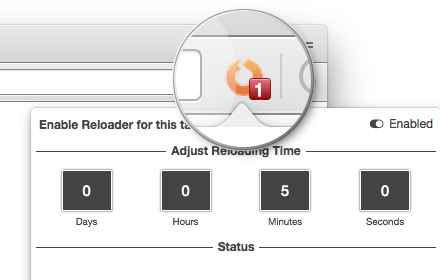
Tab reloader provides a toolbar panel to perform infinite reloading jobs on individual tabs.

You can define a custom period with a random variation for each tab. Tab reloading jobs can be disabled or enabled through the toolbar panel.

Preview:
https://www.youtube.com/watch?v=zAhQlorZZTc

Features:
1. Define variable (random) reloading times with a predefined range
2. Define whether reloading occurs when a tab is active or not
3. Restores reloading jobs after a restart (session manager)
4. Reload tabs from the context menu over tab element (see screenshot)
5. Optionally displays the remaining time of the next reloading on the badge area
6. See the list of all tabs with active reloading jobs in the browser action's popup
7. Set custom rules to start reloading a tab when URL or hostname matches.
8. Optionally move to the bottom of a tab after reloading occurs to read the new content
9. Reload all tabs in the current window or all browser windows
10. Reload local files (file://)
11. Optionally bypass form submissions
12. Define a policy that prevents reloading based on the time (date) and URL
13. Run custom JavaScript code on each reload.
14. Reload only a few times and then stop.
15. Reload discarded tabs in the current window or all windows
16. Supports setting reloading jobs of all selected tabs at once

To disable an already activated tab, please make sure to switch to the tab first, then open the toolbar button and disable the job. Note that if you are closing the tab, there is no need to disable the job. The job will be disabled automatically after an active tab gets closed.

As of version 0.2.7, you can now ask the extension to automatically set new reloading jobs for you based on the "Custom JSON" object. If the option is checked and the new page has a matching hostname, the extension will load the custom reloading job from the JSON and applies to the tab. Check the options and FAQs pages for more info.

As of version 0.2.9, 1 you can define a policy that prevents reloading based on the time (date) and URL. Both time and URL keys accept regular expressions to prevent reloading. With the policies you can, for instance, prevent reloading on a specific page of a domain or prevent reloading at specific hours of a day.
Technical
- Version
- 0.6.8
- Manifest
- V3
- Size
- 607KiB
- Min Chrome
- 88
- Languages
- 7
- Featured
- Yes
Metadata
- ID
- dejobinhdiimklegodgbmbifijpppopn
- Developer ID
- u27a71bca62f6f885d2a8f00b3a49aa03
- Developer Email
- [email protected]
- Created
- Nov 27, 2016
- Last Updated (Store)
- May 14, 2026
- Last Scraped
- Jun 15, 2026
- Website
- —
- Privacy Policy
- —
Similar extensions
Alternatives to Tab Reloader (page auto refresh), ranked by description similarity.

Reload All Tabs (in Window)
Reload all open tabs in current window.
70
★ 5.0

Basic Reload Timer
Reloads the current tab at a set interval.
15

Auto Refresh
Automatically refresh the current tab at set intervals
7
★ 5.0

Reload All Tabs
Quickly reload all open tabs in the current window
9

Quick Auto-Refresh
Provides a quick tab auto-refresh toolbar control.
10

Auto Reloader
Reload the current page every X seconds with optional ± random jitter.
3

Page Auto Refresh
Very easy and fast Page Auto Refresh extension with multi-tabs support
136

Tab Suspender
Automatically suspend, park, hibernate inactive tabs and save up to 80% of memory, reduce load on your device, battery and heat.
100.0K
★ 3.7
Data sourced from the Chrome Web Store · last verified Jun 15, 2026.