
LinkedIn Questions Generator
Generate Questions for Coffee Chats based on LinkedIn profiles
As of May 2026, LinkedIn Questions Generator has 20 users and a 5.00/5 rating from 1 reviews in the Communication category.
Usersno change0%
20
20
Ratingno change0%
5.00
1 reviews
Reviewsno change0%
1
Version
1.0
Manifest V3
History
2 snapshotsTracking since Apr 24, 2026.
View as table
| Date | Users | Rating | Reviews | Version |
|---|---|---|---|---|
| Apr 24, 2026 | 20 | 5.00 | 1 | 1.0 |
| May 19, 2026 | 22 | 5.00 | 1 | 1.0 |
| Now | 20 | 5.00 | 1 | 1.0 |
Permissions & access
- Permissions
- activeTabscripting
- Host access
- https://linkedin-extension-backend.vercel.app/*
Screenshots
About
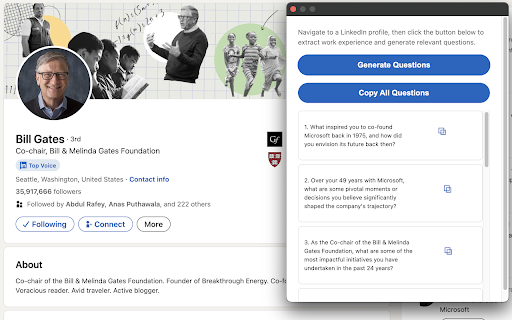
LinkedIn Questions Generator is a powerful Chrome extension designed to elevate your networking game and streamline your preparation for coffee chats, informational interviews, and professional meetings. By analyzing LinkedIn profiles, this tool generates tailored, insightful questions that demonstrate your genuine interest and help you make meaningful connections.

Key Features:
1. Instant Question Generation: With just one click, generate a list of personalized questions based on the LinkedIn profile you're viewing.
2. Professional Context: Questions are tailored to the individual's work experience, skills, and career trajectory, ensuring relevance and depth in your conversations.
3. Time-Saving: Quickly prepare for meetings or interviews without spending hours researching and formulating questions.
4. Networking Enhancement: Stand out in your professional interactions by asking thoughtful, context-specific questions that show you've done your homework.
5. User-Friendly Interface: Our clean, intuitive popup interface makes it easy to view, copy, and use the generated questions.
6. Privacy-Focused: All processing is done locally and through our secure API. We don't store any personal data from the LinkedIn profiles you view.
7. Customizable Output: Easily copy individual questions or the entire set to use in your preferred note-taking app or document.

How It Works:
1. Navigate to a LinkedIn profile you're interested in.
2. Click the LinkedIn Questions Generator icon in your Chrome toolbar.
3. Press the "Generate Questions" button in the popup.
4. Review the list of tailored questions generated for you.
5. Copy the questions you like and use them in your upcoming conversation or meeting.

Perfect for:
1. Job seekers preparing for interviews
2. Networkers looking to make meaningful connections
3. Recruiters preparing to engage with candidates
4. Professionals preparing for mentorship meetings
5. Anyone looking to have more engaging professional conversations

Elevate your networking and interviewing skills with LinkedIn Questions Generator. Download now and start having more insightful, productive conversations!

Note: This extension is not affiliated with or endorsed by LinkedIn. It is an independent tool designed to enhance your professional networking experience.
Technical
- Version
- 1.0
- Manifest
- V3
- Size
- 7.26KiB
- Min Chrome
- 88
- Languages
- 1
- Featured
- No
Metadata
- ID
- debhloicmfegccfdebnpnldjpckafaha
- Developer ID
- uebd791c38c0774d823d282e99f75d40d
- Developer Email
- [email protected]
- Created
- Sep 10, 2024
- Last Updated (Store)
- Sep 12, 2024
- Last Scraped
- May 19, 2026
- Website
- —
- Support URL
- —
- Privacy Policy
- —
Similar extensions
Alternatives to LinkedIn Questions Generator, ranked by description similarity.

Linkedin Content Generator
Create powerful LinkedIn posts in seconds.
14

LinkGenie AI
AI-powered LinkedIn comment generator with customizable tones and settings
32
★ 5.0

Social Media AI Reply Generator
Generate AI-powered replies for social media platforms
—

LinkedIn Helper
AI-powered assistant for LinkedIn: content creation, ad removal, and feed filtering
9

Voxer - Personalized messaging made easy
AI-powered personalization for every message you send. Perfect for recruiters, sales, and job seekers. 🚀
10

LinkedIn Message Manager
AI summaries & replies for LinkedIn. Decline, styles, preview then send. Anthropic key (Haiku) — local only.
15

LinkedIn Outreach AI
Generate personalized LinkedIn connection requests and messages using Claude AI
1

ReplyWise: AI Comment Generator
Maintain an authentic social presence using AI. Save time, boost your engagement, and stay genuinely you.
1.0K
★ 4.3
Data sourced from the Chrome Web Store · last verified May 19, 2026.