
Tab Group Share
Share and import Chrome Tab Groups with a single code.
As of June 2026, Tab Group Share has 160 users and a 5.00/5 rating from 2 reviews in the Productivity category.
Usersup 72.0 percent+72.0%
160
160
Ratingno change0%
5.00
2 reviews
Reviewsup 100.0 percent+100.0%
2
Version
1.1.1
Manifest V3
History
10 snapshotsTracking since Apr 2, 2026.
View as table
| Date | Users | Rating | Reviews | Version |
|---|---|---|---|---|
| Apr 2, 2026 | 93 | 5.00 | 1 | 1.1.1 |
| Apr 17, 2026 | 92 | 5.00 | 1 | 1.1.1 |
| Apr 23, 2026 | 117 | 5.00 | 2 | 1.1.1 |
| Apr 27, 2026 | 122 | 5.00 | 2 | 1.1.1 |
| May 5, 2026 | 122 | 5.00 | 2 | 1.1.1 |
| May 10, 2026 | 136 | 5.00 | 2 | 1.1.1 |
| May 16, 2026 | 138 | 5.00 | 2 | 1.1.1 |
| May 29, 2026 | 135 | 5.00 | 2 | 1.1.1 |
| Jun 4, 2026 | 147 | 5.00 | 2 | 1.1.1 |
| Jun 11, 2026 | 159 | 5.00 | 2 | 1.1.1 |
| Now | 160 | 5.00 | 2 | 1.1.1 |
Permissions & access
- Permissions
- tabGroupstabscontextMenusoffscreenclipboardWrite
- Host access
- None declared
Screenshots


About
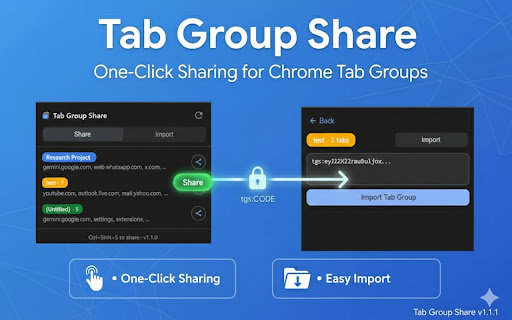
Tab Group Share makes it effortless to share your Chrome tab groups with anyone. Generate a compact share code for any tab group and send it to colleagues, friends, or save it for later. Recipients can instantly recreate the entire tab group with all its tabs in one click.

**Key Features:**

• **One-Click Sharing** - Select any tab group and generate a shareable code instantly
• **Easy Import** - Paste a share code to recreate the entire tab group with all tabs
• **Keyboard Shortcuts** - Quick sharing with Ctrl+Shift+S (Windows/Linux) or Cmd+Shift+E (Mac)
• **Right-Click Menu** - Share directly from the page context menu
• **Visual Preview** - See group name, color, and tab count before importing
• **Color Preservation** - Tab group colors are preserved when sharing
• **Privacy Focused** - No data collection, everything works locally

**Perfect For:**
• Team collaboration - share research tabs with colleagues
• Device switching - move tab groups between computers
• Backup - save important tab groups as text codes
• Teaching - share curated resources with students

**How It Works:**
1. Click the extension icon to see your tab groups
2. Click the share button on any group
3. Copy the generated code (starts with "tgs:")
4. Share the code with anyone
5. They paste it in the Import tab to recreate the group

No accounts, no cloud sync, no tracking - just simple, instant tab group sharing.


Tab Group Share v1.1.1 - Changelog

This release brings significant optimizations to reduce the size of the generated share codes (payloads).

🚀 Performance & Optimizations

Reduced Payload Size (V3 Encoding): Introduced a new, highly compact encoding format (Version 3). By stripping out unnecessary JSON characters and using a pipe-delimited (|) structure, the overall length of share codes is dramatically reduced.
URL Parameter Cleanup: Automatically strips out long, unnecessary tracking parameters (like utm_source, utm_campaign, utm_medium, ref, etc.) before encoding.
Protocol & www. Optimization: Removes http://, https://, and www. prefixes during encoding to save extra space. These are automatically restored during the decoding process.

🐛 Bug Fixes

Delimiter Collision Prevention: Added an escape mechanism for URLs or group names that naturally contain the pipe (|) character, preventing decoding errors and payload corruption.
🔄 Backward Compatibility

Seamless Compatibility: Any existing V1 or V2 share codes generated in older versions (v1.1.0 and below) are fully supported and will continue to work flawlessly.
Technical
- Version
- 1.1.1
- Manifest
- V3
- Size
- 25.53KiB
- Min Chrome
- 109
- Languages
- 1
- Featured
- No
Metadata
- ID
- ddnmhlcgfenlkimakdeefbafjmifmbmd
- Developer ID
- u746c03f8f10ee4d879c5237d6c1ddefa
- Developer Email
- [email protected]
- Created
- Feb 10, 2026
- Last Updated (Store)
- Mar 10, 2026
- Last Scraped
- Jun 11, 2026
- Website
- —
- Support URL
- —
Similar extensions
Alternatives to Tab Group Share, ranked by description similarity.

GroupShare
Share Chrome Tab Groups as a single link. Recipients open all tabs instantly.
12
★ 5.0

Olbrite Tabs
Copy URLs of all tabs in a tab group via right-click context menu
—

Tab Group Manager
Export and import Chrome tab groups as JSON
62

Tab Manager Plus Plus
Like Tab Manager Plus, but better—keep tab groups with names even after closing Chrome, memory reduce and Auto-restore supported.
358
★ 5.0

Tab Manager
Organize tabs into color-coded groups with drag & drop. Save, restore, and share your tab collections effortlessly.
8
★ 5.0

Project Tab Groups
Save, restore, and switch tab groups per project
—
★ 1.0
Сhrome grouping tabs
Boost productivity with Chrome Grouping Tabs! Easily organize, tabs in chrome manage. Ideal for clutter-free & multitasking!
2.0K
★ 4.3

ElGrupos
Chrome Extension to manage and share your tab groups with ease.
—
Data sourced from the Chrome Web Store · last verified Jun 11, 2026.