
Biscotti
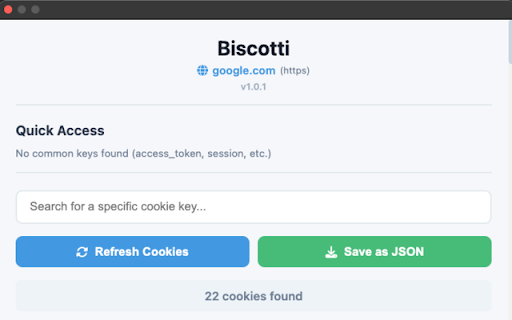
View, search, and copy cookies from the currently active website. Designed for developers working with tokens and APIs.
As of June 2026, Biscotti has 8 users in the Developer Tools category.
Usersup 60.0 percent+60.0%
8
8
Ratingno change0%
—
— reviews
Reviewsno change0%
—
Version
1.0.3
Manifest V3
History
5 snapshotsTracking since Apr 18, 2026.
View as table
| Date | Users | Rating | Reviews | Version |
|---|---|---|---|---|
| Apr 18, 2026 | 5 | — | — | 1.0.3 |
| Apr 28, 2026 | 5 | — | — | 1.0.3 |
| May 7, 2026 | 5 | — | — | 1.0.3 |
| May 14, 2026 | 6 | — | — | 1.0.3 |
| May 24, 2026 | 7 | — | — | 1.0.3 |
| Now | 8 | — | — | 1.0.3 |
Permissions & access
- Permissions
- cookiesactiveTabdownloads
- Host access
- http://*/*, https://*/*
Screenshots


About
Biscotti is a Chrome extension for developers who just want to see cookies.
Fast and straightforward. Easy to use. Light like a biscotto :-)

What it does:

• Shows all cookies for the current website
• Highlights common auth data like access_token, session_id, jwt, etc
• Search cookies by name or value
• Copy any cookie value with one click
• Export all cookies to a clean JSON file
• View useful details like domain, path, expiration, secure, HttpOnly, SameSite
• Simple modern UI that stays out of your way

Why you would use it:

• Debug authentication flows
• Test APIs
• Inspect session handling
• Extract tokens for development and testing
• Understand how websites use cookies

Privacy and security:

• No data collection
• No external servers
• Everything runs locally in your browser
• No tracking or analytics
• Read only access. Biscotti never modifies or deletes cookies
• Open source and transparent

How to use it

1. Open any website
2. Click the Biscotti icon
3. Browse or search cookies
4. Click to copy any value
5. Use Quick Access for common auth tokens
6. Export cookies to JSON if needed

Typical use cases

• Copy access tokens for tools like Postman
• Debug OAuth and login issues
• Inspect session cookies
• Compare cookies across domains
• Export cookie data for documentation
• Check expiration dates and security flags

Icon credit: Cookie icons by Rohim on Flaticon
https://www.flaticon.com/free-icons/cookie

Why "Biscotti"? It means cookies in Italian.
Technical
- Version
- 1.0.3
- Manifest
- V3
- Size
- 31.2KiB
- Min Chrome
- 88
- Languages
- 1
- Featured
- No
Metadata
- ID
- ddkfcmonfpiapdgbgdjehkcbpfoohfjg
- Developer ID
- uf626113e3632adc64d7d4b8c56c523e5
- Developer Email
- [email protected]
- Created
- Dec 16, 2025
- Last Updated (Store)
- Dec 16, 2025
- Last Scraped
- Jun 3, 2026
- Website
- —
- Support URL
- —
- Privacy Policy
- —
Similar extensions
Alternatives to Biscotti, ranked by description similarity.

Cookie Selector
Chrome extension to view, select, and copy cookies for the current tab. Useful for developers and testers.
4

Cookies Getter
View cookies with full details for the current tab and copy them to the clipboard.
85

Cukie : Most flexible cookie copy extension
Quickly copy cookies from the current page for development and debugging
7
★ 5.0

Cookie Editor
View and edit cookies on the current website
34

CookieForge: Craft, Import, and Inspect
A modern developer tool to craft, import, and inspect cookies with ease and security.
5

Cookie Cutter
Cookie inspector and manager - view sizes, security flags, and export data for any website.
40
★ 5.0

Cookie Manager Pro
View, edit, delete, export, and manage cookies with one click. Save cookie profiles, monitor changes, and protect cookies.
2.0K
★ 5.0

Cookie Extractor
Inspect and copy cookies for the active tab without sending data anywhere.
42
★ 5.0
Data sourced from the Chrome Web Store · last verified Jun 3, 2026.