Mobile View Switcher
Switch user agent to simulate mobile (Android/iOS). Test mobile views, access content and save bandwidth.
As of June 2026, Mobile View Switcher has 2,000 users and a 4.48/5 rating from 31 reviews in the Privacy & Security category.
Usersno change0%
2.0K
2,000
Ratingdown 2.0 percent−2.0%
4.48
31 reviews
Reviewsup 10.7 percent+10.7%
31
Version
1.6
Manifest V3
History
5 snapshotsTracking since Apr 6, 2026.
View as table
| Date | Users | Rating | Reviews | Version |
|---|---|---|---|---|
| Apr 6, 2026 | 2.0K | 4.57 | 28 | 1.6 |
| Apr 17, 2026 | 2.0K | 4.59 | 29 | 1.6 |
| Apr 27, 2026 | 2.0K | 4.59 | 29 | 1.6 |
| May 11, 2026 | 2.0K | 4.59 | 29 | 1.6 |
| Jun 3, 2026 | 2.0K | 4.47 | 30 | 1.6 |
| Now | 2.0K | 4.48 | 31 | 1.6 |
Permissions & access
- Permissions
- storagedeclarativeNetRequest
- Host access
- <all_urls>
Screenshots
About
Easily Test Mobile Views and Access Device-Specific Content with Mobile View Switcher!

Ever needed to see how a website looks on an Android phone or an iPhone? Want to access content that's only available to mobile users or test your website's responsiveness? Mobile View Switcher gives you the power to change how your browser identifies itself to websites by modifying the User-Agent string.

Key Features:

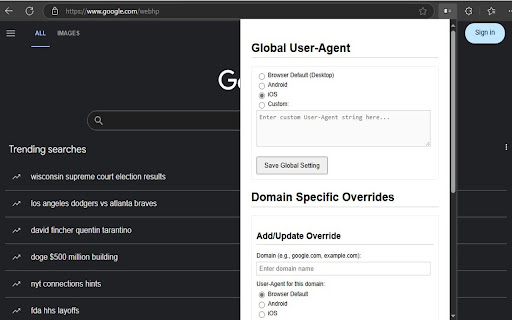
Simulate Mobile Devices: Quickly switch your browser's User-Agent to popular mobile profiles like Android or iOS with built-in presets, or define your own custom User-Agent string [cite: uploaded:mobileview/options.js].
Global Control: Set a single User-Agent that applies to all websites you visit. Choose a mobile profile, a custom one, or easily revert to your browser's default [cite: uploaded:mobileview/options.js].
Per-Domain Overrides: Need more granularity? Configure specific User-Agents for individual websites. For example, make example.com load as an iPhone while google.com loads as Android, and let all other sites use your global setting or the browser default [cite: uploaded:mobileview/options.js, uploaded:mobileview/background.js].
Simple Configuration: Manage all your global settings and domain overrides through a clear and easy-to-use options page [cite: uploaded:mobileview/options.html].
Why Use Mobile View Switcher?

Web Development & Testing: Essential tool for developers and designers to preview and test how websites render on different mobile devices.
Access Mobile-Only Content: Some websites offer different features or layouts for mobile users; this extension helps you access them from your desktop.
Potential Bandwidth Savings: By requesting lighter, mobile-optimized versions of websites, you may potentially use less data on some sites (though this depends on how the site is built).
Mobile View Switcher uses the modern and efficient declarativeNetRequest API [cite: uploaded:mobileview/background.js], ensuring minimal impact on your browser's performance and privacy by modifying headers without needing to read website content.

Install Mobile View Switcher today and take control of your browser's identity!
Technical
- Version
- 1.6
- Manifest
- V3
- Size
- 28.55KiB
- Min Chrome
- 88
- Languages
- 1
- Featured
- No
Metadata
- ID
- ddfcjnekgmblacbpifjdmcbbhfcdekic
- Developer ID
- u76ea63b9b04609e8f3db413112679927
- Developer Email
- [email protected]
- Created
- Apr 3, 2025
- Last Updated (Store)
- Feb 12, 2026
- Last Scraped
- Jun 3, 2026
- Website
- https://yukieliot.com/
- Support URL
- https://x.com/yuki_eliot
- Privacy Policy
- https://telegra.ph/Privacy-Policy-04-02-50
Similar extensions
Alternatives to Mobile View Switcher, ranked by description similarity.

UserAgent Switcher for Chrome
Automatically rotates User-Agent strings with advanced randomization, DOM spoofing, and settings export/import.
152

AgentShift (User-Agent Switcher)
Easily change your User-Agent
10

Fast User-Agent Switcher
Automatically spoof your browser’s User-Agent with random, timed switches to protect privacy and bypass tracking effortlessly.
350
★ 4.0

Random User Agent
Generate random user agent with chrome extension. Switch browser agents to any device or browser. Perfect for testing and privacy
3.0K
★ 4.3

Random User-Agent (Switcher)
Automatically change the user agent after specified period of time to a randomly selected one
100.0K
★ 4.6

CleanRedirect
Block unwanted ad redirects while preserving user-initiated navigation. Lightweight, privacy-focused, and stealth-optimized.
611
★ 4.0

Website Unblocker
Website Unblocker helps you instantly unblock access to any website or content platform, with just a single click!
3.0K
★ 3.7

threatxtension
Real-time OSINT & threat-intel overlay with URL analysis
5
Data sourced from the Chrome Web Store · last verified Jun 3, 2026.