
AccessiFlow — Universal Accessibility Toolkit
Premium accessibility toolkit for all websites. Supports vision, dyslexia, ADHD, motion sensitivity, and more.
As of June 2026, AccessiFlow — Universal Accessibility Toolkit has 2 users in the Accessibility category.
Usersno change0%
2
2
Ratingno change0%
—
— reviews
Reviewsno change0%
—
Version
1.0.0
Manifest V3
History
2 snapshotsTracking since May 21, 2026.
Not enough history yet for this metric — the chart fills in as we collect more snapshots.
View as table
| Date | Users | Rating | Reviews | Version |
|---|---|---|---|---|
| May 21, 2026 | — | — | — | 1.0.0 |
| May 27, 2026 | — | — | — | 1.0.0 |
| Now | 2 | — | — | 1.0.0 |
Permissions & access
- Permissions
- storageactiveTabtabsscripting
- Host access
- <all_urls>
Screenshots


About
Make every website accessible to you. AccessiFlow is a powerful, privacy-first accessibility toolkit that applies your preferences to all websites automatically.

♿ WHO IS THIS FOR?
People with low vision, dyslexia, ADHD, motion sensitivity, elderly users, keyboard-only users, and anyone who wants a more comfortable web experience.

🎨 VISUAL & COLOR TOOLS
• High Contrast Mode — maximum black/white contrast
• Force Dark Mode — dark theme on any website
• Grayscale, Invert Colors, Low Brightness
• Blue Light Filter — warm tones to reduce eye strain
• Saturation and Contrast Level sliders

📝 FONT & TEXT TOOLS
• Dyslexia-Friendly Font (OpenDyslexic) — bundled, no CDN
• Readable Font, Bold Text
• Font Size (70%–200%), Line Height, Letter Spacing, Word Spacing
• Paragraph Width limit, Text Alignment

📖 FOCUS & READING TOOLS
• Reading Guide Line — follows your cursor
• Reading Mask — dims everything except the current line
• Focus Mode — fades ads, banners, and distracting elements
• Reader View — extracts and shows only the main article

🎬 MOTION & ANIMATION CONTROL
• Disable All Animations, Disable Autoplay Videos
• Reduce Motion Mode, Disable Flashing Effects
• Disable Parallax Scrolling

⌨️ KEYBOARD & NAVIGATION
• Enhanced Focus Outlines — high-visibility focus ring
• Tab Navigation Helper, Skip to Content Link
• Keyboard-Only Mode

👁️ SCREEN READER ASSISTANCE
• ARIA Helper Overlay, Landmark Highlighting
• Heading Structure Viewer (H1–H6 badges)
• Form Label Checker

🔍 WCAG 2.2 ACCESSIBILITY SCANNER
Powered by axe-core. Scan any page for accessibility issues and get a score with actionable fixes across 10 categories (images, contrast, forms, headings, links, ARIA, keyboard, language, structure, media).

👤 ACCESSIBILITY PROFILES
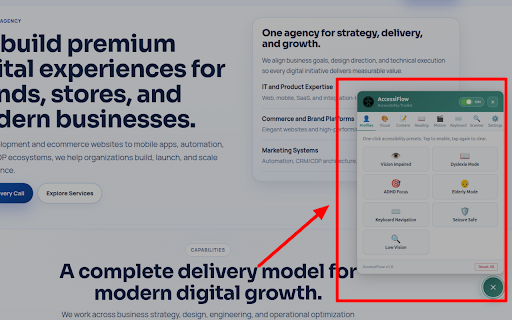
One-click presets: Vision Impaired, Dyslexia Mode, ADHD Focus, Elderly Mode, Keyboard Navigation, Seizure Safe, Low Vision.

🔒 100% PRIVATE
• Zero tracking, zero analytics
• No external network requests whatsoever
• All settings stored locally
• Cannot read passwords or personal data
• Declarative CSS injection only

⚙️ MORE
• Draggable floating widget on every website
• Settings sync across devices
• Export / import settings as JSON
• Keyboard shortcuts: Alt+A to open panel, Alt+C for high contrast
• Works on all websites including SPAs
Technical
- Version
- 1.0.0
- Manifest
- V3
- Size
- 507KiB
- Min Chrome
- 88
- Languages
- 1
- Featured
- No
Metadata
- ID
- ddfcfcideeildccknhhbnbkklniaaepo
- Developer ID
- ue3b3e1c56790b35a563ffd72db9c3fa8
- Developer Email
- [email protected]
- Created
- May 20, 2026
- Last Updated (Store)
- May 20, 2026
- Last Scraped
- Jun 9, 2026
- Website
- isekainextgen.com
- Support URL
- —
- Privacy Policy
- —
Data sourced from the Chrome Web Store · last verified Jun 9, 2026.