
Chrome Remote Multi-Task
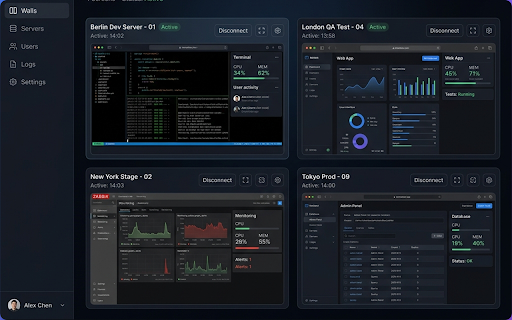
Multi-tab and grid TV wall manager for Chrome Remote Desktop.
As of June 2026, Chrome Remote Multi-Task has 15 users and a 5.00/5 rating from 2 reviews in the Productivity category.
Usersno change0%
15
15
Ratingno change0%
5.00
2 reviews
Reviewsno change0%
2
Version
1.0.1
Manifest V3
History
5 snapshotsTracking since May 17, 2026.
View as table
| Date | Users | Rating | Reviews | Version |
|---|---|---|---|---|
| May 17, 2026 | — | — | — | 1.0.1 |
| May 23, 2026 | — | — | — | 1.0.1 |
| May 30, 2026 | 6 | 5.00 | 2 | 1.0.1 |
| Jun 5, 2026 | 11 | 5.00 | 2 | 1.0.1 |
| Jun 13, 2026 | 10 | 5.00 | 2 | 1.0.1 |
| Now | 15 | 5.00 | 2 | 1.0.1 |
Permissions & access
- Permissions
- declarativeNetRequeststorage
- Host access
- *://*.google.com/*
Screenshots

About
Chrome Remote Multi-Task 是一款专为 Google Chrome 远程桌面(Chrome Remote Desktop)用户打造的高级管理工具。它打破了原生应用一次只能查看一个远程窗口的限制,为你提供强大的“多任务”与“电视墙”视图。
核心功能:
1. 电视墙模式 (TV Wall):支持将多个远程桌面窗口以网格(Grid)形式排列。无论是 2x2 对齐,还是 1+2 分屏,都能让你同时监控和操作多台远程计算机。
2. 多标签页切换:顶部的现代化标签栏让你在不同的远程会话间秒级切换,告别繁琐的窗口切换。
3. 防掉线心跳 (Keep-Alive):内置自动活动模拟机制,有效防止远程会话因长时间无操作而自动断开连接。
4. 动态布局调整:利用可调节面板,你可以根据需求自由拉伸每个远程屏幕的大小。
5. 极简集成:完美集成于 remotedesktop.google.com 页面,无需繁琐配置,安装即用。
---
Chrome Remote Multi-Task is a premium management tool for Google Chrome Remote Desktop users. It enables you to monitor and control multiple remote sessions simultaneously through a powerful "TV Wall" grid view.
Key Features:
- TV Wall Mode: Display multiple remote sessions in a customizable grid (2x2, 1+2, etc.).
- Tabbed Interface: Seamlessly switch between remote computers with a modern tab bar.
- Keep-Alive: Prevents sessions from timing out by simulating activity in the background.
- Resizable Layout: Dynamically adjust the size of each remote screen.
- Zero Config: Works instantly on remotedesktop.google.com.
Technical
- Version
- 1.0.1
- Manifest
- V3
- Size
- 338KiB
- Min Chrome
- 88
- Languages
- 1
- Featured
- No
Metadata
- ID
- ddcpgglmbfeapkhinfgmdlflpmmhjfim
- Developer ID
- u758380de1957983a0e7f3756eae68ef4
- Developer Email
- [email protected]
- Created
- May 16, 2026
- Last Updated (Store)
- May 16, 2026
- Last Scraped
- Jun 13, 2026
- Website
- —
- Support URL
- https://github.com/ikki99/10w_cremote/
Data sourced from the Chrome Web Store · last verified Jun 13, 2026.