
AppSheet View Customizer
Customize Your Way to Better AppSheet Apps
As of June 2026, AppSheet View Customizer has 4,000 users and a 4.93/5 rating from 15 reviews in the Developer Tools category.
Usersno change0%
4.0K
4,000
Ratingno change0%
4.93
15 reviews
Reviewsno change0%
15
Version
7.6.1
Manifest V3
History
4 snapshotsTracking since Apr 2, 2026.
View as table
| Date | Users | Rating | Reviews | Version |
|---|---|---|---|---|
| Apr 2, 2026 | 4.0K | 4.93 | 15 | 7.6.1 |
| Apr 6, 2026 | 4.0K | 4.94 | 16 | 7.6.1 |
| Apr 17, 2026 | 4.0K | 4.93 | 15 | 7.6.1 |
| Apr 27, 2026 | 4.0K | 4.93 | 15 | 7.6.1 |
| Now | 4.0K | 4.93 | 15 | 7.6.1 |
Permissions & access
- Permissions
- scriptingstorage
- Host access
- https://www.appsheet.com/template/*, https://www.appsheet.com/Template/*, https://www.appsheet.com/start/*
Screenshots

About
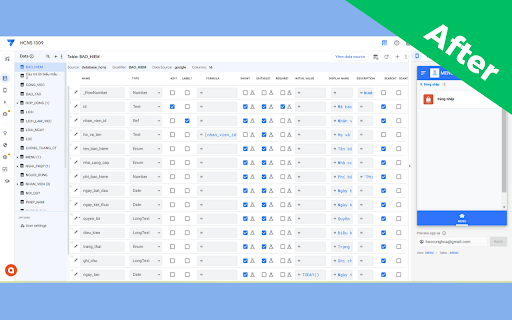
Appsheet View Customize - Boost Your Appsheet Workflow by 3X
A free extension that optimizes your Google Appsheet experience, saves time, and increases productivity.

Who is this for?
-Frequent Google Appsheet users
-Developers looking to optimize app development workflow
-Anyone wanting to customize Appsheet interface for better efficiency

 Key Features
1. Resize Data Columns
- Automatically fix and adjust column sizes for optimal viewing
- Add options to hide Display Name, Description, Search, Scan
- Optimized display for smaller screens (MacBook, laptops)

2. Remove Column Name Whitespace
-Automatically remove trailing whitespace when copying column names
-No more extra spaces like [column_name ]
-Save time on manual editing

3. Hide Password Fields
-Automatically hide values in columns named "Password"
-Display as ****** like standard forms
-Protect sensitive information during data entry

4. Looker Studio Integration
-Embed Looker Studio dashboards directly into Appsheet
-Professional data visualization
-Combine the power of both Google tools

5. Thousand Separator Display (BETA)
-Show separators when entering numbers: 100,000 instead of 100000
-Easier to read and reduces input errors
-Currently in testing and improvement phase

6. Auto Display Name with AI
-Use Google AI Studio to automatically generate Display Names
-Convert column names from MySQL standard to formatted, readable text
-Multi-language support (Vietnamese, English, and more)
-Batch process multiple columns and tables at once

How to Use
-Install the extension from Chrome Web Store
-Open Appsheet and work as usual
-Click the extension icon to enable/disable features
-For AI feature: Get API key from Google AI Studio and paste into extension

Requirements
-Chrome/Edge/Brave browser
-Google Appsheet account
-(Optional) API key from Google AI Studio for AI features

Notes
-Completely free extension
-No user data collection
-Open source and transparent
-Continuous updates and improvements

2025 Update
-Added options to hide UI components
-Performance optimization for smaller screens
-Improved thousand separator feature
-Enhanced AI processing capabilities

Support
If you encounter any issues or have feature suggestions, please contact us through reviews or support email.

Save Time - Increase Efficiency - Work Smarter with Appsheet View Customize!
Technical
- Version
- 7.6.1
- Manifest
- V3
- Size
- 43.97KiB
- Min Chrome
- 88
- Languages
- 1
- Featured
- No
Metadata
- ID
- ddaoiephbgngpbpiagcpmgabnjmlfefl
- Developer ID
- u855fb05f8425f53fea4d8b5538d4e40f
- Developer Email
- [email protected]
- Created
- Oct 30, 2023
- Last Updated (Store)
- Jan 13, 2026
- Last Scraped
- Jun 10, 2026
- Website
- hocappsheet.online
Similar extensions
Alternatives to AppSheet View Customizer, ranked by description similarity.
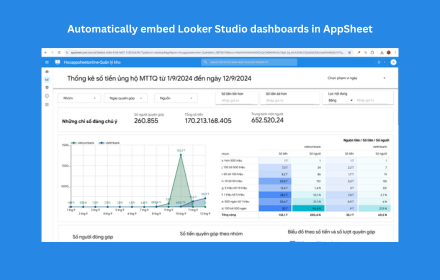
AppSheet Looker Integration
Automatically embed Looker Studio dashboards in AppSheet applications for seamless data visualization - Developed by Hoà Data
474
★ 5.0

Buy App Downloads
Boost app installs with expert App Store Optimization services - ASO tools for iOS, Android, iPad, and macOS apps
2

BigqueryFaster
Better UX for Bigquery
37

DriveWind Studio - Build Google Workspace Automations with AI
AI-powered Google Workspace assistant for building automations, tools or complex workflows in Apps Script and Sheets.
46

Adalo Builder Tools
Orphan screen detection, dark mode, stats, performance insights, and screen export for the Adalo builder.
14

Atrean Extension
A scraping data extension for Atrean.
—

GetVisaJobs - Job Form Filler
Privacy-first fake data form filler for QA engineers and developers. Fill forms instantly with realistic test data.
5

Google Apps Script Copilot
AI pair-programmer inside the Apps Script editor — chat, inline completions, and an agent that edits code for you.
10.0K
★ 3.7
Data sourced from the Chrome Web Store · last verified Jun 10, 2026.