
Export History/Bookmarks to JSON/CSV*/XLS*
Allows to export Chrome history and bookmarks into JSON file, which can be converted to CSV/XLS/XLSX file at http://www.json-xls.com
As of May 2026, Export History/Bookmarks to JSON/CSV*/XLS* has 30,000 users and a 3.14/5 rating from 71 reviews in the Workflow & Planning category.
Usersup 50.0 percent+50.0%
30.0K
30,000
Ratingno change0%
3.14
71 reviews
Reviewsno change0%
71
Version
2.6
Manifest V3
90-day change · In the last 90 days this extension gained 10.0K users.
History
1 snapshotsTracking since Apr 24, 2026.
View as table
| Date | Users | Rating | Reviews | Version |
|---|---|---|---|---|
| Apr 24, 2026 | 20.0K | 3.14 | 71 | 2.6 |
| Now | 30.0K | 3.14 | 71 | 2.6 |
Permissions & access
- Permissions
- historybookmarksdownloads
- Host access
- None declared
Screenshots
About
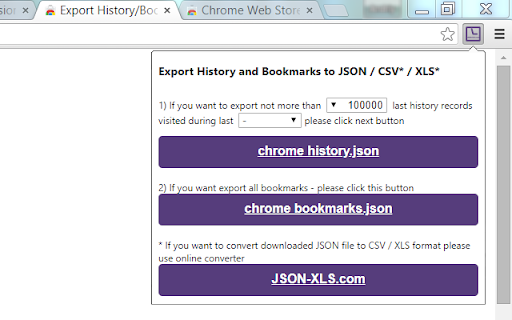
Save Chrome history and bookmarks as JSON files.

Click on 'Chrome History.json' or 'Chrome Bookmarks.json' button to download JSON file with your browser history/bookmarks.

Also extension allows to transform original history JSON file exported with Google Takeout.

If you want to convert downloaded JSON file to CSV/XLS/XLSX format please use online converter https://www.JSON-XLS.com/json2xls.

NOTICE:
This extension doesn't export history or bookmarks into CSV or Microsoft Excel Binary File Format (.xls) file.

Any JSON file can be converted to CSV/XLS/XLSX format at https://json-xls.com/.
-----------
v2.6:
 - Added link to 'Google Takeout' page.
 - Added button to transform 'Google Takeout' history json file (remove metadata information).
v2.4:
 - Added 'no limit' options for customer. But please remember that Chrome limitations (not more than 3 months) are still primary.
v2.3:
 - Changed maximum period due to Chrome limitations (not more than 3 months).
v2.2:
 - Fixed downloading bookmarks (invalid 'Added date').
v2.1:
 - Fixed download on second attempt.
v2.0:
 - Fixed download if "Ask where to save each file before downloading" is Checked in Chrome's Settings
v1.9:
 - JSON files have been formatted!
v1.8:
 - Extension requires 'Manage your downloads' permission (for Chrome v65.0.3325.181 or later)!
v1.6:
 - Two new limits were added for history records: 100K and 500K!
v1.4:
 - Allows to limit number of history records!
v1.3:
 - CSV/TSV formats are available!
v1.2:
 - human readable format for date/time stamp!
Technical
- Version
- 2.6
- Manifest
- V3
- Size
- 21.82KiB
- Min Chrome
- 88
- Languages
- 1
- Featured
- Yes
Metadata
- ID
- dcoegfodcnjofhjfbhegcgjgapeichlf
- Developer ID
- u4061d2013962ac0526d5a36cab5ee5cc
- Developer Email
- [email protected]
- Created
- Oct 22, 2015
- Last Updated (Store)
- Aug 13, 2024
- Last Scraped
- May 19, 2026
- Website
- json-xls.com
- Support URL
- —
- Privacy Policy
- —
Similar extensions
Alternatives to Export History/Bookmarks to JSON/CSV*/XLS*, ranked by description similarity.

Chrome History Analysis to CSV
Easily export your Chrome browsing history analysis to CSV
931
★ 5.0

Quick Chrome History Export
Export your Chrome browsing history to CSV, JSON, or XLSX. Fast, private, and processed entirely on your device.
10.0K
★ 4.7

View Chrome History
See your View Chrome History and export it in a readable format as a CSV, JSON file or XLSX file.
48

Extended History | 90+ days of history
Unlimited history retention, session management, time tracking, bookmarks, multi-device.
43
★ 5.0

Export Chrome History
Export your Chrome History as an Excel-readable CSV file or as a JSON file.
100.0K
★ 4.5

HistoryOut - Export Chrome History
Export Chrome History in Excel-readable CSV, JSON or HTML formats. Use custom date ranges and customize the output fields.
599
★ 5.0

Google Takeout Mileage & Timeline Exporter
This extension helps you siphoning through that massive amount of data and distills them to useful bits of information for you to…
1.0K
★ 4.1

Export Twitter Bookmarks
1-Click export for ALL your twitter bookmarks
9.0K
★ 3.9
Data sourced from the Chrome Web Store · last verified May 19, 2026.