
Deepseek AI Analyzer Pro
Investment report analyzer with streaming, keywords, context, and export
As of June 2026, Deepseek AI Analyzer Pro has 1 users in the Productivity category.
Usersno change0%
1
1
Ratingno change0%
—
— reviews
Reviewsno change0%
—
Version
2.1.0
Manifest V3
History
4 snapshotsTracking since Apr 17, 2026.
View as table
| Date | Users | Rating | Reviews | Version |
|---|---|---|---|---|
| Apr 17, 2026 | — | — | — | 2.1.0 |
| Apr 27, 2026 | 1 | — | — | 2.1.0 |
| May 14, 2026 | 1 | — | — | 2.1.0 |
| Jun 2, 2026 | — | — | — | 2.1.0 |
| Now | 1 | — | — | 2.1.0 |
Permissions & access
- Permissions
- activeTabcontextMenusstoragescripting
- Host access
- http://localhost:11434/*
Screenshots
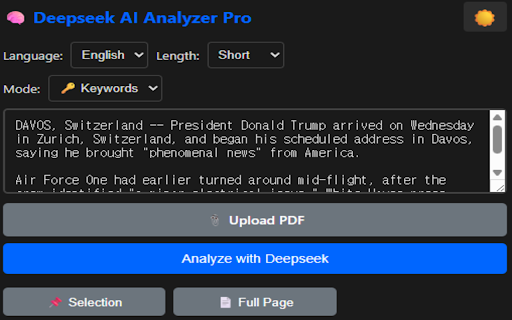


About
# Deepseek AI Analyzer Pro

Transform how you analyze investment reports and financial news with the power of local AI.

## 🚀 Key Features

**Multiple Analysis Modes:**
- 📊 Investment Report Summary - Extract target price, ratings, and key points
- 📰 News Translation & Summary - Get English summaries with investor takeaways
- 🔑 Keyword Extraction - Pull out 8-12 key terms instantly
- 🌐 Translation - Full text translation without summarization
- 🔄 Multi-Report Comparison - Compare multiple analyst reports side-by-side
- 💬 Context-Aware Q&A - Ask follow-up questions about your documents

**Productivity Boosters:**
- ⚡ Real-time streaming responses (see results as they generate)
- 📌 Auto-capture selected text from any webpage
- 📋 One-click copy to clipboard
- ⭐ Bookmark important analyses
- 📊 Export results to CSV
- 📝 Save custom prompt templates
- 🌙 Dark mode for comfortable late-night work

**Privacy-First Design:**
- 🔒 100% local processing - your data never leaves your computer
- 🖥️ Runs on Ollama with Deepseek-R1 model
- 🚫 No cloud API, no data collection, no subscription fees

**Multilingual Support:**
Output in English, 日本語, 中文, or 한국어

## 📋 Requirements

1. [Ollama](https://ollama.com) installed locally
2. Deepseek-R1 model: `ollama pull deepseek-r1:7b`
3. Ollama server running: `ollama serve`
4. Set OLLAMA_ORIGINS environment variable (see setup guide)

## 🎯 Perfect For

- Individual investors analyzing brokerage reports
- Traders scanning multiple news sources
- Researchers processing large documents
- Anyone needing fast, private AI analysis

## 🔧 Setup Guide

1. Install Ollama from ollama.com
2. Open terminal/command prompt
3. Run: `ollama pull deepseek-r1:7b`
4. Set environment: `OLLAMA_ORIGINS=*`
5. Start server: `ollama serve`
6. Open extension and start analyzing!

## 🆓 Completely Free

No API keys, no subscriptions, no hidden costs. Just install Ollama and go.

## 🔗 Links

- GitHub: [Your repo URL]
- Documentation: [Your docs URL]
- Report Issues: [Your issues URL]

---

**Note:** This extension requires a local Ollama installation. Internet connection is NOT required for analysis (only for initial model download).
Technical
- Version
- 2.1.0
- Manifest
- V3
- Size
- 30.95KiB
- Min Chrome
- 88
- Languages
- 1
- Featured
- No
Metadata
- ID
- dclkghpfeeiekpbnbhalmbnpmoaoohba
- Developer ID
- ub8e38f118d2241c0e4737ebd7d373dc2
- Developer Email
- [email protected]
- Created
- Jan 25, 2026
- Last Updated (Store)
- Jan 27, 2026
- Last Scraped
- Jun 2, 2026
- Website
- —
- Support URL
- —
- Privacy Policy
- —
Similar extensions
Alternatives to Deepseek AI Analyzer Pro, ranked by description similarity.

OpenTalkGPT - UI to access DeepSeek,Llama or open source modal with rag.
This extension hosts an ollama ui on localhost and help you to access all open srouce modals.
196
★ 4.7

WebRAG
网页知识库助手 - Local RAG-powered knowledge base from web pages
3

PrivyExtract
Local, privacy-first AI extraction and summaries powered by local providers like Ollama and LM Studio. No data leaves your device.
3

Ollamatch
AI-powered job matching assistant powered by Ollama
—

HAL
HAL - AI-powered browser extension with summarization, mind maps, and diagram generation
8

Browser AI Agent
AI-powered browser automation agent using Ollama local LLM
27

ReadingBuddy
Your AI reading companion - highlight any text for instant explanations
2

Local LLM Helper
Interact with your local LLM server directly from your browser.
251
★ 1.8
Data sourced from the Chrome Web Store · last verified Jun 2, 2026.