
Search by image for China import
Search by image on 1688, Taobao, Alibaba, etc.
As of May 2026, Search by image for China import has 448 users and a 5.00/5 rating from 2 reviews in the Shopping category.
Usersup 2.3 percent+2.3%
448
448
Ratingno change0%
5.00
2 reviews
Reviewsno change0%
2
Version
3.0.1.1
Manifest V3
History
2 snapshotsTracking since Apr 24, 2026.
View as table
| Date | Users | Rating | Reviews | Version |
|---|---|---|---|---|
| Apr 24, 2026 | 438 | 5.00 | 2 | 3.0.1.1 |
| May 19, 2026 | 442 | 5.00 | 2 | 3.0.1.1 |
| Now | 448 | 5.00 | 2 | 3.0.1.1 |
Permissions & access
- Permissions
- activeTabalarmscontextMenuscookiesdeclarativeNetRequestdeclarativeNetRequestFeedbackdownloadsnotificationsscriptingstorage
- Host access
- *://*.aliprice.com/*, <all_urls>, http://*/*, https://*/*
Screenshots


About
Main features:
1. Price history: You can check the price history within 3/6/12 months on 1688.
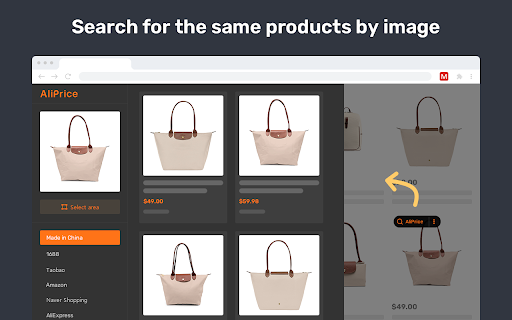
2. Search similar products by image, click the search button or right-click and search by image, quickly find the same product on Ali 1688, Tao Bao, etc., a must-have tool for dropshipping.
3. Price drop alert: add the product to your favorites, you will receive a notification when the price drops.
4. Sales statistics,  analysis of the order and price distribution on AE and Shopee product list pages, the percentage of seller sales, etc.
5. Display coupons on JD
6. Copy link, added copy link button to help you to copy product links of Tao Bao and 1688.
7. Capture and translate. Capture a photo and translate text on it.
8. Review analysis: On the  Ali Express product details page, analyze the country distribution of reviewers.
9. Download product image and video on Tao Bao, Ali Express, Ali 1688 with 1 click, export image links to copy, image translation.
10. Added Wildberries and vvic.com search by image
11. Currency converter, you can use the currency converter for currency conversion on 1688
12. Supported Google Lens to search similar products by image.
13. Supported comparing the same products on 1688, and export it as a CSV file.
14. Download review images from Ali Express and Amazon, and export reviews as a CSV file.
15. Export shopping cart list of 1688 and Tao Bao
16. Search by image to find similar products on Shein, Naver and Amazon.
17. Filter and export similar products based on different fields to TXT or Excel.
18. Copy the product title and search for the same items on 1688, Tao Bao.
19. Ranking by Dropshipping sales and Filter to export on 1688.com product list pages.
20. Translate chat content with supplier on 1688 and Tao Bao

If you have any questions or suggestions, please feel free to contact us.
https://www.aliprice.com/information/index?page=contact

Edge/Firefox/Opera: https://www.aliprice.com?extension=taobao_search_by_image
Android: https://play.google.com/store/apps/details?id=com.dengpai.aliprice
IOS: https://apps.apple.com/us/app/aliprice-aliexpress-assitant/id1282323896

Disclaimer
The product listings displayed in the image search results are matched purely and automatically by the algorithm. AliPrice does not play any active role and will not intervene in the matching process, nor does AliPrice guarantee any accuracy and/or correctness of the search results generated via an automatic algorithm.
We only collect anonymous information.
We use technologies like cookies (small files stored by your browser), web beacons, or unique device identifiers to anonymously identify your computer or device so we can deliver a better experience. Our systems also log information like your browser, operating system and IP address. For more details please read our Privacy Policy - https://www.aliprice.com/information/index?page=privacy
By installing the AliPrice extension, you accept the terms of the "AliPrice Terms of Service" and allow the extension to redirect to affiliate links, including Taobao and other programs. AliPrice Terms of Service - https://www.aliprice.com/information/index/page/term_of_use
This extension uses the Google Analytics service to collect statistics on the use of the extension. If you do not want to transfer data, you can find the official Google blocker application or any equivalent. The official Google Analytics blocker from Google — https://tools.google.com/dlpage/gaoptout
Technical
- Version
- 3.0.1.1
- Manifest
- V3
- Size
- 5.59MiB
- Min Chrome
- 88
- Languages
- 1
- Featured
- No
Metadata
- ID
- dchenijpebdpbnhboikhhcgipkgoglln
- Developer ID
- ud6615a32b986502ec591660a95d91d27
- Developer Email
- [email protected]
- Created
- Sep 20, 2020
- Last Updated (Store)
- Oct 17, 2024
- Last Scraped
- May 19, 2026
- Website
- —
- Privacy Policy
- https://www.aliprice.com/information/index/page/privacy
Similar extensions
Alternatives to Search by image for China import, ranked by description similarity.

Cdisount recherche par image
Recherche par image sur 1688, Alibaba, Aliexpress, Taobao, etc.
60
★ 5.0

AiPrice(AliPrice) Price Tracker Beta
AiPrice.com - Your price tracker for e-commerce websites.
8.0K
★ 4.9

AiPrice(AliPrice) Search by Image for TB Beta
AiPrice Search by Image allows you to easily find the source goods on e-commerce websites.
20.0K
★ 5.0

Faire Search by Image
AliPrice Search by Image allows you to easily find the source goods on e-commerce websites.
3
★ 5.0

1688 Price Tracker
AiPrice Sourcing Tool allows you to easily find the source goods on e-commerce websites.
7.0K
★ 5.0

Search by image for Globalsources
AliPrice Search by Image allows you to easily find the source goods on e-commerce websites.
38
★ 4.9

AiPrice(AliPrice) Search by Image for China Import Beta
AiPrice Search by Image allows you to easily find the source goods on e-commerce websites.
10.0K
★ 5.0

AiPrice(AliPrice) Search by Image for TB Beta
AiPrice Search by Image allows you to easily find the source goods on e-commerce websites.
337
★ 4.7
Data sourced from the Chrome Web Store · last verified May 19, 2026.