
Promptaa: Prompt Engineering and Library
Promptaa Chrome Extension - Prompt Engineering and Library.
As of June 2026, Promptaa: Prompt Engineering and Library has 31 users and a 5.00/5 rating from 1 reviews in the Productivity category.
Usersup 6.9 percent+6.9%
31
31
Ratingno change0%
5.00
1 reviews
Reviewsno change0%
1
Version
0.3.1
Manifest V3
90-day change · In the last 90 days this extension 1 version update, changed permissions.
History
7 snapshotsTracking since Apr 1, 2026.
View as table
| Date | Users | Rating | Reviews | Version |
|---|---|---|---|---|
| Apr 1, 2026 | 29 | 5.00 | 1 | 0.1.0 |
| Apr 20, 2026 | 31 | 5.00 | 1 | 0.3.1 |
| Apr 25, 2026 | 32 | 5.00 | 1 | 0.3.1 |
| May 9, 2026 | 32 | 5.00 | 1 | 0.3.1 |
| May 26, 2026 | 28 | 5.00 | 1 | 0.3.1 |
| Jun 2, 2026 | 27 | 5.00 | 1 | 0.3.1 |
| Jun 8, 2026 | 28 | 5.00 | 1 | 0.3.1 |
| Now | 31 | 5.00 | 1 | 0.3.1 |
Changelog
- Apr 1, 2026host_permissions
https://promptaa.com/*, https://promptaa.com/*, https://*.clerk.accounts.dev/*, https://*.clerk.com/*, https://promptaa.com/*, https://www.promptaa.com/*
https://promptaa.com/*, https://promptaa.com/*, https://*.clerk.accounts.dev/*, https://*.clerk.com/*, https://promptaa.com/*, https://us.i.posthog.com/*, https://www.promptaa.com/*
Permissions & access
- Permissions
- storagesidePanelcookiesidentitytabs
- Host access
- https://promptaa.com/*, https://promptaa.com/*, https://*.clerk.accounts.dev/*, https://*.clerk.com/*, https://promptaa.com/*, https://us.i.posthog.com/*, https://www.promptaa.com/*
Screenshots

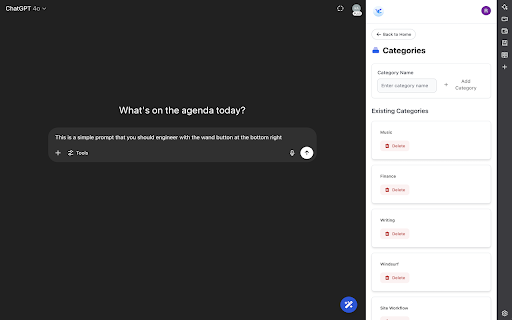

About
Promptaa: AI Prompt Engineering and Prompt Library
Upgrade your AI workflow with Promptaa, the chrome extension designed to help you save, organize, and engineer your prompts, all in one place.

Whether you're a developer, marketer, content creator, or just exploring AI prompt engineering, Promptaa gives you the tools to manage your most effective prompts like a pro. It's a prompt library and prompt engineering tool designed to help you save time.

✨ Features You’ll Love:

🪄 Improve prompt quality with one-click prompt engineering

🧠 Save and reuse your best AI prompts

🗂️ Organize prompts by categories

⚡ One-click insert into ChatGPT and other AI tools

We hope you love it as much as we do!

Instructions:
After installing, there are two main elements to interact with.

1. The AI enhance button located in the bottom right of the window.
Use: AI enhance prompts on any site where you use AI. This button has two other buttons that will appear once hovered over, the XML enhance button, and the "save prompt" button, which will copy the prompt over for you to save for later re-use.

2. The side-panel, which is opened by clicking the extension icon once installed.
Use: This has your prompt libraries. You can create categories, as well as create and re-use prompts after you've logged in.

Everything between the chrome extension and the web app are synced.

Website: https://promptaa.com
Technical
- Version
- 0.3.1
- Manifest
- V3
- Size
- 2.89MiB
- Min Chrome
- 88
- Languages
- 1
- Featured
- No
Metadata
- ID
- dcehgmbpmnadadleankijhdcelnlglha
- Developer ID
- u26bc0c5f74ed604905442d0771c9d804
- Developer Email
- [email protected]
- Created
- Jul 17, 2025
- Last Updated (Store)
- Mar 29, 2026
- Last Scraped
- Jun 8, 2026
- Website
- —
- Support URL
- https://promptaa.com/contact
- Privacy Policy
- https://promptaa.com/blog/privacy-policy
Similar extensions
Alternatives to Promptaa: Prompt Engineering and Library, ranked by description similarity.

AI Prompt Manager – PromptIn for ChatGPT, Claude, Gemini & More
AI Prompt Manager for ChatGPT, Claude, Gemini, Perplexity & Grok. Save, organize & reuse your best prompts in one place.
178
★ 5.0

AiPromptAgent
Manage your AI prompts across multiple AI platforms with ease.
79
★ 5.0

MagicPrompt - AI Prompt Generator
The ultimate AI prompt generator for ChatGPT, Claude, Gemini, and MidJourney. Save, optimize, and launch prompts in one click.
1.0K
★ 4.9

Promptly – AI Prompt Enhancer & Manager for ChatGPT, Claude, Gemini
Optimize, save & reuse AI prompts for ChatGPT, Claude, Gemini & more. Prompt library, one-click enhancer & conversation exporter.
30.0K
★ 4.5

Prompt Keeper
Save and manage your prompts easily
34

The Prompt Index
Access and manage prompts from The Prompt Index. Includes PromptShare, AI Humanizer, AI Detection, and more.
179
★ 5.0

AI Prompt Optimizer
Unleash AI power! Optimize prompts for ChatGPT, Claude, Grok, Gemini & more. Boost conversations instantly.
849
★ 3.0

AI Prompt Injector
Manage and insert prompts into AI chat interfaces
52
★ 5.0
Data sourced from the Chrome Web Store · last verified Jun 8, 2026.