
Context Reincarnation
Visualizes ChatGPT context token usage and helps you reincarnate sessions.
As of June 2026, Context Reincarnation has 8 users in the Productivity category.
Usersdown 27.3 percent−27.3%
8
8
Ratingno change0%
—
— reviews
Reviewsno change0%
—
Version
1.3.1
Manifest V3
History
5 snapshotsTracking since Apr 2, 2026.
View as table
| Date | Users | Rating | Reviews | Version |
|---|---|---|---|---|
| Apr 2, 2026 | 11 | — | — | 1.3.1 |
| May 5, 2026 | 10 | — | — | 1.3.1 |
| May 12, 2026 | 8 | — | — | 1.3.1 |
| May 30, 2026 | 9 | — | — | 1.3.1 |
| Jun 8, 2026 | 6 | — | — | 1.3.1 |
| Now | 8 | — | — | 1.3.1 |
Permissions & access
- Permissions
- storage
- Host access
- https://chatgpt.com/*, https://chat.openai.com/*
Screenshots


About
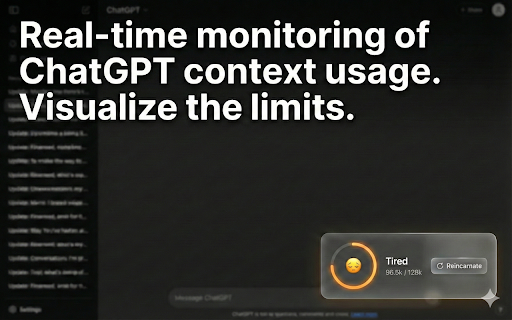
Does your ChatGPT get "tired" or "forgetful" after a long conversation? Context Reincarnation is a Chrome extension that visualizes ChatGPT's "vitality" (token usage) and helps you transfer the context to a fresh session before it hits the limit.

No more manually copying summaries or explaining the situation from scratch.

🌟 Key Features

1. Visualize AI "Vitality" A sleek ring widget displays the current token usage relative to the context limit . It shows the AI's status with intuitive emojis:

😄 Energetic: Fresh and ready.

😐 Serious: Getting deep into the conversation.

😓 Tired: Memory limit is approaching.

😵 CRITICAL: Time to reincarnate!

2. One-Click "Reincarnation" When the AI gets tired, simply click the "↺ Reincarnate" button. The extension automatically handles the rest:

Auto-Summarize: It asks ChatGPT to summarize the current role, tasks, and key decisions.

Auto-Transport: It opens a new chat and injects the summary as a "restored memory."

Seamless Continuity: Continue your work exactly where you left off.

3. Safety & Optimization Includes a safety token estimation logic that accounts for multi-byte characters (like Japanese or emojis), ensuring you don't hit the hard limit unexpectedly.

🎯 Perfect For:

Developers doing long coding/debugging sessions.

Writers & Roleplayers keeping track of complex story arcs.

Power Users who want to maintain high-quality responses over long periods.

How to use:

Install the extension. A widget will appear in the bottom-right corner of ChatGPT.

Monitor the ring gauge as you chat.

When the "Reincarnate" button appears, click it to transport your context to a fresh session.

Keep your AI partner fresh, smart, and efficient.
Technical
- Version
- 1.3.1
- Manifest
- V3
- Size
- 19.85KiB
- Min Chrome
- 88
- Languages
- 1
- Featured
- No
Metadata
- ID
- dcdcnfhgkhdkepdkgoankfldijkfeonh
- Developer ID
- u5afa41612492c1e22c01b42c3a53e756
- Developer Email
- [email protected]
- Created
- Jan 22, 2026
- Last Updated (Store)
- Jan 22, 2026
- Last Scraped
- Jun 8, 2026
- Website
- —
- Support URL
- —
- Privacy Policy
- —
Similar extensions
Alternatives to Context Reincarnation, ranked by description similarity.

AI Reincarnation
Resets the chat context while preserving memory.
2

AI Context Transfer
Transfer conversation context when hitting rate limits on AI chatbots
4

Unfreeze for ChatGPT
Makes long ChatGPT conversations load instantly by showing recent messages first
50

SoulArchive.AI
Export AI chat logs to Markdown and help preserve your character with a reusable persona core.
1

Contextual - Context Visualizer for ChatGPT
Tool to help you visualize context of conversations in ChatGPT
3
★ 5.0

GPT Cleaner
Optimizes ChatGPT performance - virtualizing messages — keeps only recent messages rendered and lazily loads older ones on scroll.
76
★ 5.0

AI Context Limit Tracker - ContextPulse
Real-time AI conversation quality tracker. Know when ChatGPT, Claude, Gemini, Perplexity, or Grok starts losing context.
129
★ 5.0

MaxMemory - Long-term memory for ChatGPT
Stop re-explaining your projects to ChatGPT. MaxMemory remembers what matters.
459
★ 4.7
Data sourced from the Chrome Web Store · last verified Jun 8, 2026.