
SuperChromePass
Generate secure, per-domain password based on an original master password, with the click of a button
As of May 2026, SuperChromePass has 175 users and a 4.67/5 rating from 3 reviews in the Workflow & Planning category.
Usersup 14.4 percent+14.4%
175
175
Ratingno change0%
4.67
3 reviews
Reviewsno change0%
3
Version
4.0.0
Manifest V3
History
2 snapshotsTracking since Apr 24, 2026.
View as table
| Date | Users | Rating | Reviews | Version |
|---|---|---|---|---|
| Apr 24, 2026 | 153 | 4.67 | 3 | 4.0.0 |
| May 19, 2026 | 171 | 4.67 | 3 | 4.0.0 |
| Now | 175 | 4.67 | 3 | 4.0.0 |
Permissions & access
- Permissions
- tabsstorage
- Host access
- None declared
Screenshots

About
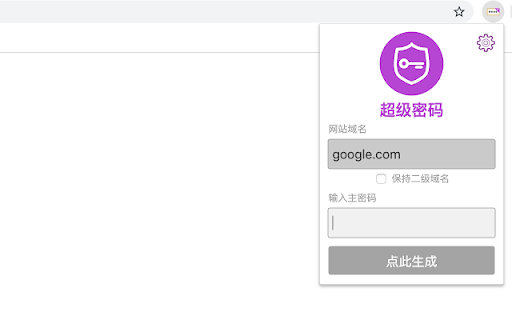
A SuperGenPass Google Chrome Extension How It Works Step 1 Click on the SuperGenPass extension button. Step 2 Type your master password and Enter. Step 3 Your password is generated and fill on input field. Do you know SuperGenPass? SuperGenPass is a useful bookmarklet. You can make unique strong secured password for each websites and No Need to remember. For more information, visit http://supergenpass.com.
Technical
- Version
- 4.0.0
- Manifest
- V3
- Size
- 95.93KiB
- Min Chrome
- 88
- Languages
- 2
- Featured
- No
Metadata
- ID
- dcdaiabaidgglbdapfdaengffpdpicbk
- Developer ID
- uf6dc0a7f07204d5784fed9c4f0f73d5a
- Developer Email
- [email protected]
- Created
- Sep 26, 2013
- Last Updated (Store)
- Jan 21, 2025
- Last Scraped
- May 19, 2026
- Website
- 70apps.com
- Support URL
- https://www.70apps.com/supergenpass/
- Privacy Policy
- https://70apps.com/blog/privacy/
Similar extensions
Alternatives to SuperChromePass, ranked by description similarity.

PassPocket
Generate high quality passwords with the click of a button.
2

Safepass: password generator - unique, random, and strong
SafePass – a unique, strength-driven password generator ensures your passwords are robust and random, offering security for free.
1.0K
★ 4.3

GetMyPassword - Create Strong, Random Passwords Instantly
Fast and simple Chrome extension with an on-page widget for generating strong, random passwords directly in website forms
93
★ 5.0

Password Generator
A simple password generator extension.
—

PassG: Random Password Generator
Create strong, customizable passwords for enhanced online security.
188
★ 5.0

EasyPass – Secure Passwords in One Click
Create secure passwords instantly – simple, smart, and safe with EasyPass.
3
TweakPass: Free Password Manager
Manage your passwords on a single click
718
★ 4.7

Password Generator
Create strong and customizable passwords. Ajust length & characters. Quick copy. Protect your accounts. Get the Chrome extension now
84
★ 5.0
Data sourced from the Chrome Web Store · last verified May 19, 2026.