
Deep Tab Search: Tab Switcher & Search
Tab manager, tab switcher and search. Fast navigation through open tabs and quick access to information.
As of May 2026, Deep Tab Search: Tab Switcher & Search has 989 users and a 3.25/5 rating from 12 reviews in the Workflow & Planning category.
Usersdown 1.1 percent−1.1%
989
989
Ratingno change0%
3.25
12 reviews
Reviewsno change0%
12
Version
1.0.6
Manifest V3
History
2 snapshotsTracking since Apr 24, 2026.
View as table
| Date | Users | Rating | Reviews | Version |
|---|---|---|---|---|
| Apr 24, 2026 | 1.0K | 3.25 | 12 | 1.0.6 |
| May 19, 2026 | 1.0K | 3.25 | 12 | 1.0.6 |
| Now | 989 | 3.25 | 12 | 1.0.6 |
Permissions & access
- Permissions
- tabsscriptingfaviconstoragesearch
- Host access
- *://*/*
Screenshots


About
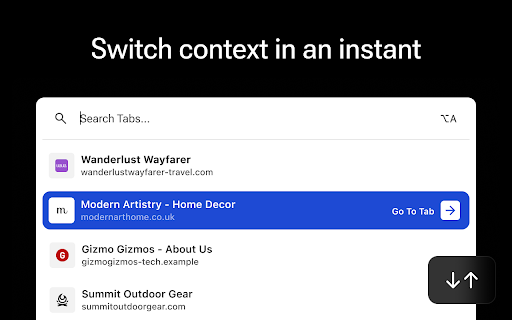
Deep Tab Search is a Chrome extension that helps you search through and efficiently switch between all your open tabs. Deep Tab Search is the perfect solution for those who work with multiple tabs open and want to find information quickly without the hassle of manually searching through each tab.

FEATURES:

- Content Search: Search across all your open Chrome tabs.
- Relevant Results: Search results are sorted be relevance.
- Blazing Fast: Instantly searches every open tab in the blink of an eye.
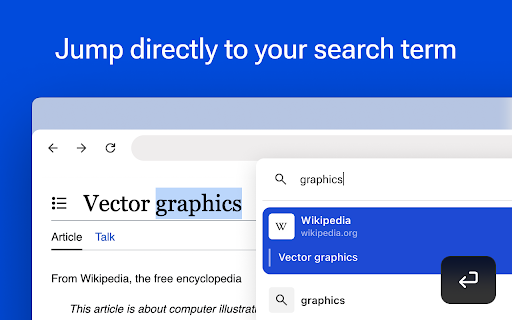
- Jump to Search Terms: Open tabs and go directly to your search term.
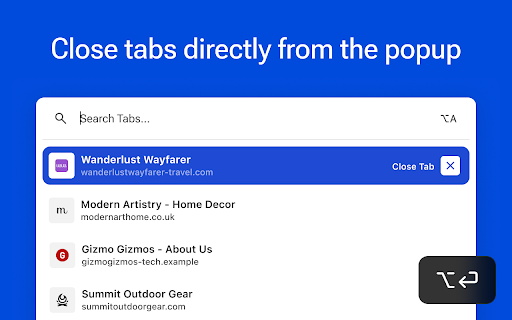
- Tab Management: Close tabs from the extension popup.
- Web Search Integration: Perform web searches directly from the extension.
- Intuitive Ordering: Tabs are listed by most recently used.
- Search History: Access your recent search history.

IDEAL FOR:

- Professionals, Researchers and Students.
- Multitaskers.
- Power Users.

USAGE

Install Deep Tab Search and click the icon in Chrome's extension tray, or use the shortcut Option/Alt + A to activate the extension. Start typing to instantly see results from all your open tabs. Click on a search result to switch to that tab and find your search term highlighted. Alternatively, navigate through results with arrow keys and press Enter to select. Hold the Alt/Option key while selecting a tab to close it. Browse your recent search history by holding Shift and pressing the Up and Down arrow keys.

- Option/Alt + A to invoke Deep Tab Search
- Arrow Keys to browse search results
- Enter to select a result
- Option + Enter to close a tab
- Shift + Arrow Keys to browse session search history

PERFORMANCE

For optimal performance, it's recommended to use Deep Tab Search with Chrome's memory saver feature turned off. This is because the extension needs to access the content of all tabs, and the memory saver feature might unload some tabs to conserve resources. However, Deep Tab Search will still work as expected with memory saver on, it just means that if it encounters any unloaded tabs, it will automatically reload them when you invoke the extension and show an "Indexing tabs..." message during this process.
Technical
- Version
- 1.0.6
- Manifest
- V3
- Size
- 27.53KiB
- Min Chrome
- 109
- Languages
- 1
- Featured
- Yes
Metadata
- ID
- dbppkkjmaloclihjakcpnionomlidbhk
- Developer ID
- ub35186ba2fe065983d099b234cc90e37
- Developer Email
- [email protected]
- Created
- Jan 9, 2024
- Last Updated (Store)
- Jan 31, 2024
- Last Scraped
- May 19, 2026
- Website
- —
- Support URL
- —
- Privacy Policy
- —
Similar extensions
Alternatives to Deep Tab Search: Tab Switcher & Search, ranked by description similarity.

Quick Tab Search
Quickly search and switch between open tabs
209
★ 5.0

Tab Search
Search and switch to a specific tab
18
★ 3.0

Tab & Group Manager
A tab manager with vertical view designed for developers
33
★ 5.0

Tab Brain
Local RAG-powered semantic search across your open browser tabs
—

Advanced Tab Switcher
Automatically switches between tabs at a specified interval. Created by MD Arifuzzaman
212
★ 1.0

quickee
Tabs on steroids
10
★ 5.0

TabShab – Search Through 100+ Tabs Instantly
Easily Search and Organize Tabs, the best tool for Tab Management, enhancing your productivity and saving time.
52
★ 5.0

Lightweight Tab Search
Quick way to navigate through tabs!
504
★ 4.8
Data sourced from the Chrome Web Store · last verified May 19, 2026.