AI Response Generator for Email Review Reply
AI Response Generator: Streamlines email, reviews, comments, and feedback reply, boosting customer satisfaction and efficiency.
As of May 2026, AI Response Generator for Email Review Reply has 173 users in the Communication category.
Usersdown 10.4 percent−10.4%
173
173
Ratingno change0%
—
— reviews
Reviewsno change0%
—
Version
1.0.6
Manifest V3
History
1 snapshotsTracking since Apr 24, 2026.
View as table
| Date | Users | Rating | Reviews | Version |
|---|---|---|---|---|
| Apr 24, 2026 | 193 | — | — | 1.0.6 |
| Now | 173 | — | — | 1.0.6 |
Permissions & access
- Permissions
- storage
- Host access
- https://api.tubeaide.com/*
Screenshots


About
💡 Do you find yourself overwhelmed by the sheer volume of emails, online reviews, and social media feedback that require your attention daily? The challenge of crafting timely, personalized, and professional responses across various digital platforms can disrupt your workflow and stretch your customer service resources thin.
The AI Response Generator for Email Reply offers a seamless solution: with intelligent automation, it quickly generates coherent, context-sensitive replies, ensuring efficient customer engagement without the manual workload.

Why Choose Our AI Response Generator  Extension:
● One-click replies for emails, reviews, comments, and feedback
● Streamlines multitasking workflows
● Enhances customer interaction and satisfaction

How To Use It: A Step-by-Step Guide
Add the AI Response Generator extension from the Chrome Web Store.
Open an email, review, comment, or feedback form in Chrome.
Click the extension icon for AI Response Generator.
Input the message needing a reply.
Select your desired tone and language.
Generate a personalized reply with just one click.

Key Features and Capabilities of  AI Response Generator Extension

1.Navigation Tabs:
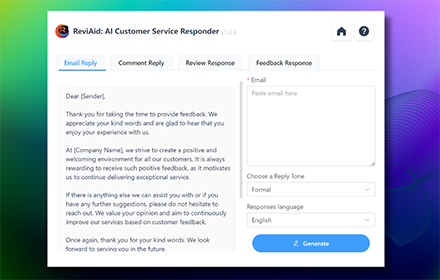
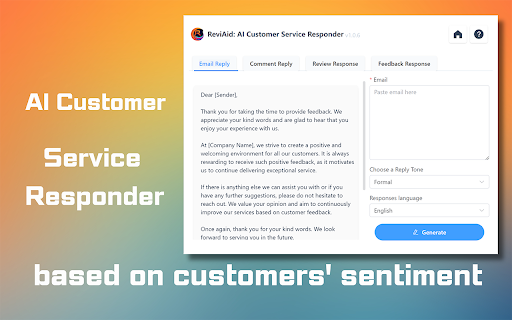
The user interface is divided into four main tabs: Email Reply, Comment Reply, Review Response, and Feedback Response. Users can click on these tabs to access the specific feature they need to use.

2.Email Reply:
●Under the "Email Reply" tab, there is a text box where users can paste the content of the customer's email.
●Users can select the "Tone of voice" from a dropdown menu to match the desired communication style, such as empathetic, professional, friendly, etc.
●The "Responses language" dropdown allows users to choose the language in which they want the response to be generated.
●After setting the parameters, clicking the "Generate" button will instruct the AI to produce a suitable reply.

3.Comment Reply:
●This feature allows users to generate replies to comments received on social media or other platforms.
●The process is similar to the Email Reply, where users paste the comment, select the tone and language, and generate a response.

4.Review Response:
●For responding to online reviews, users can use this feature to maintain a positive and professional online presence.
●After pasting the review text, users can again adjust the tone and choose a language for the AI to craft a suitable reply.

5.Feedback Response:
●This tab is specialized for handling direct customer feedback.
●Users can input the feedback content, adjust the tone of voice, and language, then generate a thoughtful and appropriate response.

The interface is designed for ease of use, allowing customer service agents or business owners to quickly generate high-quality responses to various forms of customer communications, saving time and ensuring consistency in tone and quality.

FAQs for AI Response Generator for Email Reply

What is the AI Response Generator for Email Reply?

The AI Response Generator for Email Reply is an advanced digital communication tool designed to automate and enhance responses across emails, reviews, comments, and feedback. It leverages artificial intelligence to provide efficient, personalized, and contextually relevant replies.

How does this AI email reply tool improve customer satisfaction?

By delivering prompt and accurately tailored responses, this tool significantly improves customer interaction and satisfaction. It ensures that each reply is relevant and thoughtful, fostering positive customer relationships and enhancing your brand's reputation.

Can the AI tool handle different types of digital communication?

Yes, our AI response tool is versatile and can manage a variety of digital communications, including professional email replies, engaging comment responses on social media, insightful review feedback, and constructive responses to customer feedback.

What makes this AI tool stand out for managing email and online interactions?

Our AI Response Generator is not just an automated reply tool; it's an intelligent system that understands the context and nuances of different types of digital communications. This makes it uniquely effective for businesses looking to enhance online customer engagement and maintain a strong digital presence.

How does the AI Response Generator ensure privacy and data security?

Data security and privacy are our top priorities. The tool adheres to strict data protection protocols, ensuring that all customer interactions are handled with the utmost confidentiality and security.

Is there customer support available for this AI digital communication tool?

Yes, we provide comprehensive customer support for our AI Response Generator. Our team of experts is available to assist with setup, integration, and any queries you may have, ensuring a smooth user experience.

Where can I find more information about optimizing digital communication with AI?

For more insights on enhancing your digital communication strategies with AI, visit our website. We offer a wealth of resources, including detailed articles, user guides, and case studies demonstrating the effectiveness of our AI tools in various business contexts.
Technical
- Version
- 1.0.6
- Manifest
- V3
- Size
- 1.05MiB
- Min Chrome
- 88
- Languages
- 1
- Featured
- Yes
Metadata
- ID
- dboaknppnafgciopnkolidkincjabmad
- Developer ID
- u1a842ba35a85efa5a2d7d2274ee352ba
- Developer Email
- [email protected]
- Created
- Aug 7, 2023
- Last Updated (Store)
- Jan 2, 2024
- Last Scraped
- May 19, 2026
- Website
- reviaid.com
- Support URL
- https://reviaid.com/contact/
- Privacy Policy
- https://reviaid.com/privacy-policy/
Similar extensions
Alternatives to AI Response Generator for Email Review Reply, ranked by description similarity.

Email Reply Generator
Write emails faster with Email Reply Generator—a professional AI response tool for generating emails for Gmail, Outlook, and more.
1.0K
★ 5.0

SmartReply AI
Generate human-like email and message replies using AI. Multiple tones, lengths, and intents.
—

AI Message Response Generator - by AIFreeBox
Generate message responses with AI. Turn ideas into professional replies in seconds. Create responses directly in your browser.
15

AI for Email
Compose or reply fast with AI for Email. Improve your writing and grammar with smart email AI. Ideal GPT tool for work messages.
76
★ 1.0

A.I. Reply Generator
Never Be Stuck for a Reply Again – A.I. Reply Generator Writes It For You! Craft Brilliant Replies to Emails, Comments, and More.
24

Free AI Email Generator: AIFreeBox
Free AI Email Generator: Create high-quality emails fast. Turn ideas into engaging emails with AI-driven technology, by AIFreeBox.
1.0K
★ 5.0

GPT.ga – Email & Messenger ChatGPT Support
🤖 AI replies for email, chat & CRM. Save prompts, respond faster, boost productivity — directly in your browser.
31
★ 5.0

AI Comment Generator
AI Comment and reply generator for any platform
5
Data sourced from the Chrome Web Store · last verified May 19, 2026.