
SnapLingo AI - 英语学习助手
在真实阅读场景中学习英语。划词即查,AI 生成详细解释、语法分析与例句,支持记忆卡复习。
As of June 2026, SnapLingo AI - 英语学习助手 has 2 users in the Education category.
Usersno change0%
2
2
Ratingno change0%
—
— reviews
Reviewsno change0%
—
Version
0.1.0
Manifest V3
History
6 snapshotsTracking since Apr 22, 2026.
View as table
| Date | Users | Rating | Reviews | Version |
|---|---|---|---|---|
| Apr 22, 2026 | — | — | — | 0.1.0 |
| Apr 26, 2026 | — | — | — | 0.1.0 |
| May 4, 2026 | 1 | — | — | 0.1.0 |
| May 9, 2026 | — | — | — | 0.1.0 |
| May 14, 2026 | 1 | — | — | 0.1.0 |
| May 21, 2026 | — | — | — | 0.1.0 |
| Now | 2 | — | — | 0.1.0 |
Permissions & access
- Permissions
- storagetabs
- Host access
- https://*/*, http://127.0.0.1/*, http://localhost/*
Screenshots



About
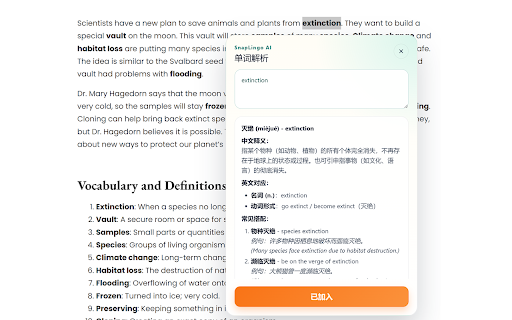
SnapLingo AI is an AI-powered English learning assistant for Chrome and Edge. It helps users understand English content directly while browsing by providing detailed explanations, grammar analysis, and vocabulary insights.

Simply select any English text on a webpage, press Alt + T, or click the SL button to get AI-generated explanations, example sentences, and grammar breakdowns. You can also save important content into memory cards for later review.

## Key Features

### 📚 Smart Learning

* **Vocabulary insights**: meanings, common phrases, and contextual examples
* **Sentence analysis**: translation, grammar structure, and comparison examples
* **Long text understanding**: full translation with key highlights

### 💾 Memory & Review

* **Flashcard system**: save important content with automatic deduplication (up to 200 cards)
* **Learning history**: track recent queries (up to 100 entries)
* **Review mode**: browse flashcards and history directly on web pages

### ⚡ Easy Interaction

* **Text selection trigger**: select text to activate the SL button
* **Keyboard shortcut**: Alt + T to query, Escape to close
* **Smart detection**: automatically adapts to words, sentences, or long text

### 🔧 Flexible Configuration

* **Multiple AI models**: supports GLM, Hunyuan, Tongyi, DeepSeek, and more
* **Custom API support**: compatible with OpenAI-style APIs
* **User-controlled API key**: no data relay through third-party servers
* **Local storage**: all settings, flashcards, and history are stored locally

## Best For

* Reading English articles
* Browsing international websites
* Learning vocabulary and grammar
* Improving reading comprehension

Chinese edition:
SnapLingo AI 是一个基于 AI 的英语学习助手(Chrome/Edge 扩展)。它不只是翻译工具,而是帮你在真实阅读场景中积累单词、理解语法、建立记忆卡片。选中网页中的英文内容,按 Alt + T 或点击 SL 按钮,即可获得 AI 生成的详细解释、例句和语法说明,并可保存到记忆卡中随时复习。

核心功能
📚 智能学习内容
单词深度解析:核心含义、常用短语、语境示例
句子语法讲解:翻译 + 语法结构分析 + 例句对比
长文本理解:全文翻译 + 重点难点提示
💾 记忆与复习
记忆卡系统:一键收藏重要内容,自动去重管理(最多 200 条)
学习历史:自动记录每次查询(最近 100 条)
浏览复习模式:在网页中循环浏览记忆卡或历史记录,沉浸式复习
⚡ 便捷交互
划词触发:选中文本后显示 SL 按钮
快捷键:Alt + T 快速查询,Escape 关闭面板
智能识别:自动判断单词/短句/长文本,匹配最佳解析策略
🔧 灵活配置
多模型支持:内置智谱 GLM、腾讯混元、阿里通义、DeepSeek 等预设模型
自定义模型:支持接入任何兼容 OpenAI API 格式的模型
自主可控:使用你自己的 API Key,数据不经第三方中转
本地存储:所有设置、记忆卡、历史记录仅保存在浏览器本地

适用于:
- 阅读英文文章
- 浏览海外网站
- 学习英语词汇与语法
- 提高阅读理解能力
Technical
- Version
- 0.1.0
- Manifest
- V3
- Size
- 113KiB
- Min Chrome
- 88
- Languages
- 2
- Featured
- No
Metadata
- ID
- dbjjlamedmjccojpfbgfackbbjkifnkp
- Developer ID
- u003a877360f2414e8b41910370d2a151
- Developer Email
- [email protected]
- Created
- Apr 21, 2026
- Last Updated (Store)
- Apr 21, 2026
- Last Scraped
- Jun 9, 2026
- Website
- —
- Support URL
- —
Data sourced from the Chrome Web Store · last verified Jun 9, 2026.