
Citrix Web Extension
Launch your workspaces anytime, anywhere without an .ica file keeping your experience safe and reliable.
As of June 2026, Citrix Web Extension has 500,000 users and a 2.00/5 rating from 28 reviews in the Workflow & Planning category.
Usersdown 16.7 percent−16.7%
500.0K
500,000
Ratingup 11.1 percent+11.1%
2.00
28 reviews
Reviewsup 12.0 percent+12.0%
28
Version
26.1.6
Manifest V3
90-day change · In the last 90 days this extension lost 100.0K users, 1 version update.
History
11 snapshotsTracking since Apr 1, 2026.
View as table
| Date | Users | Rating | Reviews | Version |
|---|---|---|---|---|
| Apr 1, 2026 | 600.0K | 1.80 | 25 | 26.1.5 |
| Apr 5, 2026 | 600.0K | 1.80 | 25 | 26.1.6 |
| Apr 16, 2026 | 500.0K | 1.80 | 25 | 26.1.6 |
| Apr 23, 2026 | 600.0K | 1.77 | 26 | 26.1.6 |
| May 11, 2026 | 600.0K | 1.77 | 26 | 26.1.6 |
| May 14, 2026 | 500.0K | 1.77 | 26 | 26.1.6 |
| May 19, 2026 | 600.0K | 1.89 | 27 | 26.1.6 |
| May 23, 2026 | 500.0K | 1.89 | 27 | 26.1.6 |
| May 28, 2026 | 600.0K | 1.89 | 27 | 26.1.6 |
| Jun 6, 2026 | 500.0K | 1.89 | 27 | 26.1.6 |
| Jun 23, 2026 | 600.0K | 1.89 | 27 | 26.1.6 |
| Now | 500.0K | 2.00 | 28 | 26.1.6 |
Permissions & access
- Permissions
- nativeMessagingstoragetabs
- Host access
- *://*/Citrix/*
Screenshots



About
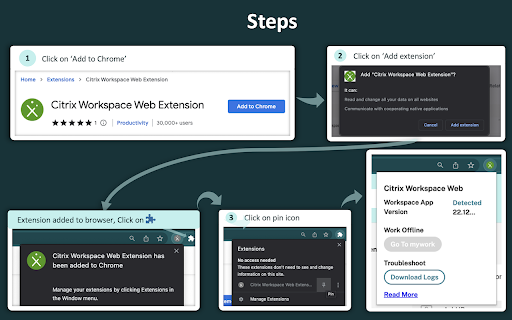
Install this extension to detect your locally installed Workspace app from your browser. This will launch your browser with added security and reliability without the need to download an .ica file. Additional benefits to this are screen capture, app protection and seamless service continuity.

Once installed, extension has access only to workspace websites (turns green) and don't have access to other websites (grayed out). The browser extension also detects the Workspace app version you are using and displays the version number. This will be accessible for both on-premises and cloud users.

Key features ;

1. Reliable: No more failures when launching Citrix workspace virtual desktops and apps, simultaneously launch multiple apps without failure.

2. Secure: No more .ica file download on non-secure devices.

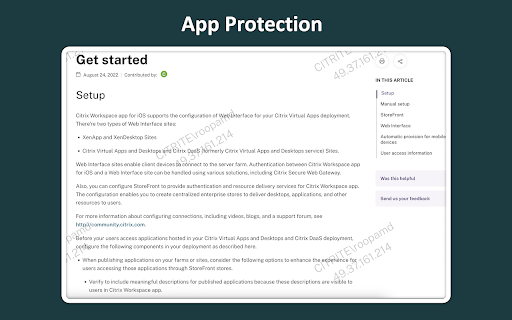
3. App Protection: Prevents screen capture by displaying an IP address watermark.

4. Login timeout tooltip: Prompts users to start using offline mode if the authentication is not successful within 30 seconds.

5. Troubleshooting logs: To help troubleshoot any problems.

Note: Feature support depends on the platform support and entitlement
Technical
- Version
- 26.1.6
- Manifest
- V3
- Size
- 409KiB
- Min Chrome
- 104
- Languages
- 9
- Featured
- No
Metadata
- ID
- dbdlmgpfijccjgnnpacnamgdfmljoeee
- Developer ID
- ua7f45729b73d16e7ef8da08adffb1376
- Developer Email
- [email protected]
- Created
- Dec 23, 2020
- Last Updated (Store)
- Mar 31, 2026
- Last Scraped
- Jun 23, 2026
- Website
- —
- Support URL
- https://www.citrix.com/support/
- Privacy Policy
- —
Similar extensions
Alternatives to Citrix Web Extension, ranked by description similarity.

Citrix Web Extension - Beta
Launch your workspaces anytime, anywhere without an .ica file keeping your experience safe and reliable.
1.0K

Devolutions Password Manager
Form filler that obtains entries from Remote Desktop Manager, Devolutions Server, and Devolutions Cloud
60.0K
★ 3.7

Workplace by OS33
Login to a company-branded dashboard with secure access to all your web and hosted applications.
30.0K
★ 3.7

CTX Launcher for Managed Guest Sessions
A helper extension for Chrome Enterprise with requirements to auto-launch Citrix Workspace after entering a managed guest session
10.0K
Prevent-Workday-Timeout
Prevent session timeouts on the Workday website.
580
★ 3.2

Secure Workspace
Splashtop Secure Workspace is for simple & secure access to applications and services.
124
★ 5.0

Idira Identity Browser Extension
The Idira® Browser Extension(formerly CyberArk Identity Browser Extension) increases your security and efficiency at work.
With…
600.0K
★ 3.3

Llamabox Extension
Captures snippets or entire webpage content.
6
Data sourced from the Chrome Web Store · last verified Jun 23, 2026.