
Sticky Notes Pro
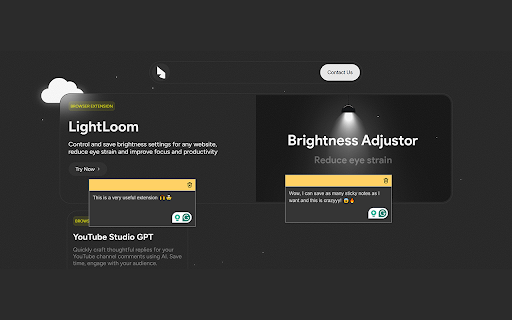
Add sticky notes to any website, save them, and view them anytime!
As of June 2026, Sticky Notes Pro has 17 users in the Workflow & Planning category.
Usersup 88.9 percent+88.9%
17
17
Ratingno change0%
—
— reviews
Reviewsno change0%
—
Version
1.12.0
Manifest V3
90-day change · In the last 90 days this extension 3 version updates, changed permissions.
History
7 snapshotsTracking since Apr 17, 2026.
View as table
| Date | Users | Rating | Reviews | Version |
|---|---|---|---|---|
| Apr 17, 2026 | 9 | — | — | 0.8 |
| May 2, 2026 | 12 | — | — | 0.10 |
| May 13, 2026 | 13 | — | — | 0.11 |
| May 19, 2026 | 15 | — | — | 0.11 |
| May 26, 2026 | 14 | — | — | 0.11 |
| Jun 1, 2026 | 15 | — | — | 0.11 |
| Jun 8, 2026 | 16 | — | — | 1.12.0 |
| Now | 17 | — | — | 1.12.0 |
Changelog
- Jun 1, 2026description
Ever find yourself forgetting important notes or ideas while browsing? 🤔📝

Sticky Notes is here to help! With this simple yet powerful extension, you can easily add and save sticky notes on any website, ensuring that nothing slips through the cracks.

Whether you're researching 📚, organizing tasks ✅, or need a quick place to jot down thoughts 💡, Sticky Notes makes it effortless to stay on top of everything.

✨ Why do you need Sticky Notes?

- 📝 Never lose a note again: Your notes are saved and synced, no matter which website you're on.

- ⚡ Stay organized in a click: Quickly add notes without interrupting your workflow.

- 🚀 No more scattered tools: Keep everything in one place, right in your browser, without jumping between apps.

Make your browsing experience smarter, more organized, and more productive with Sticky Notes! 🖥️✨

Use the handy keyboard shortcut (Ctrl + Q or ⌘ + Q on macOS) ⌨️ or right-click anywhere on a website and click the 'Create Sticky Note' button to add a new note instantly.

Your notes are saved automatically 💾 and stay accessible across all websites you visit, so you never have to worry about losing them again. Everything you need is right there in your browser, ready to view anytime, anywhere.

⚠️ Please take note: Your notes are stored in your browser’s local storage, which is persistent across sessions. However, if you clear your browser's data, your notes may be lost. To avoid this, please make sure to keep your browser data intact. (We will soon let you store your notes in a database — next updates!) 📦💡

👉 UPDATES (actively updating this extension)

v0.4 (11 Oct 2025)
- search function
- edit, copy icons, go to note, delete icon with delete confirmation
- customizable color selection sticky notes
- custom matching visuals in popup sync with sticky notes

v0.5 (11 Oct 2025)
- added simple dashboard view icon (+ dashboard page)

v0.6 (14 Oct 2025)
- added note editing in dashboard
- fixed sticky note icon styling
** (sticky note header might overflow on some website, will be fixed soon)

v0.7 & v0.8 (24 Dec 2025)
- minor updates

v0.9 (10 April 2026)
- fixed the sticky notes not working properly on websites
- sleek delete confirmations on sticky notes (both in popup and on sites)
- Google Auth with database backup (never lose a note again)
- Robust fallback system to backup your notes when not logged-in, sync notes when ready.

v0.11 (24 April 2026)
- Added: Cloud Synchronization: Seamlessly sync your notes across devices using Google Sign-In.
- Fixed: Search Stability: Fixed a bug where collapsing a domain group would reset active search results.
- Fixed: Sleeker UI/UX


*** WE STILL IN BETA, so much ideas for this tool and send your feedback so we can built something you love, be part of it. 💞
Leave sticky notes on any website and pick up exactly where you left off. Sticky Notes Pro keeps ideas, tasks, and research tied to the pages they belong on—so nothing gets lost in a separate app or forgotten tab.

**What you get**

• **Notes on any site** — Add sticky notes while you browse. They stay on that page and come back when you return.
• **Fast capture** — Press **Ctrl + Q** (⌘ + Q on Mac) or right-click **Create Sticky Note**. Turn selected text into a note in one click.
• **Auto-save** — Notes save as you type. Drag, resize, color-code, and minimize without breaking your flow.
• **All notes in one place** — Use the extension popup or full **My Notes** dashboard to search, sort, and manage everything by site.
• **Organize your library** — Folders, tags, and search help you find notes quickly as your collection grows.
• **Page highlights** — Save important snippets from articles and pages alongside your notes.
• **Reminders** — Set a time and get a notification when a note needs your attention.
• **Sign in with Google** — Back up and sync notes to the cloud with **Pro**, access them from the extension and dashboard, and migrate existing local notes when you upgrade.

**Why Sticky Notes Pro?**

Most note tools live in a separate window. Sticky Notes Pro lives where you work—in the browser. That means less context switching, fewer lost thoughts, and notes that make sense because they sit on the page you were reading, shopping on, or researching.

**Get started in seconds**

1. Pin the extension from the Chrome toolbar.
2. Open any website and create your first note.
3. Click the icon anytime to view all notes, or open **My Notes** for the full dashboard.

Free to start. Upgrade to **Pro** for cloud sync, backup, ad-free use, and migration tools.

Questions or feedback? We’re actively improving Sticky Notes Pro—your input helps shape what we build next.
- Jun 1, 2026name
Sticky Notes
Sticky Notes Pro
- Jun 1, 2026permissions
storage, activeTab, scripting, contextMenus, identity, offscreen
storage, activeTab, scripting, contextMenus, identity, offscreen, alarms, notifications
- May 2, 2026description
Ever find yourself forgetting important notes or ideas while browsing? 🤔📝

Sticky Notes is here to help! With this simple yet powerful extension, you can easily add and save sticky notes on any website, ensuring that nothing slips through the cracks.

Whether you're researching 📚, organizing tasks ✅, or need a quick place to jot down thoughts 💡, Sticky Notes makes it effortless to stay on top of everything.

✨ Why do you need Sticky Notes?

- 📝 Never lose a note again: Your notes are saved and synced, no matter which website you're on.

- ⚡ Stay organized in a click: Quickly add notes without interrupting your workflow.

- 🚀 No more scattered tools: Keep everything in one place, right in your browser, without jumping between apps.

Make your browsing experience smarter, more organized, and more productive with Sticky Notes! 🖥️✨

Use the handy keyboard shortcut (Ctrl + Q or ⌘ + Q on macOS) ⌨️ or right-click anywhere on a website and click the 'Create Sticky Note' button to add a new note instantly.

Your notes are saved automatically 💾 and stay accessible across all websites you visit, so you never have to worry about losing them again. Everything you need is right there in your browser, ready to view anytime, anywhere.

⚠️ Please take note: Your notes are stored in your browser’s local storage, which is persistent across sessions. However, if you clear your browser's data, your notes may be lost. To avoid this, please make sure to keep your browser data intact. (We will soon let you store your notes in a database — next updates!) 📦💡

👉 UPDATES (actively updating this extension)

v0.4 (11 Oct 2025)
- search function
- edit, copy icons, go to note, delete icon with delete confirmation
- customizable color selection sticky notes
- custom matching visuals in popup sync with sticky notes

v0.5 (11 Oct 2025)
- added simple dashboard view icon (+ dashboard page)

v0.6 (14 Oct 2025)
- added note editing in dashboard
- fixed sticky note icon styling
** (sticky note header might overflow on some website, will be fixed soon)

v0.7 & v0.8 (24 Dec 2025)
- minor updates

v0.9 (10 April 2026)
- fixed the sticky notes not working properly on websites
- sleek delete confirmations on sticky notes (both in popup and on sites)
- Google Auth with database backup (never lose a note again)
- Robust fallback system to backup your notes when not logged-in, sync notes when ready.


*** WE STILL IN BETA, so much ideas for this tool and send your feedback so we can built something you love, be part of it. 💞
Ever find yourself forgetting important notes or ideas while browsing? 🤔📝

Sticky Notes is here to help! With this simple yet powerful extension, you can easily add and save sticky notes on any website, ensuring that nothing slips through the cracks.

Whether you're researching 📚, organizing tasks ✅, or need a quick place to jot down thoughts 💡, Sticky Notes makes it effortless to stay on top of everything.

✨ Why do you need Sticky Notes?

- 📝 Never lose a note again: Your notes are saved and synced, no matter which website you're on.

- ⚡ Stay organized in a click: Quickly add notes without interrupting your workflow.

- 🚀 No more scattered tools: Keep everything in one place, right in your browser, without jumping between apps.

Make your browsing experience smarter, more organized, and more productive with Sticky Notes! 🖥️✨

Use the handy keyboard shortcut (Ctrl + Q or ⌘ + Q on macOS) ⌨️ or right-click anywhere on a website and click the 'Create Sticky Note' button to add a new note instantly.

Your notes are saved automatically 💾 and stay accessible across all websites you visit, so you never have to worry about losing them again. Everything you need is right there in your browser, ready to view anytime, anywhere.

⚠️ Please take note: Your notes are stored in your browser’s local storage, which is persistent across sessions. However, if you clear your browser's data, your notes may be lost. To avoid this, please make sure to keep your browser data intact. (We will soon let you store your notes in a database — next updates!) 📦💡

👉 UPDATES (actively updating this extension)

v0.4 (11 Oct 2025)
- search function
- edit, copy icons, go to note, delete icon with delete confirmation
- customizable color selection sticky notes
- custom matching visuals in popup sync with sticky notes

v0.5 (11 Oct 2025)
- added simple dashboard view icon (+ dashboard page)

v0.6 (14 Oct 2025)
- added note editing in dashboard
- fixed sticky note icon styling
** (sticky note header might overflow on some website, will be fixed soon)

v0.7 & v0.8 (24 Dec 2025)
- minor updates

v0.9 (10 April 2026)
- fixed the sticky notes not working properly on websites
- sleek delete confirmations on sticky notes (both in popup and on sites)
- Google Auth with database backup (never lose a note again)
- Robust fallback system to backup your notes when not logged-in, sync notes when ready.

v0.11 (24 April 2026)
- Added: Cloud Synchronization: Seamlessly sync your notes across devices using Google Sign-In.
- Fixed: Search Stability: Fixed a bug where collapsing a domain group would reset active search results.
- Fixed: Sleeker UI/UX


*** WE STILL IN BETA, so much ideas for this tool and send your feedback so we can built something you love, be part of it. 💞
- Apr 17, 2026description
Ever find yourself forgetting important notes or ideas while browsing? 🤔📝

Sticky Notes is here to help! With this simple yet powerful extension, you can easily add and save sticky notes on any website, ensuring that nothing slips through the cracks.

Whether you're researching 📚, organizing tasks ✅, or need a quick place to jot down thoughts 💡, Sticky Notes makes it effortless to stay on top of everything.

✨ Why do you need Sticky Notes?

- 📝 Never lose a note again: Your notes are saved and synced, no matter which website you're on.

- ⚡ Stay organized in a click: Quickly add notes without interrupting your workflow.

- 🚀 No more scattered tools: Keep everything in one place, right in your browser, without jumping between apps.

Make your browsing experience smarter, more organized, and more productive with Sticky Notes! 🖥️✨

Use the handy keyboard shortcut (Ctrl + Q or ⌘ + Q on macOS) ⌨️ or right-click anywhere on a website and click the 'Create Sticky Note' button to add a new note instantly.

Your notes are saved automatically 💾 and stay accessible across all websites you visit, so you never have to worry about losing them again. Everything you need is right there in your browser, ready to view anytime, anywhere.

⚠️ Please take note: Your notes are stored in your browser’s local storage, which is persistent across sessions. However, if you clear your browser's data, your notes may be lost. To avoid this, please make sure to keep your browser data intact. (We will soon let you store your notes in a database — next updates!) 📦💡

👉 UPDATES (actively updating this extension)

v0.4 (11 Oct 2025)
- search function
- edit, copy icons, go to note, delete icon with delete confirmation
- customizable color selection sticky notes
- custom matching visuals in popup sync with sticky notes

v0.5 (11 Oct 2025)
- added simple dashboard view icon (+ dashboard page)

v0.6 (14 Oct 2025)
- added note editing in dashboard
- fixed sticky note icon styling
** (sticky note header might overflow on some website, will be fixed soon)
Ever find yourself forgetting important notes or ideas while browsing? 🤔📝

Sticky Notes is here to help! With this simple yet powerful extension, you can easily add and save sticky notes on any website, ensuring that nothing slips through the cracks.

Whether you're researching 📚, organizing tasks ✅, or need a quick place to jot down thoughts 💡, Sticky Notes makes it effortless to stay on top of everything.

✨ Why do you need Sticky Notes?

- 📝 Never lose a note again: Your notes are saved and synced, no matter which website you're on.

- ⚡ Stay organized in a click: Quickly add notes without interrupting your workflow.

- 🚀 No more scattered tools: Keep everything in one place, right in your browser, without jumping between apps.

Make your browsing experience smarter, more organized, and more productive with Sticky Notes! 🖥️✨

Use the handy keyboard shortcut (Ctrl + Q or ⌘ + Q on macOS) ⌨️ or right-click anywhere on a website and click the 'Create Sticky Note' button to add a new note instantly.

Your notes are saved automatically 💾 and stay accessible across all websites you visit, so you never have to worry about losing them again. Everything you need is right there in your browser, ready to view anytime, anywhere.

⚠️ Please take note: Your notes are stored in your browser’s local storage, which is persistent across sessions. However, if you clear your browser's data, your notes may be lost. To avoid this, please make sure to keep your browser data intact. (We will soon let you store your notes in a database — next updates!) 📦💡

👉 UPDATES (actively updating this extension)

v0.4 (11 Oct 2025)
- search function
- edit, copy icons, go to note, delete icon with delete confirmation
- customizable color selection sticky notes
- custom matching visuals in popup sync with sticky notes

v0.5 (11 Oct 2025)
- added simple dashboard view icon (+ dashboard page)

v0.6 (14 Oct 2025)
- added note editing in dashboard
- fixed sticky note icon styling
** (sticky note header might overflow on some website, will be fixed soon)

v0.7 & v0.8 (24 Dec 2025)
- minor updates

v0.9 (10 April 2026)
- fixed the sticky notes not working properly on websites
- sleek delete confirmations on sticky notes (both in popup and on sites)
- Google Auth with database backup (never lose a note again)
- Robust fallback system to backup your notes when not logged-in, sync notes when ready.


*** WE STILL IN BETA, so much ideas for this tool and send your feedback so we can built something you love, be part of it. 💞
- Apr 17, 2026permissions
storage, activeTab, scripting, contextMenus, identity
storage, activeTab, scripting, contextMenus, identity, offscreen
Permissions & access
- Permissions
- storageactiveTabscriptingcontextMenusidentityoffscreenalarmsnotifications
- Host access
- <all_urls>
Screenshots

About
Leave sticky notes on any website and pick up exactly where you left off. Sticky Notes Pro keeps ideas, tasks, and research tied to the pages they belong on—so nothing gets lost in a separate app or forgotten tab.

**What you get**

• **Notes on any site** — Add sticky notes while you browse. They stay on that page and come back when you return.
• **Fast capture** — Press **Ctrl + Q** (⌘ + Q on Mac) or right-click **Create Sticky Note**. Turn selected text into a note in one click.
• **Auto-save** — Notes save as you type. Drag, resize, color-code, and minimize without breaking your flow.
• **All notes in one place** — Use the extension popup or full **My Notes** dashboard to search, sort, and manage everything by site.
• **Organize your library** — Folders, tags, and search help you find notes quickly as your collection grows.
• **Page highlights** — Save important snippets from articles and pages alongside your notes.
• **Reminders** — Set a time and get a notification when a note needs your attention.
• **Sign in with Google** — Back up and sync notes to the cloud with **Pro**, access them from the extension and dashboard, and migrate existing local notes when you upgrade.

**Why Sticky Notes Pro?**

Most note tools live in a separate window. Sticky Notes Pro lives where you work—in the browser. That means less context switching, fewer lost thoughts, and notes that make sense because they sit on the page you were reading, shopping on, or researching.

**Get started in seconds**

1. Pin the extension from the Chrome toolbar.
2. Open any website and create your first note.
3. Click the icon anytime to view all notes, or open **My Notes** for the full dashboard.

Free to start. Upgrade to **Pro** for cloud sync, backup, ad-free use, and migration tools.

Questions or feedback? We’re actively improving Sticky Notes Pro—your input helps shape what we build next.
Technical
- Version
- 1.12.0
- Manifest
- V3
- Size
- 4.51MiB
- Min Chrome
- 88
- Languages
- 1
- Featured
- No
Metadata
- ID
- dbdbpgnapbdffchoikhlaonkbkggppib
- Developer ID
- u2304f3e30f0d81be23bcd0807a752088
- Developer Email
- [email protected]
- Created
- Mar 5, 2025
- Last Updated (Store)
- Jun 1, 2026
- Last Scraped
- Jun 8, 2026
- Website
- partnerflow.co.za
Similar extensions
Alternatives to Sticky Notes Pro, ranked by description similarity.

Sticky Notes - Capture thoughts anywhere on any web page
Add sticky notes to any webpage, saved per URL.
24
★ 5.0

Sticky Notes - Easy Web Notes & Quick Reminders
Add sticky notes to any website! Free forever, simple & easy. Save notes, set reminders & organize ideas. Never forget!
16
★ 5.0

Sticky Notes Extension
Take notes on any webpage with floating sticky notes
13
★ 5.0

Sticky Notes
Notes for your browser
109
★ 5.0

SkyNotes: Sticky Notes on new tab
Create floating sticky notes for webpages that appear on popup and new tab
32
★ 5.0

Simple Sticky Notes
Boost your productivity with simple sticky notes app. Make handy floating notes! Online sticky notes in Chrome on Mac & Windows
8.0K
★ 4.8
Sticky Notes
Extension sticky notes is an online notes for Chrome. Use this notes board to jot down your sticky ideas and tasks in the browser.
1.0K
★ 5.0

Sticky Notes Plus
Place and share sticky notes on webpages
2.0K
★ 2.5
Data sourced from the Chrome Web Store · last verified Jun 8, 2026.