
HubSpot UI Color Changer
Customize HubSpot sidebar, top bar, and accent colors for your own UI.
As of June 2026, HubSpot UI Color Changer has 27 users in the Productivity category.
Usersno change0%
27
27
Ratingno change0%
—
— reviews
Reviewsno change0%
—
Version
1.2.5
Manifest V3
History
5 snapshotsTracking since Apr 18, 2026.
View as table
| Date | Users | Rating | Reviews | Version |
|---|---|---|---|---|
| Apr 18, 2026 | — | — | — | 1.2.5 |
| Apr 28, 2026 | 20 | — | — | 1.2.5 |
| May 7, 2026 | 20 | — | — | 1.2.5 |
| May 14, 2026 | 24 | — | — | 1.2.5 |
| Jun 3, 2026 | 25 | — | — | 1.2.5 |
| Now | 27 | — | — | 1.2.5 |
Permissions & access
- Permissions
- storage
- Host access
- https://*.hubspot.com/*
Screenshots
About
🌈 Bring Personality & Comfort to Your HubSpot. Finally!

HubSpot is powerful… but its UI is stuck in one color scheme, and it offers zero built-in customization.
If you spend hours a day inside HubSpot, you’ve probably asked yourself:

“Why can’t I change the colors? Why can’t I make it match my brand or at least look easier on my eyes?”

This extension fixes that.

✨ What HubSpot UI Color Changer Does

This extension lets you fully customize HubSpot’s appearance right from your browser, instantly and safely.

With one click, you can change:

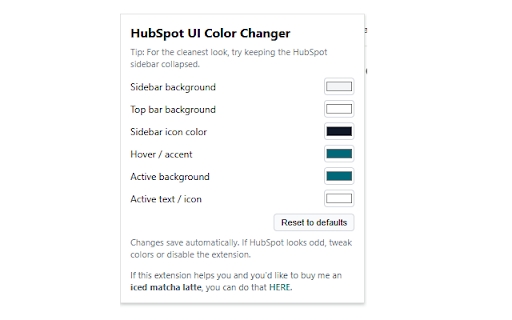
🎨 Sidebar color
🎨 Sidebar icons
🎨 Hover color & accent color
🎨 Active menu highlight
🎨 Top navigation bar color

You get complete control over your HubSpot look & feel — without affecting anyone else on your team and without touching any HubSpot data.

It simply updates your own browser’s CSS, similar to popular extensions like Dark Reader or Stylish.

💡 Why You Should Install It
1. HubSpot has no built-in theme customization
      Every user gets the same default colors… forever.
      This extension gives you the freedom HubSpot never offered.
2. Make HubSpot match your brand
    Use your company’s colors so your CRM looks like part of your environment...not a random       magenta takeover.
3. Make your workspace feel personal
   You live inside HubSpot all day.
   It should actually feel good to use.
4. It’s safe, fast, and always free
    No trackers
    No analytics
    No data collection
    No HubSpot API access
    No performance hit
   Just simple CSS theme customization.

🚀 Who is this for?
Anyone who:
Works in HubSpot daily
Wants a cleaner, more modern UI
Wants to match their CRM to their brand
Simply doesn’t like the default HubSpot magenta

If that’s you this extension will make HubSpot instantly more enjoyable and visually cohesive.
Technical
- Version
- 1.2.5
- Manifest
- V3
- Size
- 11.33KiB
- Min Chrome
- 88
- Languages
- 1
- Featured
- No
Metadata
- ID
- daplgfjbmhahephncfabmjcmdcoapejj
- Developer ID
- u7c861c841908251b08ae6f826edd4c03
- Developer Email
- [email protected]
- Created
- Nov 25, 2025
- Last Updated (Store)
- Nov 25, 2025
- Last Scraped
- Jun 3, 2026
- Website
- —
- Support URL
- —
Similar extensions
Alternatives to HubSpot UI Color Changer, ranked by description similarity.

HubSpot Colored Favicons
Updates the standard favicon on HubSpot tabs with colored versions to help differentiate between environments and organizations.
14

HubSpot Activity Highlighter
Highlight different activity types with distinct colors on HubSpot record pages
5

Twitter Color Customizer - Unlimited Theme Options
Unlock unlimited color themes for Twitter (and X.com)! Customize your Twitter experience with any color.
28
★ 5.0

Color Picker – Eye Dropper & Palette Generator
Pick colors, generate palettes, export to JSON/CSS/ASE.
—

Webpage Color Customizer
Customize webpage colors with presets and custom themes.
126

Hue Changer 🌈
Change the hue of any website at any time! Adjust or turn off the hue whenever you want. (for colorblind people)
77
★ 5.0

Extension Hub
Your central control center for all browser extensions.
33
★ 5.0

color identifier
The color identifier app helps you to find hex code from images or web pages. Use our rgb color finder to detect a color in seconds
52
Data sourced from the Chrome Web Store · last verified Jun 3, 2026.