BQ Tabs+
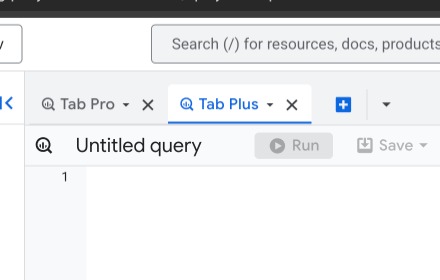
Rename SQL tabs in BigQuery (double-click)
As of June 2026, BQ Tabs+ has 3 users and a 5.00/5 rating from 1 reviews in the Productivity category.
Usersdown 25.0 percent−25.0%
3
3
Ratingno change0%
5.00
1 reviews
Reviewsno change0%
1
Version
2.0.0
Manifest V3
History
5 snapshotsTracking since Apr 17, 2026.
View as table
| Date | Users | Rating | Reviews | Version |
|---|---|---|---|---|
| Apr 17, 2026 | 4 | 5.00 | 1 | 2.0.0 |
| Apr 27, 2026 | 4 | 5.00 | 1 | 2.0.0 |
| May 10, 2026 | 4 | 5.00 | 1 | 2.0.0 |
| Jun 1, 2026 | 3 | 5.00 | 1 | 2.0.0 |
| Jun 9, 2026 | — | 5.00 | 1 | 2.0.0 |
| Now | 3 | 5.00 | 1 | 2.0.0 |
Permissions & access
- Permissions
- None declared
- Host access
- https://console.cloud.google.com/*
Screenshots


About
Short description: Rename BigQuery SQL tabs with double-click!

Full description:
Rename your SQL tabs in BigQuery console easily.

✨ Features:
• Double-click tab title → new name
• Works with new tabs
• Stable & lightweight
• BigQuery console only

📱 Usage:
1. Install extension
2. Go to console.cloud.google.com/bigquery
3. Double-click "Untitled query" → your name!
Technical
- Version
- 2.0.0
- Manifest
- V3
- Size
- 10.89KiB
- Min Chrome
- 88
- Languages
- 1
- Featured
- No
Metadata
- ID
- danlmkjolgbdceanncgcbhijfphmibec
- Developer ID
- u16a18dca3952276751e86f91f2376fc2
- Developer Email
- [email protected]
- Created
- Feb 17, 2026
- Last Updated (Store)
- Feb 17, 2026
- Last Scraped
- Jun 9, 2026
- Website
- —
- Support URL
- —
- Privacy Policy
- —
Similar extensions
Alternatives to BQ Tabs+, ranked by description similarity.

Easy Tab Renamer
Click the icon, right-click, or use a shortcut to rename your tabs!
4

simple-tab-rename
This is a Simple Tab Rename.
140
★ 5.0

Rename Tab
Rename Chrome tabs with persistent titles across page refreshes
58
★ 3.0

Tab Renamer
Temporarily change the title of the current tab.
6
★ 5.0

Retabtile
Retabtile - set the title of your browser tabs.
58
★ 5.0

Tab Renamer
Rename the current tab’s title and keep it from changing.
1

Custom Tab Name
Customize browser tab titles manually or automatically.
138
★ 3.0

Advanced Tab Renamer - Custom Names & Icons
Rename any tab & set a custom favicon by URL, prefix, or regex. phpMyAdmin DB detection. Bilingual EN/FR. For all users !
40
★ 4.5
Data sourced from the Chrome Web Store · last verified Jun 9, 2026.