
Thinkly - AI Chat Capture & Conversation Search
Capture, search, and organize ChatGPT, Claude, Gemini, and other AI conversations before they disappear.
As of June 2026, Thinkly - AI Chat Capture & Conversation Search has 7 users in the Productivity category.
Usersno change0%
7
7
Ratingno change0%
—
— reviews
Reviewsno change0%
—
Version
4.2.2
Manifest V3
90-day change · In the last 90 days this extension 1 version update, changed permissions.
History
8 snapshotsTracking since Apr 21, 2026.
View as table
| Date | Users | Rating | Reviews | Version |
|---|---|---|---|---|
| Apr 21, 2026 | — | — | — | 0.4.10 |
| Apr 26, 2026 | — | — | — | 0.4.10 |
| May 3, 2026 | 2 | — | — | 0.4.10 |
| May 9, 2026 | 3 | — | — | 4.2.2 |
| May 14, 2026 | 8 | — | — | 4.2.2 |
| May 20, 2026 | 7 | — | — | 4.2.2 |
| May 26, 2026 | 8 | — | — | 4.2.2 |
| Jun 2, 2026 | 6 | — | — | 4.2.2 |
| Now | 7 | — | — | 4.2.2 |
Changelog
- May 3, 2026description
Thinkly is a Chrome extension for quickly saving useful text from AI conversations and webpages, then organizing what you saved so it stays useful later.

  Use Quick Save on ChatGPT, Claude, and the web to capture the lines, answers, and research you want to keep. Instead of leaving saved text scattered across
  tabs, docs, and bookmarks, Thinkly helps you keep it organized and easier to reuse.

  What Thinkly helps you do:
  - Quick Save useful text from AI chats and webpages
  - Keep highlights, notes, and links in one place
  - Organize saved clips for later review
  - Turn saved material into reusable pages and briefs
  - Work without building a complicated note system first

  Thinkly is built for people who already save useful ideas, answers, and research, but want that saved material to stay easy to find and use again later.
Thinkly — Save & Organize AI Conversations Save useful text from ChatGPT, Claude, Gemini, and any AI chat with one click. Thinkly captures your conversations before they disappear, keeps them organized, and makes them easy to find and reuse. ★ KEY FEATURES • Quick Save — One-click capture from any AI chat or webpage • Auto Capture — Automatically save AI conversations as they happen • Smart Organization — Filter, search, and review saved clips • Multi-Platform — Works with ChatGPT, Claude, Gemini, Perplexity, DeepSeek, and more • Export — Download saved content as Markdown files • Keyboard Shortcut — Cmd+Shift+S (Mac) / Ctrl+Shift+S (Windows) ★ PRIVACY FIRST • All data stored locally in your browser by default • Cloud sync is completely optional and encrypted • No tracking, no ads, no data selling • Free forever — no account required to start ★ WHO IS THIS FOR? • Researchers saving AI-generated insights and analysis • Developers capturing code snippets and technical answers • Writers collecting ideas, drafts, and reference material • Students organizing study notes from AI tutors • Anyone who uses AI daily and wants to keep the best parts ★ HOW IT WORKS 1. Install Thinkly and visit any AI chat (ChatGPT, Claude, Gemini) 2. Select text or use Quick Save to capture useful content 3. Review and organize your clips in the Thinkly popup 4. Export or sync your organized knowledge ★ SUPPORTED PLATFORMS ChatGPT · Claude · Gemini (More to come) Stop losing valuable AI conversations. Start saving what matters. Free to use. No account required. Install in 30 seconds. - May 3, 2026short_description
Capture and organize insights from AI conversations on ChatGPT and Claude
Capture, search, and organize ChatGPT, Claude, Gemini, and other AI conversations before they disappear.
- May 3, 2026name
Thinkly
Thinkly - AI Chat Capture & Conversation Search
- May 3, 2026permissions
storage, activeTab, downloads, identity, alarms
storage, activeTab, downloads, identity, alarms, sidePanel
Permissions & access
- Permissions
- storageactiveTabdownloadsidentityalarmssidePanel
- Host access
- <all_urls>
Screenshots


About
Thinkly — Save & Organize AI Conversations

Save useful text from ChatGPT, Claude, Gemini, and any AI chat with one click. Thinkly captures your conversations before they disappear, keeps them organized, and makes them easy to find and reuse.

★ KEY FEATURES
     • Quick Save — One-click capture from any AI chat or webpage
     • Auto Capture — Automatically save AI conversations as they happen
     • Smart Organization — Filter, search, and review saved clips
     • Multi-Platform — Works with ChatGPT, Claude, Gemini, Perplexity, DeepSeek, and more
     • Export — Download saved content as Markdown files
     • Keyboard Shortcut — Cmd+Shift+S (Mac) / Ctrl+Shift+S (Windows)

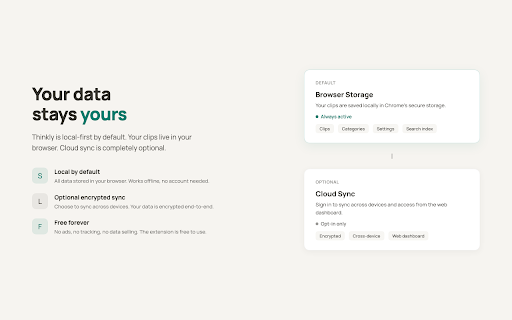
★ PRIVACY FIRST
     • All data stored locally in your browser by default
     • Cloud sync is completely optional and encrypted
     • No tracking, no ads, no data selling
     • Free forever — no account required to start

★ WHO IS THIS FOR?
     • Researchers saving AI-generated insights and analysis
     • Developers capturing code snippets and technical answers
     • Writers collecting ideas, drafts, and reference material
     • Students organizing study notes from AI tutors
     • Anyone who uses AI daily and wants to keep the best parts

★ HOW IT WORKS
     1. Install Thinkly and visit any AI chat (ChatGPT, Claude, Gemini)
     2. Select text or use Quick Save to capture useful content
     3. Review and organize your clips in the Thinkly popup
     4. Export or sync your organized knowledge

★ SUPPORTED PLATFORMS
ChatGPT · Claude · Gemini (More to come)

Stop losing valuable AI conversations. Start saving what matters.

Free to use. No account required. Install in 30 seconds.
Technical
- Version
- 4.2.2
- Manifest
- V3
- Size
- 186KiB
- Min Chrome
- 88
- Languages
- 1
- Featured
- No
Metadata
- ID
- dalpnaomnhgfddnikeoolnopmniegplo
- Developer ID
- u3ce913bfdd4a246102ff265a460e1bc7
- Developer Email
- [email protected]
- Created
- Apr 20, 2026
- Last Updated (Store)
- Apr 28, 2026
- Last Scraped
- Jun 8, 2026
- Website
- https://thinkly.pluglab.ai/
- Support URL
- https://thinkly.pluglab.ai/en/guide
- Privacy Policy
- https://thinkly.pluglab.ai/en/privacy
Data sourced from the Chrome Web Store · last verified Jun 8, 2026.