
SplitView - Multi Panel Browser
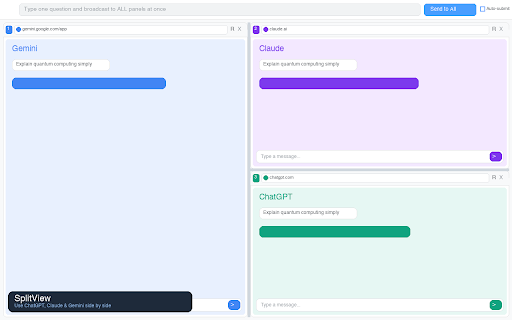
Display 2, 3, or 4 web pages simultaneously with resizable panels
As of June 2026, SplitView - Multi Panel Browser has 13 users and a 5.00/5 rating from 1 reviews in the Productivity category.
Usersno change0%
13
13
Ratingno change0%
5.00
1 reviews
Reviewsno change0%
1
Version
1.2.0
Manifest V3
90-day change · In the last 90 days this extension 1 version update.
History
4 snapshotsTracking since May 15, 2026.
View as table
| Date | Users | Rating | Reviews | Version |
|---|---|---|---|---|
| May 15, 2026 | — | — | — | 1.1.1 |
| May 21, 2026 | — | — | — | 1.1.1 |
| May 27, 2026 | 3 | 5.00 | 1 | 1.2.0 |
| Jun 3, 2026 | 9 | 5.00 | 1 | 1.2.0 |
| Now | 13 | 5.00 | 1 | 1.2.0 |
Permissions & access
- Permissions
- storagedeclarativeNetRequesthistory
- Host access
- <all_urls>
Screenshots
About
Stop switching tabs. SplitView lets you view 2, 3, or 4 websites side by side in a single window — look up references, compare prices, or read documentation without ever leaving your current page.

  KEY FEATURES

  · View up to 4 websites simultaneously with resizable panels
  · 9 layout options — side-by-side, stacked, 3-panel, 4-panel, and asymmetric grids
  · Drag to resize panels at any time
  · Address bar with browser history autocomplete in every panel
  · Broadcast bar — type once and send the same message to all panels at once
  · Auto-submit — automatically clicks the send button after broadcasting
  · Save presets — bookmark your favorite URL combinations and reopen them in one click

  HOW TO USE
  1. Click the SplitView icon in your toolbar
  2. Choose a layout or pick a saved preset
  3. Each panel has its own address bar — type a URL and press Enter
  4. Use the broadcast bar to send the same message to all panels at once

  No accounts, no cloud sync, no data collection. Everything stays on your device.
Technical
- Version
- 1.2.0
- Manifest
- V3
- Size
- 29.8KiB
- Min Chrome
- 88
- Languages
- 4
- Featured
- No
Metadata
- ID
- daiabkfonahieaehpojeknlhajjcoenf
- Developer ID
- u19e88b35bb8151f24f4b1a4b396adac9
- Developer Email
- [email protected]
- Created
- May 14, 2026
- Last Updated (Store)
- May 19, 2026
- Last Scraped
- Jun 9, 2026
- Website
- —
- Support URL
- https://github.com/aleclee1005/splitview
- Privacy Policy
- https://fluffy-puffpuff-4411a9.netlify.app
Data sourced from the Chrome Web Store · last verified Jun 9, 2026.