
ScriptVault - Premium JS Manager
Save, manage, and execute your favorite JavaScript snippets with style.
As of June 2026, ScriptVault - Premium JS Manager has 7 users in the Productivity category.
Usersup 40.0 percent+40.0%
7
7
Ratingno change0%
—
— reviews
Reviewsno change0%
—
Version
1.0.0
Manifest V3
History
5 snapshotsTracking since Apr 18, 2026.
View as table
| Date | Users | Rating | Reviews | Version |
|---|---|---|---|---|
| Apr 18, 2026 | 5 | — | — | 1.0.0 |
| Apr 28, 2026 | 3 | — | — | 1.0.0 |
| May 7, 2026 | 4 | — | — | 1.0.0 |
| May 24, 2026 | 5 | — | — | 1.0.0 |
| Jun 3, 2026 | 3 | — | — | 1.0.0 |
| Now | 7 | — | — | 1.0.0 |
Permissions & access
- Permissions
- storageactiveTabscripting
- Host access
- None declared
Screenshots


About
ScriptVault is the ultimate tool for developers, testers, and power users who need quick access to their custom JavaScript snippets. Tired of typing the same console commands over and over? ScriptVault lets you save, organize, and run your JavaScript code on any webpage with a single click.

Designed with a modern, premium aesthetic, ScriptVault offers a seamless experience that feels right at home in your browser. Whether you're automating form filling, debugging a site, or injecting custom styles and behavior, ScriptVault keeps your code safe and ready to use.

Key Features:
⚡ One-Click Execution: Run your saved scripts instantly on the active tab.
🎨 Premium UI: Enjoy a beautiful, clean interface with dark mode support and smooth animations.
💾 Local Storage: Your scripts are saved securely in your browser's local storage—no account required.
🔍 Quick Search: Find the script you need in seconds with the built-in search bar.
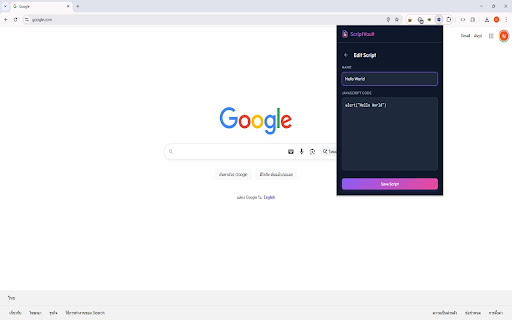
📝 Full Editor: Write and edit your code directly in the extension with a user-friendly editor.
📋 Clipboard Ready: Quickly copy your snippets to the clipboard when you need to share them or paste them elsewhere.
🛡️ Safe Execution: Scripts run in the page's main world context, giving you full access to the window object and global variables.
Perfect for:

Web Developers
QA Engineers
Data Entry Automation
Customizing Web Experience
Privacy Policy: ScriptVault operates entirely offline. Your scripts are stored locally on your device and are never sent to any external server.
Technical
- Version
- 1.0.0
- Manifest
- V3
- Size
- 26.22KiB
- Min Chrome
- 88
- Languages
- 1
- Featured
- No
Metadata
- ID
- dafhfphdjcbeilldjfljknapaicignbi
- Developer ID
- u22f141ba8ab1b94ce1b1a3c2ce921887
- Developer Email
- [email protected]
- Created
- Dec 10, 2025
- Last Updated (Store)
- Dec 10, 2025
- Last Scraped
- Jun 3, 2026
- Website
- —
- Support URL
- —
- Privacy Policy
- —
Similar extensions
Alternatives to ScriptVault - Premium JS Manager, ranked by description similarity.

xVault
A storage that helps you manage your important text snippets and notes. Keep and copy in 1 click!
6
★ 5.0

ClipVault: Secure Clipboard History & Sync
Never lose what you copy again. A secure, searchable clipboard manager with optional end-to-end encrypted cloud sync
2

Script Master
Run custom scripts on a webpage.
858

Web Vault
Save and organize media, web pages, and text snippets.
3

TabVault - Smart Session Manager
Save, restore, and organize your browser tabs into sessions. Never lose your work again.
6
★ 5.0

Site Script Launcher
Run custom JavaScript on a user-defined URL.
9

ScriptRunner - v3 userScript manager
ScriptRunner allow you to create,manage and inject userScripts on any website you want
1.0K
★ 4.0

SessionVault
Powerful session management extension - Backup, restore, and organize your browsing sessions
9
Data sourced from the Chrome Web Store · last verified Jun 3, 2026.