Sidelane - Tabs and bookmarks by project
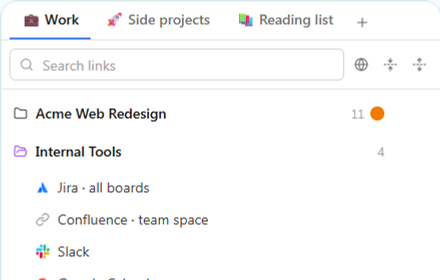
Side panel to organize your tabs and bookmarks by project. Smart tab reuse, native Tab Groups, sync across profiles.
As of June 2026, Sidelane - Tabs and bookmarks by project has 4 users and a 5.00/5 rating from 1 reviews in the Productivity category.
Usersno change0%
4
4
Ratingno change0%
5.00
1 reviews
Reviewsno change0%
1
Version
1.1.0
Manifest V3
90-day change · In the last 90 days this extension 1 version update.
History
3 snapshotsTracking since May 21, 2026.
Not enough history yet for this metric — the chart fills in as we collect more snapshots.
View as table
| Date | Users | Rating | Reviews | Version |
|---|---|---|---|---|
| May 21, 2026 | — | — | — | 1.0.2 |
| May 27, 2026 | — | — | — | 1.0.2 |
| Jun 3, 2026 | — | 5.00 | 1 | 1.1.0 |
| Now | 4 | 5.00 | 1 | 1.1.0 |
Permissions & access
- Permissions
- sidePaneltabstabGroupsstoragefavicon
- Host access
- None declared
Screenshots


About
Sidelane keeps your most-used tabs and links one click away, right in the Chrome side panel.

Stop hunting through 50 open tabs or losing bookmarks in a flat list. Organize your work into Spaces (one per context: Work, Personal, Research…), each with nested folders and direct links, all visible without leaving the page you're reading.

━━━━━━━━━━━━━━━━━━━━━━━━━━━━━━━━━━━━

HOW IT WORKS

• Spaces · top-level containers, one per context, switch in one click
• Nested folders · up to 5 levels deep, drag and drop to reorganize
• Direct links · pin links at the Space level, bookmarks-bar style
• Smart tab reuse · clicking a saved link switches to an already-open tab (even in another Chrome window) instead of opening a duplicate
• Native Chrome Tab Groups · opt-in per folder or per Space, with auto-sync of the group's name and color
• Fuzzy search · find any link by title or URL in milliseconds, scoped to the active Space or across all of them
• Drag and drop from the address bar · drop any URL straight into a folder or a Space, with live visual feedback

━━━━━━━━━━━━━━━━━━━━━━━━━━━━━━━━━━━━

DESIGNED FOR

• Developers juggling several projects (frontend, backend, ops, internal tools)
• Researchers and students collecting sources across topics
• Knowledge workers who never close their tabs and need them organized somewhere

━━━━━━━━━━━━━━━━━━━━━━━━━━━━━━━━━━━━

YOUR DATA STAYS YOURS

Sidelane uses chrome.storage.sync: your data syncs automatically across every Chrome profile signed into your Google account. No server, no analytics, no tracking. Export and import everything as JSON anytime from Settings.

━━━━━━━━━━━━━━━━━━━━━━━━━━━━━━━━━━━━

PRACTICAL DETAILS

• Available in English, French, Spanish (follows your Chrome language)
• Light and dark mode with auto detection
• Compact mode to fit more links on screen
• Keyboard shortcuts cheat-sheet built in
• Free, no account required

Sidelane is built with Manifest V3 and uses only the strictly necessary permissions: sidePanel, tabs, tabGroups, storage, favicon. Nothing more.
Technical
- Version
- 1.1.0
- Manifest
- V3
- Size
- 355KiB
- Min Chrome
- 88
- Languages
- 3
- Featured
- No
Metadata
- ID
- dafamhidndmggjbmbeacaadhjhcpakcc
- Developer ID
- u240a39d5b09ad405464ca1cfacbb831d
- Developer Email
- [email protected]
- Created
- May 20, 2026
- Last Updated (Store)
- May 22, 2026
- Last Scraped
- Jun 9, 2026
- Website
- —
- Support URL
- —
Data sourced from the Chrome Web Store · last verified Jun 9, 2026.