
Save as JPG
One-click image-to-JPG conversion from any webpage. Your data never leaves your browser.
As of June 2026, Save as JPG has 521 users and a 5.00/5 rating from 2 reviews in the Workflow & Planning category.
Usersup 543.2 percent+543.2%
521
521
Ratingno change0%
5.00
2 reviews
Reviewsno change0%
2
Version
2.0.2
Manifest V3
History
6 snapshotsTracking since Apr 18, 2026.
View as table
| Date | Users | Rating | Reviews | Version |
|---|---|---|---|---|
| Apr 18, 2026 | 81 | 5.00 | 2 | 2.0.2 |
| Apr 28, 2026 | 202 | 5.00 | 2 | 2.0.2 |
| May 7, 2026 | 362 | 5.00 | 2 | 2.0.2 |
| May 14, 2026 | 570 | 5.00 | 2 | 2.0.2 |
| May 24, 2026 | 525 | 5.00 | 2 | 2.0.2 |
| Jun 3, 2026 | 517 | 5.00 | 2 | 2.0.2 |
| Now | 521 | 5.00 | 2 | 2.0.2 |
Permissions & access
- Permissions
- contextMenusdownloadsstorageoffscreenactiveTabnotifications
- Host access
- <all_urls>
Screenshots


About
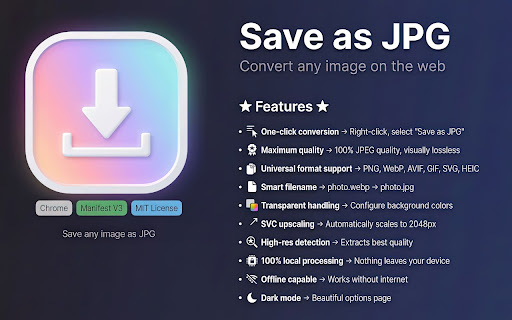
Transform any web image to high-quality JPEG with a single right-click.

Save as JPG is the ultimate image conversion tool that works instantly, locally, and beautifully. No uploads, no internet required, no compromises on quality.

Key Features:

🖱️ One-Click Simplicity Right-click any image and select "Save as JPG" — it's that easy. No complicated menus or extra steps.

💎 Maximum Quality, Every Time Default 100% JPEG quality setting ensures visually lossless conversions. Your images look exactly as they should.

🔄 Universal Format Support Seamlessly converts virtually any modern or legacy web image format into JPEG.

🧠 Smart & Intuitive
• Preserves Filenames: Keeps your original image titles intact.
• Handles Transparency: Automatically fills transparent backgrounds (configurable).
• High-Res Output: Upscales vector graphics to ensure crisp quality.
• Quality Extraction: Detects the best possible resolution from the page code.

🔒 Privacy First 100% local processing means your images never leave your device. No servers, no tracking, no data collection.

✈️ Works Anywhere, Anytime Fully functional offline — convert images even without an internet connection.

Perfect for:
✅ Designers needing quick format conversions
✅ Web developers testing image compatibility
✅ Anyone who wants images in a universally supported format
✅ Users dealing with modern web formats unsupported by older software
Technical
- Version
- 2.0.2
- Manifest
- V3
- Size
- 53.81KiB
- Min Chrome
- 88
- Languages
- 1
- Featured
- No
Metadata
- ID
- dadnafobdjcpcjaijfhchlmfhgmdklbd
- Developer ID
- u64dd7c137a5e75768f7b4e71aa25ea37
- Developer Email
- [email protected]
- Created
- Dec 9, 2025
- Last Updated (Store)
- Dec 12, 2025
- Last Scraped
- Jun 3, 2026
- Website
- —
- Support URL
- https://github.com/GosuDRM
Similar extensions
Alternatives to Save as JPG, ranked by description similarity.

Image Save as Type (JPG, PNG, WebP)
Save images in JPG, PNG, and WebP formats with a single click from the context menu
120

Image Converter & Compressor
Convert images between JPG, PNG and WebP and control compression directly in your browser.
35
★ 5.0

Save Image in Preferred Format
Download any image into JPG, PNG, SVG or WebP format.
17

Save as PNG
Easily convert and download images in PNG format with a single right-click!
123

Save Image As PNG/JPG/WebP
Convert images to PNG, JPG, or WebP format with ease. Simply right-click on any image and select your desired format.
5.0K
★ 3.3

QuickSave - Image Format Converter
Save and convert images to JPG, PNG, or WebP with keyboard shortcuts. Easily manage your favorite images.
107
★ 5.0

JPG to PDF Converter
JPG to PDF Converter — format JPG to PDF instantly on any webpage. Simple, fast convert JPG to PDF without leaving your tab.
404
★ 5.0

Convert WebP to JPG
Use Convert WebP to JPG to effortlessly change WebP to JPG, making it simple to turn WebP into JPG with one click.
1.0K
★ 4.4
Data sourced from the Chrome Web Store · last verified Jun 3, 2026.