
Inspector on acids
Inspector on Acids — Simplified HTML and CSS Inspection Inspector on Acids is a lightweight tool that allows you to inspect the…
As of June 2026, Inspector on acids has 148 users and a 5.00/5 rating from 4 reviews in the Developer Tools category.
Usersdown 2.0 percent−2.0%
148
148
Ratingno change0%
5.00
4 reviews
Reviewsno change0%
4
Version
0.0.2.0
Manifest V3
History
6 snapshotsTracking since Apr 18, 2026.
View as table
| Date | Users | Rating | Reviews | Version |
|---|---|---|---|---|
| Apr 18, 2026 | 151 | 5.00 | 4 | 0.0.2.0 |
| Apr 28, 2026 | 155 | 5.00 | 4 | 0.0.2.0 |
| May 7, 2026 | 148 | 5.00 | 4 | 0.0.2.0 |
| May 14, 2026 | 151 | 5.00 | 4 | 0.0.2.0 |
| May 24, 2026 | 136 | 5.00 | 4 | 0.0.2.0 |
| Jun 5, 2026 | 142 | 5.00 | 4 | 0.0.2.0 |
| Now | 148 | 5.00 | 4 | 0.0.2.0 |
Permissions & access
- Permissions
- activeTabscriptingstorage
- Host access
- None declared
Screenshots

About
Inspector on Acids — Simplified HTML and CSS Inspection

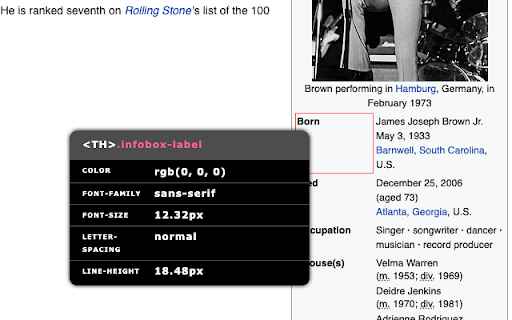
Inspector on Acids is a lightweight tool that allows you to inspect the CSS properties of any element on a webpage in a fast and unobtrusive way. Instead of opening browser DevTools, you can activate the inspector and simply hover your cursor to view the computed styles in a clear tooltip that follows your mouse.

This extension is designed for developers, designers, and anyone who needs quick access to key styling information.

Key Features:

Real-time CSS inspection: hover over any element to instantly view selected CSS properties.
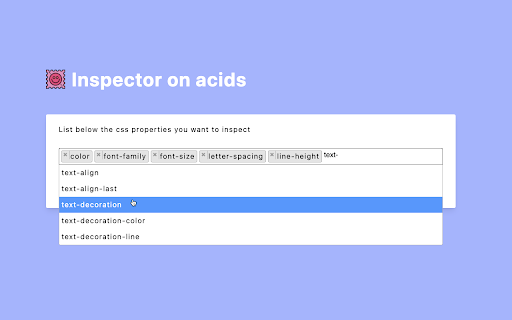
Customizable property list: choose exactly which CSS properties appear in the tooltip.
Element highlighting: clearly identify the element you are inspecting, with optional custom highlight color.
Optional themes: switch between light, dark, or system appearance for the tooltip.
Keyboard activation: enable or disable the inspector with a configurable keyboard shortcut.
Non-intrusive design: the tooltip is minimal and stays out of your way.

How to Use:

Click the extension icon or press the default shortcut (Alt + U) to activate the inspector.
Hover over any element to view its CSS properties.
Press Esc or toggle the icon again to deactivate.

Customization:

From the extension’s Options page, you can:
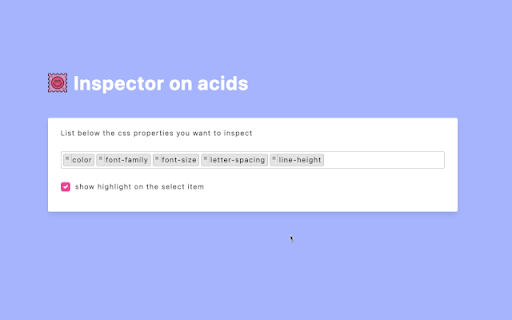
Select which CSS properties you want to inspect.
Choose a theme (light, dark, or system).
Enable or disable element highlighting.
Adjust the highlight color.
You can customize the keyboard shortcut from the browser’s shortcut settings page.

Privacy:

The extension runs entirely within your browser. It does not collect, store, or transmit any personal data or browsing information. All settings are stored locally on your device.
Technical
- Version
- 0.0.2.0
- Manifest
- V3
- Size
- 96.1KiB
- Min Chrome
- 88
- Languages
- 1
- Featured
- No
Metadata
- ID
- cponfpbdndcmnnepfncmkabjpmphncbc
- Developer ID
- ud0d58201b2e79e5fb2caeb7a62062fae
- Developer Email
- [email protected]
- Created
- May 17, 2021
- Last Updated (Store)
- Nov 19, 2025
- Last Scraped
- Jun 5, 2026
- Website
- —
- Support URL
- https://github.com/federicopasquarelli
- Privacy Policy
- —
Similar extensions
Alternatives to Inspector on acids, ranked by description similarity.

CSS Inspector
Click the extension icon or press Cmd+Shift+C to activate, then hover any element to inspect its computed CSS.
14

CSS Inspector
The CSS Inspector extension outlines the elements on a page and displays their CSS properties when you hover over them.
67

CSS Inspector
A design-first inspector for extracting styles, colors, and assets.
10

CSS Inspector Pro
Beautiful CSS, HTML & Style Inspector with copy functionality
71
★ 5.0

CSS Inspector
CSS Inspector allows you to instantly view the CSS properties of any HTML element on web pages.
58
★ 5.0

UI Inspector - Visual CSS Editor
Inspect and visually edit elements and their CSS directly on the page for faster design and UI debugging.
4.0K
★ 4.0

CSS Inspector
Inspect and copy CSS from any element on any webpage
34

Inspect Element
Use Inspect element – a CSS viewer with Chrome inspect element shortcut. Learn how to inspect element easily using this simple tool!
3.0K
★ 4.8
Data sourced from the Chrome Web Store · last verified Jun 5, 2026.